Some basic CLI commands for configuring the network, vSwitches and portgroups from command line..
This is not an exhausted list of commands, just few of them. While working through putty session you need to know them. At first the root access to your esx host is disabled by default. You can (thus it's not really recommended) activate the root access to your ESX Server by modifying one configuration file.
If you don't want to activate the SSH access for a root account, you must connect to your ESX Server via another account (previously created) and do a command switch like that (su stays for switch user):
su –
Then you'll be able to enter the root password for your root account. Let's move and see other commands you can use and they're usefull.
To see the list of NICs attached to your esx host:
esxcfg-nics –l
For example your output will look like that:
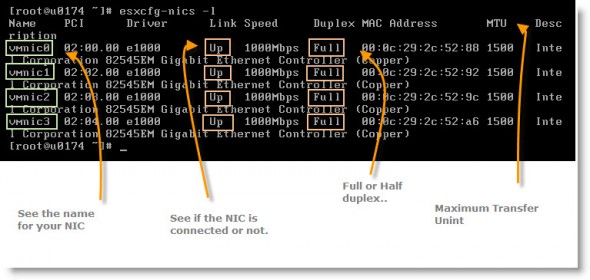
VMware ESX CLI networking commands
I have four NICs configured on my ESX server, which is running for testing as a VM inside of VMware Workstation 7 which is a real flexible choice for my testing and learning. If you prepare for your VCP exam, some of those commands might be in the questions.
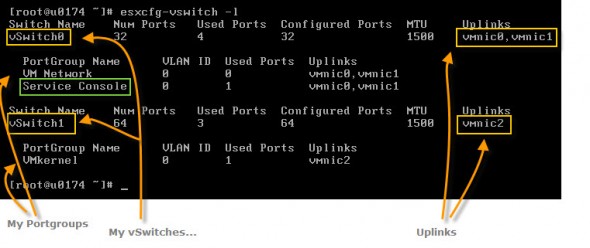
Ok Let's moove on. Then, you might want to list to see number of vSwitches configured on your ESX host. For that you'll be using command:
esxcfg-vswitch -l
And the output will look like that:
If you want to check with the VI client, the network configuration will looks like this:
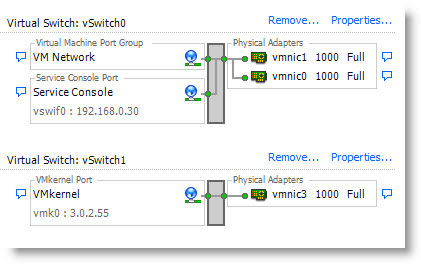
VMware ESX 4 command line interface network commands
There is a huge amount of commands to remember. Or not. For now I'm putting on just those to remember. But I'll be back with some more.
- Basic VMware ESX CLI networking commands – this post
- VMware ESX – Configuration of Service console via CLI
- Adding second service console via CLI
Stay tuned via RSS. 😎








