Disable firewall on your ESXi 5 if you experiencing problems when joining to AD. If you joining your freshly installed ESXi 5 to the Active Directory, you might run into a difficulties and receive an error. This error is due to a ESXi 5.à firewall default settings. ESXi 5.0 has a new firewall engine that is not based on iptables. The firewall is service oriented, and is a stateless firewall. For remote hosts, you can specify the IP addresses or range of IP addresses that are allowed to access each service.
You can get an error like this:
Could not join <domainname> The specified domain either does not exist or could not be contacted.
Why is that happening?
The DNS lookup queries are sent through the TCP port 53 which is not open by default on the ESXi 5.0 firewall. So in order for the request to succeed, the firewall (or the port) must be temporarily disabled (opened).
The firewall sits between the ESXi host management interface and the management network on the local area network. You can configure it by using the vSphere Client. Go to Host Configuration > Software > Security Profile.
You can use host profiles for the ESXi 5.0 firewall configuration as well.
Update: On the screenshot bellow the UDP port is opened, but If a DNS lookup returns a packet greater than 512 bytes over UDP port 53, the command may fail. Sot that's why (if it happens) you must disable the firewall temporarily… DNS queries are then sent over TCP port 53 for a reliable response.
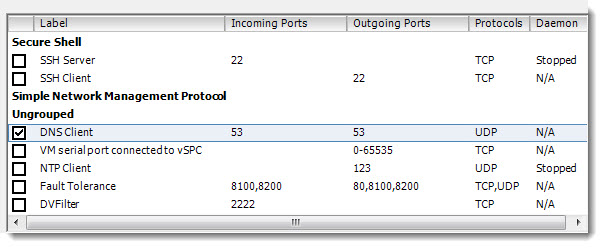
In addition, you can also use a new esxcli interface (esxcfg-firewall) is available in ESXi 5.0.
If you need more information about the ESXi 5.0 firewall, see the vSphere Security Guide. And also What’s New in VMware vSphere 5.0: Platform Whitepaper (page 6).
Source: KB article 2008226
Following this, you might be in a situation where you would like to join a computer to a domain, but you don't have a connectivity to domain controller. You can use djoin.exe tool for the job.
Offline domain join is a new process that computers that run Windows® 7 or Windows Server® 2008 R2 can use to join a domain without contacting a domain controller. This makes it possible to join computers to a domain in locations where there is no connectivity to a corporate network.
Do this offline:
A domain join establishes a trust relationship between a computer running a Windows operating system and an Active Directory® domain. This operation requires state changes to Active Directory Domain Services (AD DS) and state changes on the computer that is joining the domain.
Run Djoin.exe at an elevated command prompt to provision the computer account metadata. When you run the provisioning command, the computer account metadata is created in a .txt file that you specify as part of the command. After you run the provisioning command, you can either run Djoin.exe again to request the computer account metadata and insert it into the Windows directory of the destination computer or you can save the computer account metadata in an Unattend.xml file and then specify the Unattend.xml file during an unattended operating system installation of the destination computer.
The syntax:
djoin /provision /domain <domain_name> /machine <destination computer> /savefile <filename.txt> [/machineou <OU name>] [/dcname <name of domain controller>] [/reuse] [/downlevel] [/defpwd] [/nosearch] [/printblob] [/rootcacerts] [/certtemplate <name>] [/policynames <name(s)>] [/policypaths <Path(s)>]
….
djoin /requestodj /loadfile <filename.txt> /windowspath <path to the Windows directory of the offline image> /localos
Note:
The /rootcacerts, /certtemplate, /policynames, and /policypaths parameters are valid only on Windows Server 2012. They allow administrators to provide mobile users who never connect to corporate networks (physically or through VPN) with the ability to join a computer to the domain and configure it with DirectAccess policies.
Requirements:









Did you meant TCP port that should be open? In screen above it is UDP port
Oops… I corrected the article, to better explain how it works.
Thanks
vladan