
Desktop Virtualization with Cisco UCS. Cisco UCS has recently announced an update to it's Unified Computing System (UCS) and it's integration of VMwre View as a VDI solution. Unified Computing System (UCS) and it's integration of VMwre View as a VDI solution. If you're not familiar with Cisco UCS you might want to have a look at my article where I'm reviewing a Video Training Course for Cisco UCS.
The Cisco UCS Manager solution had a “Best of Show” award at Tech Ed 2012.
There is a new whitepaper from Cisco called Desktop Virtualization: A Cost-Effective First Step For Creating a Virtualized Desktop Experience Anytime, Anywhere, Any Device.
In this paper you'll be able to learn about different VDI solutions, Terminal Services, Application Streaming, Virtual desktop streaming… before talking about the benefits of VDI for an enterprises and showing a user case from Seattle University.
Implement state-of-the-art Cisco Unified Computing System™ technology optimized for VMware and Virtual Desktop. Cisco services planning, design, and implementation phases.
– Ability to deploy specific software applications and business requirements for any educational or administrative department on
demand
– Faster response times to students, teachers, and faculty to help meet educational and administrative needs
– Conversion of lab machines to virtual desktops, decrease in operating expenses, and prolonged desktop lifecycle.
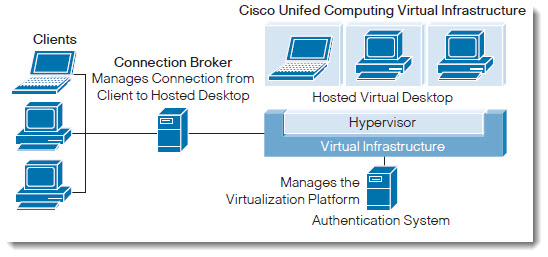
Note: Please note that there is some informations requested to fill in the online form, before you can request the paper. Then the download link will be e-mailed to you. If you have already requested some other whitepapers from the Free Virtualization Content section of our website, then most of your informations are pre-filled already.
Get the Free Whitepaper – Desktop Virtualization: A Cost-Effective First Step For Creating a Virtualized Desktop Experience Anytime, Anywhere, Any Device .
The most common VDI use cases include:
• Consolidating physical desktops
• Reducing desktop support costs
• Improving physical desktop data security
• Providing disaster recovery for desktops
• Running applications that are incompatible with physical desktop platform
• Testing, training, and development
• Providing remote connectivity for applications not supported by presentation virtualization or terminal services
Depending on the situation, VDI:
• Reduces number of desktop images
• Lengthens desktop life
• Protects virtualized desktop applications and their data from compromise
• Simplifies desktop operational management
• Helps enable business continuity and disaster recovery
Not so technical whitepaper as I would wish to read, but still, can be handy…
Get the Free Whitepaper – Desktop Virtualization: A Cost-Effective First Step For Creating a Virtualized Desktop Experience Anytime, Anywhere, Any Device .

