How to activate SSH for ESX Server. SSH is blocked by default for the root user, so if you want to access via SSH you must first enable it through the CLI. There is an updated post which shows How to activate SSH for ESXi host. The updated article shows the step by step process through the vSphere Client (via the GUI).
To enable the root access for SSH
You'll need to edit the file /etc/ssh/sshd_config.
You can use nano editor for example to do that.
You need to change the value PermitRootLogin to Yes
Save and enter this command to restart the daemon:
service sshd restart
To open the Firewall Ports on your ESX Host:
To allow access to ESX Server for a service or management agent.
1.) Log on to the VI Client and select the server from the inventory panel.
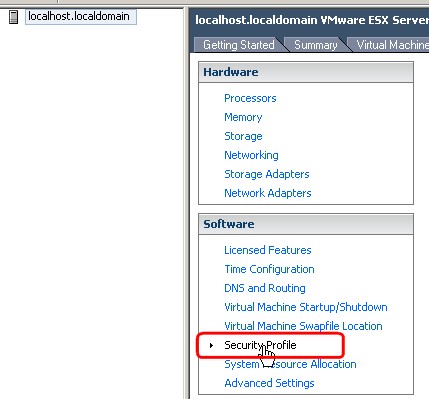
The hardware configuration page for this server appears.
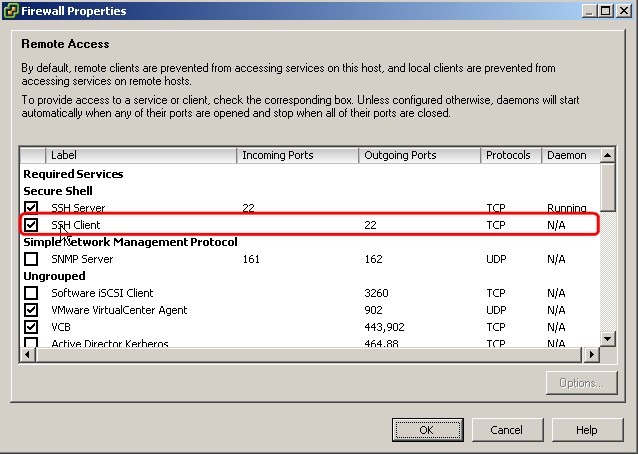
2.) Click the Configuration tab and click Security Profile.
Select the SSH Client and SSH Server checkbox and click OK.
How to activate SSH for ESX Server was published at ESX Virtualization website first.
Then reboot your ESX Server or start the ssh client daemon.









Hi Carter,
thanks for this one. I was not sure about it…. -:)
Or even shorter: service sshd restart
Eric Grays last blog post..Let them eat cake!
Since you’re already at the command line, why not turn on firewall ports there as well:
esxcfg-firewall -e sshServer
esxcfg-firewall -e sshClient
Andrews last blog post..Using