VMware Paravirtualized SCSI (PVSCSI driver)
Introduced with vSphere 4 this driver can speed up and offload CPU. VMware Paravirtual SCSI (PVSCSI) adapter is able to achieve 12% more throughput with 18% less CPU cost compared to the LSI virtual adapter.
vSphere ships with this new high-performance virtual storage adapter. Bus logic and LSI logic were the only choices so far. PVSCSI is best suited to run highly I/O intensive applications in the guest more efficiently (reduced CPU cycles).
Prerequisites:
Verify that the virtual machine has a guest operating system with VMware Tools installed.
Verify that the virtual machine has hardware version 7 or later.
Ensure that you are familiar with PVSCSI limitations
Before you activate and configure take into consideration that:
- You can't use PVSCSI on a VM which is configured for Fault Tolerance protection. (BTW if the VM has FT enabled, it can't use VMXNET3 either…). See the requirements and limitations of FT here.
The actual step-by-step for Windows you can follow here or Linux here.
- In the vSphere Client inventory, right-click the virtual machine and select Edit Settings.
- Click the Hardware tab and there you click Add > Select SCSI Device and click Next.
- Select a SCSI device in the Connection panel > Select an unused Virtual Device Node and click Next. (for example the 1:0)
- Review your selections and click Finish > the system will add new SCSI Controller and New SCSI Device.
- Click OK > Reopen the Virtual Machine Properties Editor.
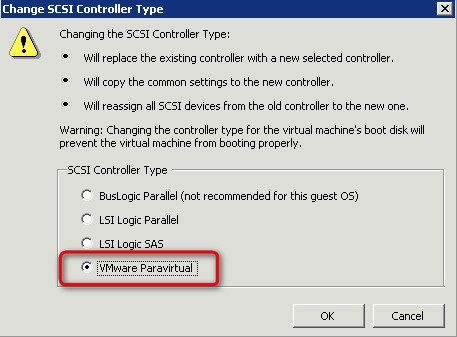
- Select the new SCSI controller and click Change Type.
- Select VMware Paravirtual and click OK > Click OK to save your changes.
For some more documentation and(or) how-to, some more links:
Check more articles from ESX Virtualization:
- vSphere 6.5
- How to Configure VMware High Availability (HA) Cluster
- Free Tools
- How to Migrate Windows Based vCenter to VCSA 6.5 [Lab] – Windows to Linux
- VMware VCSA 6.5 Active-Passive Setup with Simple Configuration – [LAB]
- VMware vCSA 6.5 HA Failover Test – Video
Stay tuned through RSS, and social media channels (Twitter, FB, YouTube)








