How-to root access VMware ESX Server
When you first install VMWare ESX Server you don't have the root account SSH acces. VMWare ESX 3 security restricts SSH access by the root user account by default. This means that the root account is denied access when using Putty, WinSCP or similar SSH applications. To remove this restriction follow this how-to:
1. Access to local server console and from the local console, either at the server, remote management or similar login as root to the ESX server.
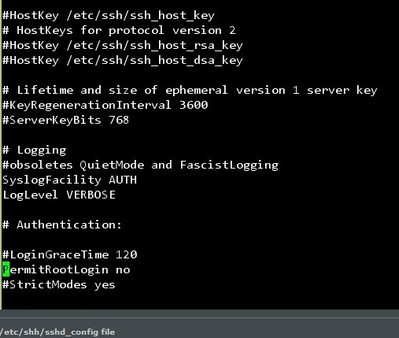
2. Navigate to the ssh folder, eg:
cd /etc/ssh
3. Open the sshd_config file with a text editor, eg: vi or nano.
4. Go to the line where it says PermitRootLogin no (In my file it's about line 32) and change the no to yes
5. Save the file and restart the sshd service: service sshd restart
More posts from the lab:
- How to install VMware ESXi 6.0 in VMware Workstation 11 … [Guide]
- How to Install VMware VCSA 6.0 (vCenter server Linux appliance) [Guide]
- VMware vCenter6 installation [Windows]… [Guide] – based on the RC code…
- vCenter 6 Configuration (after install) on Windows Server 2012 R2… [Guide] – based on the RC code…
- vSphere 6 Features – Mark or Tag local disk as SSD disk [Guide]
ESX Virtualization – The Lab!
- Building Power Efficient ESXi Server – Start with an Efficient Power Supply
- ESXi Home Lab – Get a quality and comfortable case
- Supermicro Single CPU Board for ESXi Home lab – X10SRH-CLN4F
- Supermicro Single CPU Board for ESXi Home lab – X10SRH-CLN4F – Part 2
- Supermicro Single CPU Board for ESXi Home lab – Upgrading LSI 3008 HBA on the X10SRH-CLN4F
- Building Energy Efficient ESXi Home Lab – parts list
- Homelab – Airflow Solar System
Please follow and like us:








