
A VMworld session to attend if you're present at VMworld this year.
If you're comming to VMworld 2010 this year and you're using VMware Workstation 7 as your desktop virtualization software you might want to know some more news for the future. So to get a peak about new functionalities in the future releases of VMware Workstation you can attend this session:
“The Future of VMware Workstation and Cloud Development” (DV6946). Presented by Jason Joel and Rajat Goel.
Vmware Workstation is one of the Software I've seen to progress in many areas and I follow the evolution since when Connectix Virtual PC was bought by Microsoft….
Its only 7 years back, but it seems to be so far …. I better not to look back.. -:) Just forward…
Great software which is VMware Workstation can help you to test hundreds of Operating systems without using some complicated multiboot systems which at the end they're not so reliable, and you can't use the OS you want at the same time with other OS.
With Vmware Workstation you can run several different OS in the Same time on your PC, and if you have enough RAM and some SSD drive, the speed is just very …… comfortable. -:)
Sure it's not a production environment, but can helps you to learn for a VMware, Microsoft or Cisco exam… -:)
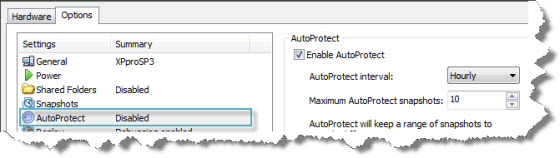
Features like Autoprotect, Snapshots, or Encryption of VM which can completely encrypt and protect your VM, are strong features making VMware Workstation the choice of every IT professional, developer, or Enthusiast.
The Workstation does cost some money, but it's a good investment. Check the promo section where you can get 10% Off the price right now… Coupon Code is: WS10
There are also upgrade plans for Workstation 5 and 6 available…which brings the upgrade price only to $99.


I just started using workstation 7 again myself recently, prior to that I stopped using it at v4, very nice! my only complaint is at least under linux if I have to kill X11 my VMs die, with the ability to keep VMs running in the background I was hoping the VMs would stay up in the event the VMware UI was killed.
How it has grown over the years!
aphro@goliath:/misc/misc/vmware$ ls -lh | grep -vi server
total 726M
-r–r–r– 1 aphro aphro 5.9M 2001-01-12 18:37 VMware-2.0.3-799.tar.gz
-r–r–r– 1 aphro aphro 6.3M 2001-06-22 12:38 VMware-2.0.4-1142.tar.gz
-r–r–r– 1 aphro aphro 9.3M 2001-11-04 13:33 VMwareWorkstation-3.0.0-1455.tar.gz
-r–r–r– 1 aphro aphro 11M 2002-07-06 19:28 VMware-workstation-3.1.1-1790.tar.gz
-r–r–r– 1 aphro aphro 12M 2002-12-10 21:24 VMware-workstation-3.2.0-2230.tar.gz
-r–r–r– 1 aphro aphro 21M 2003-07-13 11:22 VMware-workstation-4.0.0-4460.tar.gz
-rw-r–r– 1 aphro aphro 42M 2006-03-16 20:04 VMware-workstation-4.5.2-8848.tar.gz
-rw-r–r– 1 aphro aphro 41M 2006-04-10 21:17 VMware-workstation-4.5.3-19414.tar.gz
I still have my vmware 1.0.2 CD (I think back then it was only for linux, wasn’t until workstation 2? maybe that they introduced a version for windows)