
Thick or thin, that is a question?
New performance whitepaper from VROOM blog .
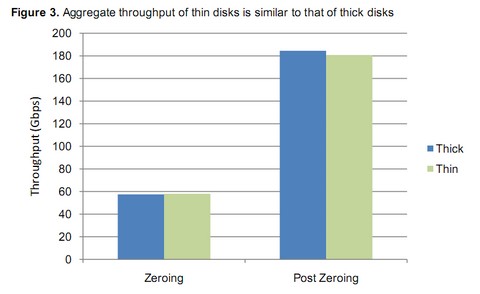
If you ever doubted any performance issues due to using Thin provisioned disks, you should read this whitepaper. In fact there are just very little performance loss (if any) when using thin disks. The benefit of using thin disks over thick disks is quite big as you can save tons of space on your SAN. Otherwise you would not manage to install as many VMs as you would like.
The results can be resumed in following:
- Both thin and thick disks perform similarly on various workloads.
- Thin provisioned disks show similar performance trends as thick disks do when scaled across different hosts.
- External fragmentation has negligible impact on the performance of thin provisioned disks.
- There is insignificant performance impact on existing thick disks if thin provisioning is implemented on a shared array.
You can get the whole whitepaper here.
Source: VROOM!
Related Posts :
Thin provisioning can save you a LOTs of SAN space. You know that storage space on a SAN its exp ...
My exploration of ThinPrint in VMware Workstation 7. With the latest version of VMware Worksta ...
VMware Converter 4.0.1 is Free Tool now fully compatible with vSphere 4. One of the great featur ...
If you just starting with VMware Virtualization and want to learn some new features comming with ...
There are 150 new features in vSphere 4 If you are having VI 3 entreprise with an suppor it's ...
Other posts from Server Virtualization
- Disable web access on VMware vCenter
- VMware ESX - Configuration of Service console via CLI
- Basic VMware ESX CLI networking commands
- How to change the default location of updates in vCenter
- Did you know that ESX 3.5 general support will end in less than 90 days?
- Starwind iSCSI HA Connection to ESX Server
- See a list of Storage Array Type Plugins on ESX Server
- New whitepaper released on PVSCSI
- Enable Jumbo Frames in ESXi 4
- How-to troubleshoot iSCSI connection to your SAN
- Starwind with ISCSI SAN Software can do High Availability for you...
- Overview Video from the new vSphere Pro video training from Train Signal
- New upgrade webpage for ESXi 4 pushes us to the right direction?
- You know how to collect diag information when your ESXi does PSOD?
- Use PVSCSI or not for lower intensive workloads
- Hardening guides for vSphere 4
- NTLDR missing - silly but can happend
- How To Shrink VMware Virtual Disk Files and disable shrinking
- vSphere Quick Start guide bonus download..
- ESXi - the past, the present and the future
- Farm commander - management tool for VI and TS or Citrix Farms
- How to collect log information from vCenter Server 4
- How to know where is my VM if vCenter is down?
- New patches for ESX 4 and ESXi 4
- Use VMware Converter to import 3rd party VMs, for example Virtual Iron's VMs
- Windows XP installation as a VM - trouble to see the disk or not?
- Vmware HCL for ESXi 4
- Time keeping for Windows VM's best practices
- Virtu-Al releasing 3rd update of PowerPack
- Not even tried Appspeed and new version is already available!


