With the new release of vSphere 4, VDR has been updated to v. 1.1.
Since I wanted to test the new functionality (now officialy supported), FLR (file level restore). Right now for Windows VMs only, but the linux version will be released in one of the future releases. Now FLR can be used without going to command line.
I had to do an upgrade of my VDR installation. I found the step-by-step on the VMware website, on a release notes page.
Basically, you should deploy the new VDR appliance (before rename the old one) from the OVF file.
When it's done, just add you deduplication store virtual hard disk which you previously used to store your backups to the new VDR appliance as a second disk. Before adding the disk to the new VDR appliance I just copied the VMDK file to the folder where my new VDR appliance reside, to keep me organized.
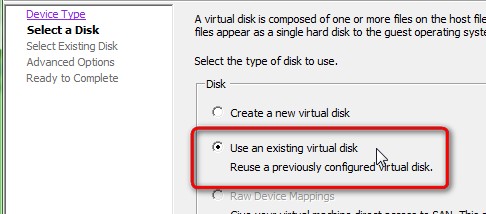
Note that you should mount the new disk, not format it. If you format, you'll loose your backups…
You will receive a prompt to restore the configuration from your old deduplication store. Just choose Yes. Like this you'll be able to recover all your programmed backup jobs.

Then you can just copy the new FLR restore utility inside of your VM, to test the restore within a GUI… Once done, you can execute the VMwareRestoreClient.exe and login to your VDR appliance.
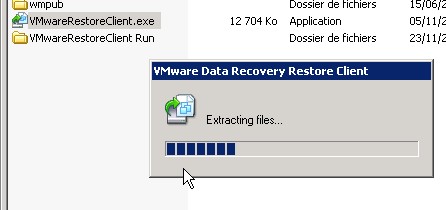
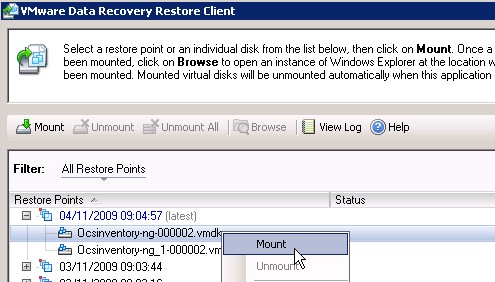
Once there just select the restore point you wan to restore files from and choose the virtual disk where the files are located.
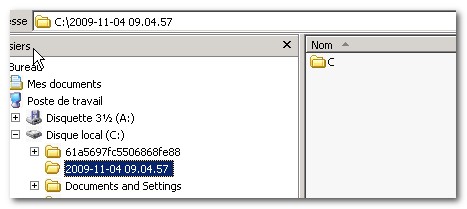
You'll see the disk mounted as a folder on your C drive….. The folder has a name of when the backup was taken. Note that if your files reside on a D drive, just mount your D drive the same manner….
Eric Sloof from NTPRO.nl has done a nice little video too … -:)
More on Vmware Data Recovery:
[seriesposts name=”vdr” title=”VDR” listtype=ul]









data recovery is a serious task and cost a hell lot of dollars too;**