Ok, I already posted a guide about how to configure Openfiler Linux for free as a shared storage for your Virtual Infrastructure. If you're not into linux, you can just try Starwind for free too…. (up to 2 TB of Data !!). Here is a PDF guide (it's for ESX 3.5 but the princip is the same for ESXi 4.
You must create a virtual disk storage which will became a iSCSI Target. Thist target will then be presented to your ESX server as a shared storage.
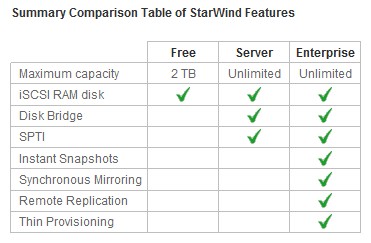
You'll be able to setup Starwind iSCSI SAN in only about 10 minuts. In the Free package you'll get:
- Large 2 TB storage capacity
- Unlimited number of nodes / connections
- Virtualization environment support for VMware, Microsoft Hyper-V and XenServer
- Enhances VMware environments by enabling VMotion, VMware HA, DRS and VCB
- Supports Windows server clustering for any application including SQL Server, Exchange, SharePoint
How-to steps:
01. You will need download the FREE iSCSI software target and install it on your Windows Server (or Workstation).You can download the PDF guide from Starwind Website.
02. Download the Step-by-step PDF guide to follow the necessary configuration steps here.
03. Enjoy… -:)
If you're looking for some more training about VMware vSphere Virtual Infrastructure, why don't you try the New Video Learning course from TrainSignal?
You can watch also this video which I found on Starwinds Website.









Great post!
Recently I`ve migrated from Datacore to StarWind and I`m really glad. It is SO not complicated!
Are you using the Standard or the Entreprise version of Starwind? I would like to do some testing for the Entreprise version..
I`m using Enterprise version. If you want to test it, use followed link to download 30 days trial
http://www.starwindsoftware.com/starwind-enterp…
Regards
I got a NFR from Starwind… They're great. Just need to find some more time to get the testing done and I'll post some how-to and report too…
Yeah, I think you`ll be exited by its simplicity and performance. I`ll wait for your report!
All the best!
Great post!
Is there anything about testing SW5? I heard that it is really great.
You can setup 2Tb of storage with SW5 for free…