vSphere Data protection has a bigger brother called VDP Advanced. This advanced version of VDP scales up to 8Tb of deduplication storage as well as 400 VMs per VDP appliance. That's rather good news (if you're not using anything else out there for much less) for medium sized companies willing to use that product, but were kind of stuck, because of the limitations of the VDP appliance. The VDP classic provides up to 2Tb of deduplicated data with possibility to protect up to 100 VMs.
Other functions of the VDP advanced remains the same, it's possible to upgrade the VDP “classic” to VDP Advanced, and also it's possibly to add capacity dynamically as the needs for larger capacity deduplication store grows (this wasn't the case in the Standard version).
VDP in general is easy to deploy. You can read my articles about how-to install and configure the VDP here. vSphere Data Protection (VDP) – install, configure, manage (Step by step Serie of 3 posts).
VMware vSphere Data Protection (VDP) Advanced – the Features
- 8Tb of Deduplicated storage – per VDP advanced appliance
- 400 VMs per appliance
- Migration possibility from Standard to Advanced
- SQL Agent – recovery of the entire application, individual databases, or only logs
- Exchange Server Agent – recovery of individual databases with options to restore to special Exchange databases to perform granular recovery of mailboxes and messages
A screenshot from the VDP product page.
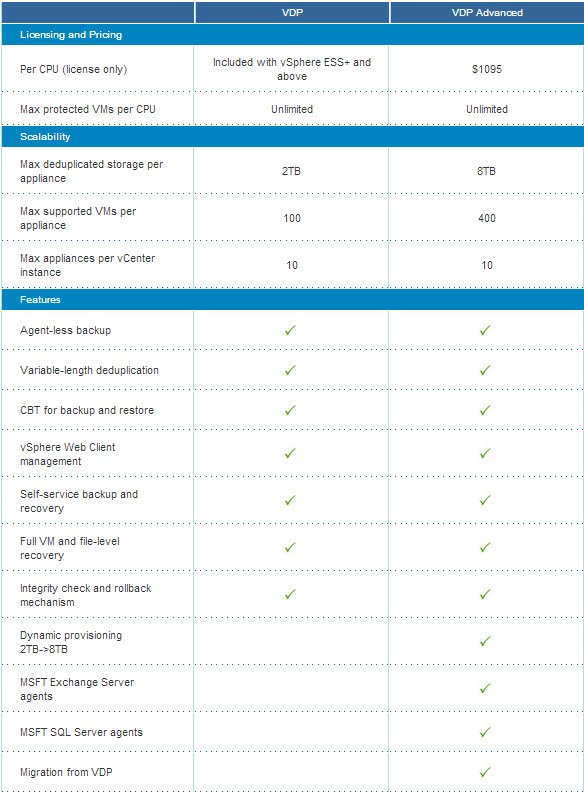
Technical Requirements to run VDP standard and advanced.
Both VDP appliances can run in vSphere 4.1, 5.0 and 5.1 where vCenter Server 5.1 is required to manage this backup product. It's not possible to operate VDP or VDP advanced without vCenter Server as both VDP appliances requires the new vSphere Web client.
If you're still using vSphere Data Recovery product together with vSphere 4.1, then you can still continue to use it. But if you migrate to vSphere 5.1 you have to migrate to VDP as vSphere 5.1 does not support VDR.
Concerning Microsoft Exchange or SQL support through agents, the Exchange 2003, 2007 or 2010 are supported for application consistency if running on Microsoft Windows 2008 and later.
There is no upgrade path from vSphere Data Recovery – rather strange. How simple admin that has many VM backed up and archived under VDR can possibly migrate those to VDP? Keep the old infrastructure in place?…. Not quite clear…
VDP Advanced – The Licensing
While the VDP Standard is included with vSphere Essentials Plus and above, the VDP Advanced is sold a part. The VDP Advanced is licensed Per physical CPU socket. You can protect as many VMs as necessary running on particular server, but the base unit is CPU socket. If the physical host has 2 CPU, then 2 licenses are necessary.
vSphere Data Protection Advanced can also be purchased as part of the Enterprise and Enterprise Plus editions of the vSphere with Operations Management Accelerations Kits.
The licensing is rather pricey – $1095 per socket
Full Press Release:
New Offerings Help Organizations Achieve Greater Value from their VMware vSphere Environments
PALO ALTO, Calif., Feb. 12, 2013 — VMware, Inc. (NYSE: VMW), the global leader in virtualization and cloud infrastructure, today introduced two new offerings to help customers further leverage their investments in VMware vSphere – VMware vSphere with Operations Management and VMware vSphere Data Protection Advanced.
“Increasingly, customers have standardized on VMware vSphere® as the core of their data centers,” said Mike Clayville, vice president, product marketing, cloud infrastructure, VMware. “To help maximize the value of their investments in VMware vSphere, customers require purpose-built, integrated solutions to more efficiently manage, optimize and protect their virtualized environments. We’ve made it convenient for new and existing customers of VMware vSphere to enhance the core capabilities of their virtual infrastructure with vCenter™ Operations Management Suite™ and VMware vSphere Data Protection Advanced™.”
Today, VMware is announcing a new VMware vSphere product line that combines the industry-leading virtualization platform with the award-winning VMware vCenter Operations Management Suite. In addition, VMware is introducing a new edition of VMware vSphere Data Protection, the backup and recovery solution first introduced as part of VMware vSphere 5.1 in August 2012. With these new offerings, customers can:
- Reduce Capex costs by up to 30 percent; (1)
- Optimize capacity, improving utilization by up to 40 percent and consolidation ratios by 37 percent; (2)
- Improve application availability and performance, cutting downtime by more than a third and reducing the time it takes to find and resolve problems by up to 26 percent; (2) and,
- Reduce backup storage capacity by up to 95 percent and backup on network traffic by up to 99 percent. (3)
New Offerings Enhance Management, Backup Capabilities of VMware vSphere
- VMware vSphere with Operations Management – Improve performance, health and utilization of virtualized environments
VMware vSphere with Operations Management unites the leading virtualization platform for all applications, including business-critical and low-latency applications, with patented analytic capabilities to provide insight into the performance, health and efficiency of virtualized environments. By providing a simple, visual and holistic view of the entire environment, VMware vSphere with Operations Management allows customers to proactively monitor and maintain performance and improve availability while optimizing the virtual environment through integrated capacity planning. The VMware vCenter Operations Management Suite helps customers nearly double the operational savings they receive from VMware vSphere. Learn more about VMware vSphere with Operations Management - VMware vSphere Data Protection Advanced – Proven, efficient and simple backup solution built for VMware vSphere
Developed for mid-sized VMware vSphere environments, VMware vSphere Data Protection Advanced offers increased scalability and new backup and recovery capabilities for business critical applications specifically Microsoft Exchange and Microsoft SQL Server. Based on EMC Avamar, VMware vSphere Data Protection delivers the most efficient backup solution with industry-leading deduplication, full support of Changed Block Tracking and single-step restores. Tight integration with VMware vSphere enables administrators to manage their virtual infrastructure, including back and recovery, from a single console. Learn more about VMware vSphere Data Protection Advanced
“VMware selected EMC Avamar software to provide the underlying technology for the introduction of VMware vSphere Data Protection,” said Shane Jackson, vice president of marketing, EMC Backup Recovery Systems division. “Customers have enthusiastically adopted this solution, and they expect that we will continue to leverage the technology collaboration between EMC and VMware to deliver enhanced backup and recovery capabilities for customers. The introduction of VMware vSphere Data Protection Advanced does just that by incorporating EMC Avamar features that can extend the value proposition for VMware customers. As a result, they gain an easy path to more scalability and additional support for business critical applications which are in demand in rapidly growing virtual environments.”
Pricing and Availability
VMware vSphere with Operations Management is expected to be available in Q1 2013, and will be offered in three editions: Standard, Enterprise and Enterprise Plus. Pricing starts at $1,745 per processer with no core, vRAM or number of VM limits. Go to VMware vSphere Pricing/Buy page. For a limited time, existing VMware vSphere edition customers will be able to upgrade to VMware vSphere with Operations Management editions or Acceleration Kits at 15 percent off the list price. New customers will be able to purchase VMware vSphere with Operations Management Acceleration Kits at 15 percent off the list price.
VMware vSphere Data Protection Advanced is expected to be available in Q1 2013, and will be priced at $1,095 per processor with no restrictions on number of protected VMs per license. VMware vSphere Data Protection Advanced is a separate, standalone solution that will be available for purchase a-la-carte and included with VMware vSphere with Operations Management Acceleration Kits (Enterprise and Enterprise Plus Editions).
- Part 1 – vSphere Data Protection (VDP) – install, configure, manage
- Part 2: vSphere Data Protection (VDP) – backup and master
- Part 3 – vSphere Data Protection (VDP) – restore operations
- Upgrade 5.0 > 5.1.x How-to Upgrade VDP – Upgrading vSphere Data protection with the Upgrade ISO
- Possibly needed: How-to reset root password in VDP
- VMware VDP Logs – locate and troubleshoot (+ divers tips)
- How to migrate backups from VDR to VDP









You can’t migrate from VDR to VDP. The way the backups are made is totally different. The only solution is to re-create the jobs 🙂
Yes, it’s a shame that kind of conversion tool does not exists. It would enable to decomission the VDR appliance completely. Like this you still have to keep it somewhere available, together with vCenter 4… -:).
I have vCenter 4.1.
Can I install VDP or I should use VDR?
VDR is up to vCenter 5.0 U3. VDP is 5.1 onwards…. So in you case, only VDR….