I did an upgrade of vCenter server in my lab, so I thought that It's a good idea to record the process.
While I had the choice to do a clean installation of VMware vSphere 5 with all the components to a new VM in my small 2 host cluster datacenter, I preferred to do an upgrade process of my vCenter (at first). I wanted to see how the installer works, how the old vCenter is detected and what's the options during the installation process. I might do a clean installation later one. The upgrade process is done with latest VMware vSphere 5 ISO. (at the moment writing those lines the product is still not GA).
In this video (at the end) you'll see that there is only one physical host connected to my datacenter, because the other one has been cleanly installed with ESXi 5.0 – see my video. The installation (upgrade) process took some time so I edited the parts of the video which are not showing anything special, but waiting sandbox or progress bar…. to actually get the most important stuff being recorded.
What I did not mentioned is that while playing with the new vSphere 5 client, I noticed a speed improvements. The work with the vSphere client is faster now. It's noticeable. I don't know exactly how much faster, but it's noticeable, so I would say like 20-25% faster than the vSphere 4 client. The vSphere 5 brought over 200 new features and enhancements. The speed enhancement of the vSphere 5 client is just one of them. The performance enhancements and the maximum config enhancements (like for example 1TB VMs or +2Tb datastores) distances the competition once again in a quite short period of time.
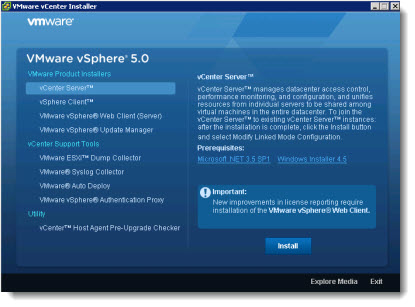 While there has been lot's of blog posts about new features, not many of them shows the detailed Installation process. Mostly because the product is not widely available yet, but also because that making videos takes time and energy…
I hope that my regular readers appreciate, and even if I don't talk during this video (in purpose), I did include some call outs to make the watching experience more enjoyable. And there is a background music too….
Feel free to leave a comment, or bring me an idea of a blog post or video.
Or…. you might want to do a guest post for ESX Virtualization? Yes, time to time I do give the possibility for bloggers which just started blogging and want to get known. If you're a one of them, you can contact me via e-mail: contact (at) vladan.fr
More on vSphere 5 from ESX Virtualization:
– ESXi 5.0 vRAM entitlement changes
– Video of installation of VMware VSA – vSphere Storage Appliance
– VMware vSphere 5 performance enhancements whitepaper
– VMware vSphere: Install, Configure, Manage [V5.0] Training Course by VMware Education
– vSphere 5 – New High Availability Agent Introduced – FDM
Enjoy the video below…
Stay Tuned for more videos by ESX Virtualization. You can subscribe to our weekly newsletter or via our RSS Feed.









Hi Vladan,
Can we install ESXi 5 in Workstation 7.0?
Absolutely… -:) !
Great guide! I have a question. In this video I have seen that you can upgrade vsphere 4 to 5. But I don’t understand if esx4 is been upgraded. Are You sure that it’s possible to upgrade a vmware cluster when the virtual machines are online? And, in your video you don’t insert the license key. I have the possibility to upgrade my license vmware 4 to 5 but when I arrive to the upgrade the license, an alert inform me that all license of vmware 4 will not be valid after the update. Is it ok? After this procedure, have I all system in version 5.0 (vSphere5, esx5,vmtools 5) and all vmx files are in vSphere5?
This video upgrades only the vCenter. To upgrade the ESX/ESXi hosts there are several other possibilities. Vmware Update Manager, directly update each of your ESX/ESXi hosts from the console … etc. Concerning the licenses, depends if you’re having a SnS subscribtion with VMware, and if yes, then you’re covered for the upgrade… and you’ll find new license keys in your client’s area at VMware.
And lastly you’ll have to update all VM’s The VMware Tools and upgrade the hardware version of each of your VMs as well……
But one of the first thinks to do is…. check if your hardware is vSphere 5 compatible through the HCL at VMware.
http://www.vladan.fr/vmware-compatibility-guide-2-0-easier-way-to-check-your-existing-or-future-vi/
Thank you!I’m tryed and my server is compatible because it’s a HP Proliant DL380 G6. But now I don’t understand what is the steps for upgrade. I read some vmware guide, I have the possible of new license for vmware 5.0 and now:
1) I can install the server and client with your guide on vCenter Server
2) Insert, when required, the new license key
3) After the finish of second point, I try to upgrade esx4 to esx5. But why Can I not find guides for ESX upgrade and I find only ESXi 5.0? Do you think that it’s better upgrade ESX4.1 from DVD or from Update Manager after that I finish the upgrade VSphere Server and client?
Basically, there is no upgrade for ESX…You must move your VMs elsewhere, install clean ESXi 5, and then join it into the vCenter again….
Only ESXi 4.0 and ESXi 4.1 can be upgraded to ESXi 5.0.
Best
Do you know if VMWare want upgrade in the future ESX4 to 5.0 or not? Because if VMWare want upgrade only ESXi, I must also schedule the move to ESXi 5 in the future.
As Vladan mentioned, VMWare will not be providing any future upgrades to ESX past 4.1 – it is purely ESXi from 5.0
I have a question concearning upgrade the vCenter.
As I understand from your great video you has a SQL Server 2005 Express on your vCenter 4.1 server (default option when you install vCenter 4.1). Did you check after upgrading vCenter from 4.1 to 5.0 – is your SQL was upgraded to SQL Server 2008 Express during upgrade process? I can see the database itself was upgraded (I can confirm that on my test lab also), but I can see that SQL still SQL Server 2005 Express?
Did I must upgrade the SQL by myself?
hi,
my virtual environment is Frequently showing vmware tools are out of date for all server, i would like to know that what is the default frequency to upgrade vmware tools.
I suppose it depends on from the period of Update Manager (one of vCenter plug-ins) try to check updates from the internet (repository). this default period is 24 hours (as I remember).
Thanks,
We are not using Update Manager, we are installing vmware tools individually in each server.
Help me here how can i take this ahead.
I installed 2 hosts ESXi 5.0 HA cluster (for testing the migration from ESX 4.1) and have 2 VMs in this cluster (1 – vCenter, 2 – just a Win2008R2 test VM).
after installation of OS to VMs I manually install VMtools in guests. now test cluster is up and running and was not turned off. And I don’t have the rpoblem you discribe. If it possible – please give me additional info – what you do and what you see – may I can help with your problem.
As I understand – you saw the message (vmtools uot-dated) in vCenter console AFTER vmtools was installed – am I right? As an addition – after upgrading vmtools you must reboot the guest (for win vm – twice) – yes, I understand it is a foolish from my side to write here about rebooting, but all we a humans and we can just forgot something.
thanks for you respones. Actually we have migrated from ESX 4.0 to ESXi 4.1 and VC 4.0 to VC4.1
and all my vm’s are freequently showing vmware tools are out of date. is there any frequency period or recommanded period from VMware to upgrade the tools. how can i take this ahead.
If you just finished the migration process I assume you are still not upgrade the vmtools in guests – this is a part of migration and must be complete to all guests before you can say “migration complete”. When you complete this task you must not see any “outdate vmtools” messages. And of course, after upgrading vmtools you must reboot the guests. I don’t have any info about frequency period of vmtools upgrading, I will try to ask my coleagues tomorrow, but can’t promise I’ll have the answer, sorry.
I just can be sure on my lab’s results – after I upgraded vmtools on guests wright after updating hosts to ESXi 5.0 – and rebooted guests (win – I has 2 reboots) I don’t has any messages in vCenter console about outdated vmtools. Lab already running a week and was not turned off.
Hi All, we have setup of 5 ESXi Hosts with 4 cpu * 4 cores 2.127GH clock speed and 72 running vm’s which are consuming 30-50 of host resources. all the five hostes are configure in same cluster. in vsphere client 4.1 when i checking the cluster cpu performance for maximum and minimum usage metrics for the past month.
Maximum it is showing 1370 and minimum 29.
can someone please pick this and explain me why it showing 1450%. how can i give justification about to my business(company).
Hi. I am confused about what to choose from. Talked to VMware support, but got a rather generic answer….
I am running vCenter server 4 (ESX hypervisor 4) and vSphere 4 Ent+. Can I upgrade vSphere 4 to version 5, without the need of upgrading vCenter?
On this website (http://vmwaretips.com/wp/2011/10/10/vsphere-5-video-series-installing-esxi-50-in-under-5-minutes/) I read :
One thing to keep in mind when doing a migration with VUM from vSphere 4 to vSphere 5 is that if you are using the ESX edition of vSphere 4 and have custom scripts, agents or modules loaded into ESX those will not be migrated into ESXi 5.0.
Now what does that mean? So far I did not fancy. Just created VMs from the interface.
Hi, So what I can’t seem to find a straight answer to… I have venter 4.1 and ESX 4.1. I want to upgrade Vcenter to 5.0 and keep my ESX 4.0 hosts for a while until I replace the hardware during my normal refresh process in 8 or so months from now. I also want to add a new cluster for a ESXi 5 cluster thus the reason for wanting to upgrade the VCenter. is this possible without complication?
Hi,
If you follow the good practices for upgrading vCenter, then you shouldn’t have a problems. Remember – backup first….
your vcenter upgrade video is not available.
There must be problem on your side. Just checket, it works.. -:)
best
Vladan
After completing the upgrade of my vcenter 4.1 servers ( I have 3 of them) everyone of them had vm’s that showed invalid after a few hours because of the management agent that gets upgraded on the hosts. Keep that in mind and if you see it restart the management agent on the hosts to resolve.