How to install downloadable vSphere Web Client help file. local help file for vSphere Web client. By default the vSphere web client does goes and check the latest help file on the internet. If you do use the vSphere web client in isolated environment without Internet access, you can still download the help file ahead and install it manually.
You'll need to reconfigure the vSphere Web client to use this local help file as well. Note that the help file for the 5.1 A version which has been released few days ago, isn't available yet, but I'll update the article whenever this file become available.
Note that this works for vSphere 5.1 and 5.5 only.
Here are the steps that you'll need to accomplish:
- For vSphere 5.1, download the vsphere-51-tc7.zip package from https://download3.vmware.com/software/help/vsphere-51-tc7.zip.
- For vSphere 5.5, download the vsphere-55-tc7.zip package from https://download3.vmware.com/software/help/vsphere-55-tc7.zip.
01. Download the help file for vSphere 5.1 from this url: vsphere-51-5c7.zip package from https://download3.vmware.com/software/help/vsphere-51-tc7.zip. .
02. Extract the content from the zip file and rename it to help.war, then copy to this location:
C:Program FilesVMwareInfrastructurevSphereWebClientserverpickup
OR, in case you use the linux version of vCenter Appliance, to this location:
/usr/lib/vmware-vsphere-client/server/pickup/
03. You'll need to Edit the webclient.properties file, which can be found in one of the following locations to change the help.url property to help.url=/help/:
Windows 2008: C:ProgramDataVMwarevSphere Web Client
Windows 2003: C:Documents and SettingsAll UsersApplication DataVMwarevSphere Web Client
vCenter Server Appliance: /var/lib/vmware/vsphere-client/
04. Restart the vSphere web client service to finalize the configuration.
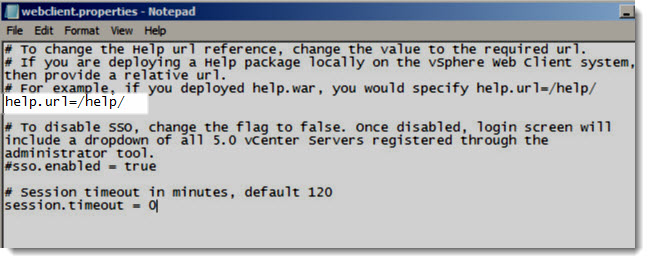
Source: VMware Kb2030344








