VMware DATA Recovery (VDR) is great product with relatively simple usage. You could follow through my posts the Installation and configuration, Backup, Recovery and File Level Restore. There are also a step-by-step videos in those posts.
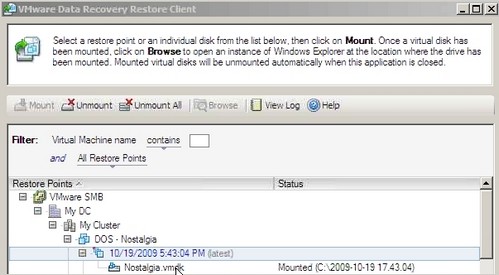
But as a user I saw that other users are having little difficulties to use the FLR restore utility (RTFM…) which is bundled with VDR. This utility does not currently has a Graphical User Interface. So to use this utility to recover accidentally deleted files inside of your VM, you have no choice, but to type some commands while you execute FLR.
Which Features VDR lucks right now?
01. GUI for FLR.
As I saw recently on Eric Sloof's blog, the developpers of VDR are preparing the GUI for upcoming release of VDR. That's great news.
02. FLR for Linux guests.
Another feature I wanted to point out is that FLR does not curently support linux guests. This might turn out some potential VMware customers since this feature would (and could) change their opinion. You can still backup your linux guests and perform Full VM restore.
03. Time scheduling trigger.
Let me explain. VDR uses some kind of GUI assistant to actually schedule the backups and the backup windows. You can define where your backups should not execute, but that's all. There is no possibility to for example schedule a backup at 4:30 AM. The manual says that:
backup jobs run at night on Monday through Friday and at any time on Saturday and Sunday. Data
Recovery attempts to back up each virtual machine in a job once a day during its backup window
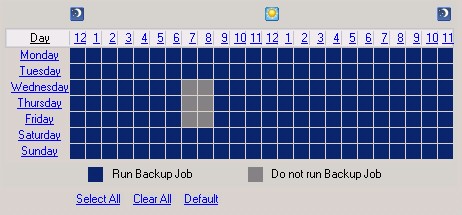
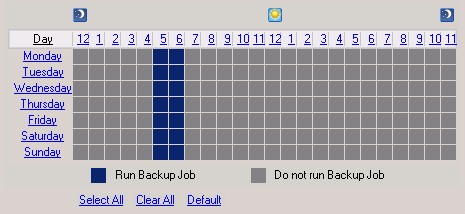
This is quite annoying since many users had in their habits to schedule precisely when the backup should start. The only way you could actually do it is to schedule not to backup until 5:00 AM, but than what? For how long I should “open” the backup window?… For the rest of the day, probably. But then I have no control if there are any changes to the VM during the day and are those changes included in the backup or not…
I'm sure that there is more features that might be considered and pointed out. If you know about one of them, feel free to post a comment. Take action !









backup FT protected vm's
I think this is one of the most wanted features
This is not an VDR limitation, it is ESX limitation since FT vm's cannot have snapshots. But this is going to change with ESX 4.0 update 1 which will, by hearsay, have support for single snapshot of FT protected vm's.
Hey, good to know that FT protected VM's cannot be backed up !!
Please note that this applies to any backup tool relying on snapshots.