You can really play now with VMware Workstation 7
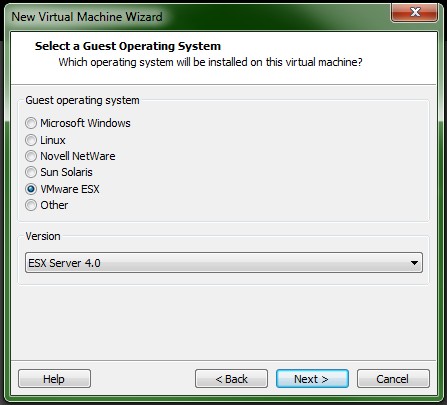
The coolest new feature of VMware workstation 7 is…
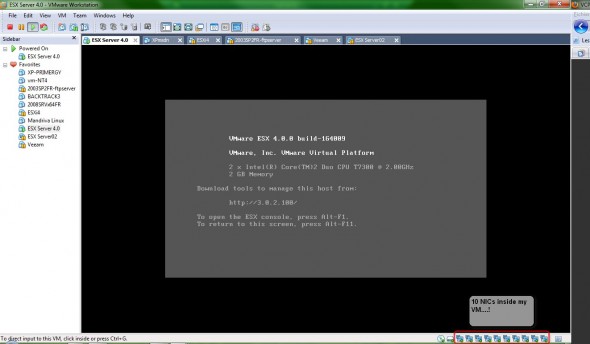
Of course to run ESX 4 server as a VM…. Some screenshots here. Now you can fully leverage the possibility to configure and run up to 10 NICs on your virtual ESX 4 …!!! This ans many more feeatures in the new VMware Workstation 7. Upgrade to VMware Workstation 7 for only $99.00 – Upgrade Now!
Other features (very exciting):
- Auto Protect – create automatically snapshots to protect your VM. Easily configurable
- Windows 7 support – of course the fancy 3D Aero graphics support with Flip 3D and Aero Peek to show live thumbnails of your virtual machines.
- ThinPrint – Support for virtual printing allows you to print from virtual machines without mapping network printers or installing printer drivers in the virtual machine. If virtual printing is enabled in the virtual machine setting, all of the printers installed on the host operating system are available in the guest operating system.
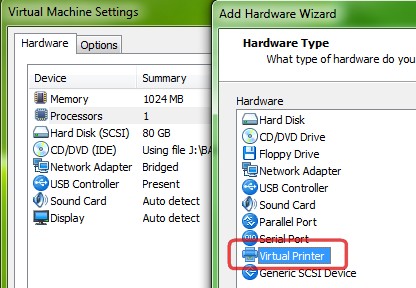
- Instant Pause – Pause a virtual machine to free up CPU resources for use by other running virtual machines
- Expand Virtual Disks — If you need larger disk for your VMs, then this functionality is for you.. For Windows Vista and Windows 7 guests, the disk partitions can be adjusted without the use of additional software.
- You can register for Free Workstation Online Training Course
Upgrade to VMware Workstation 7 for only $99.00 – Upgrade Now!
You can Buy VMware Workstation 7 here.
Related Posts :
As I expected, Xtravirt released a whitepaper about “How to install ESX 4.0 on Workstation 6.5.2 ...
With the recent release of the new version of VMware Workstation 7, there is a new offer for a f ...
This video is showing problem occured when using the quick migration feature along with the Hype ...
A feature which is not very talked about - Replay Debugging. Useful feature of Workstation 7 ...
If you have have been thinking about purchasing a copy of VMware Workstation, now may be a good ...
Other posts from Desktop Virtualization
- Minor release update for VMware Workstation 7
- Why I did not start using teams earlier?
- SSD's will transform the way we think of hard disks
- How-to install Windows 98 inside VMware fusion
- Invalid drive error when Installing VMware Workstation
- How-to enable Thin Print in VMware Workstation 7
- Vmware Workstation 7 new features - Import Windows 7 XP mode VM
- VMware ACE portable package VM creation How-to
- How-to install VMware Workstation
- How-to setup Windows 7 XP Mode
- VMware ACE
- VMware Fusion updated to 3.0.1
- Learn for free with this VMware course for VMware Workstation 7
- New Website Design of VMware Website and new product launch - VMware View 4
- How-to Install ESX 4 inside VMware Workstaiton 7 video
- Expand Virtual disk of Windows 7 VW with VMware Workstation 7
- VMware Workstation 7 final is here
- Great tip how-to boot from USB stick inside of VMware Workstation
- Create a Virtual Machine in VMware Player 3.0
- New Virtual Network Editor in VMware Workstation 7
- New feature in VMware Workstation 7 - Auto Protect
- Buying VMware Fusion 2 now gets you free upgrade to Fusion 3
- MAC users - VMware Fusion 2 On Sale only Today at Amazon
- No more tweaks of VMX files. With VMware Workstation 7 you will be able to run ESX 4 with nested VMs without any tweaks.
- Install Linux Backtrack in a VM on VMware Workstation running on Windows 7
- VMware Workstation On Sale Too...40% OFF !!!
- VMware Workstation update 6.5.3
- I had to change the comment system on the Website
- ESX Virtualization is one year old
- Windows 7 x32 edition does not use 4 gigs of RAM, did you know?