
ESX Virtualization

VMware ESXi, vSphere, VMware Backup, Hyper-V... how-to, videos....

Nakivo Backup and Replication - #1 Backup solution for Virtual, physical, cloud, NAS and SaaS

Menu
  • Certification
      • VCP-VVF Administrator
          • vcp-vvf-2.
        • Close
      • VCP-DCV vSphere 8
          • vcp2024-125.
        • Close
    • Close
  • VMware
    • Configuration Maximums
    • vSphere
      • VVF 9 and VCF 9
      • vSphere 8.0
      • vSphere 7.0
      • vSphere 6.7
      • vSphere 6.5
      • vSphere 6.0
      • Close
    • VMworld
      • VMware EXPLORE 2024
      • VMware EXPLORE 2023
      • VMware EXPLORE 2022
      • VMworld 2019
      • VMworld 2018
      • VMworld 2017
      • VMworld 2016
      • VMworld 2015
      • VMworld 2014
      • VMworld 2013
      • VMworld 2012
      • VMworld 2011
      • Close
    • Close
  • Proxmox
    • Proxmox
    • Close
  • Microsoft
    • Windows Server 2012
    • Windows Server 2016
    • Windows Server 2019
    • Windows Server 2025
    • Close
  • Categories
    • Tips – VMware, Microsoft and General IT tips and definitions, What is this?, How this works?
    • Server Virtualization – VMware ESXi, ESXi Free Hypervizor, VMware vSphere Server Virtualization, VMware Cloud and Datacenter Virtualization
    • Backup – Virtualization Backup Solutions, VMware vSphere Backup and ESXi backup solutions.
    • Desktop Virtualization – Desktop Virtualization, VMware Workstation, VMware Fusion, VMware Horizon View, tips and tutorials
    • How To – ESXi Tutorials, IT and virtualization tutorials, VMware ESXi 4.x, ESXi 5.x and VMware vSphere. VMware Workstation and other IT tutorials.
    • Free – Free virtualization utilities, ESXi Free, Monitoring and free backup utilities for ESXi and Hyper-V. Free IT tools.
    • Videos – VMware Virtualization Videos, VMware ESXi Videos, ESXi 4.x, ESXi 5.x tips and videos.
    • Home Lab
    • Reviews – Virtualization Software and reviews, Disaster and backup recovery software reviews. Virtual infrastructure monitoring software review.
    • Close
  • Partners
    • NAKIVO
    • StarWind
    • Xorux
    • Close
  • This Web
    • News
    • ESXi Lab
    • About
    • Advertise
    • Archives
    • Disclaimer
    • Privacy policy
    • PDFs and Books
    • Close
  • Free

Thinapp 5.1Allows Control of Thinapped Apps via GPO

By Vladan SEGET | Last Updated: March 17, 2015

Shares

Recent release of Thinapp 5.1 brought new features to the software. Thinapp now creates a new directory called Policy on the system where it's installed where he puts ADMX, ADML files which are used for managing thinapp applications configuration over a GPO. Thinapp runtime features (AppSync, AppLink) can be controlled through those GPO.

The administration through a GPO is possible on domains with W2008 server, W2008R2 and W2012.

Thinapp 5.1 new features:

New possibilities to manage Thinapp Packages. In the Policy folder there are following files – Policy.exe, README.TXT, ThinAppBase.adml, ThinAppBase.admx, ThinAppGeneric.adml, ThinAppGeneric.admx.

The readme.txt has all the necessary info including configuration istructions.
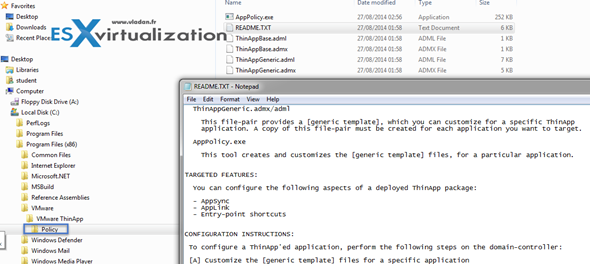
Thinapp 5.1 new features

Administrative Template files contain markup language that is used to describe a registry-based Group Policy. The administrative files are divided into language-neutral (.admx files) and language-specific resources (.adml files), available to all Group Policy administrators. These factors allow Group Policy tools to adjust the user interface according to the administrator's configured language.

ThinDirect

Thin Direct Enhancement – Poll ThinDirect settings on regular bases. The changes are now detected dynamically without the need for the user restarting his browser.
New ThinDirect ADM – there is a new ADM called ThinDirect.adm which can manage the thindirect enabled firefox
Support for Overriding Thindirect settings – via ADMX and ADML files.
Support for thindirect of Firefox – version 22 of Firefox now supported

Extract Thinapp project into the system – you can extract Thinapp package to a capture and build operating system. there are new commands snapshot.exe and snapshot64.exe commands.

Package.INI config

New Package.ini – The 5.1 of Thinapp introduces also SandboxWindowsClassName parameter which can isolate the application defined windows class names which were created inside the thinapp package.

MAPI Support

Now the 5.1 version of Thinapp has a support for Messaging application programming interface (MAPI) which can be used on W7 and W8 platforms.

Quote:

ThinApp 5.1 provides the DefaultEmailProgram option in Package.ini to register a virtual email client as the host's default email program. You have to enable this option to register the default email program.

IE 10 and IE 11 support – on W 7 systems only.

Windows 8.1 support – works with W8.1 with August update (update 2).

Check the full release notes here.

Vote !
Shares

| Filed Under: Server Virtualization Tagged With: Thinapp 5.1

About Vladan SEGET

This website is maintained by Vladan SEGET. Vladan is as an Independent consultant, professional blogger, vExpert x17, Veeam Vanguard x11, VCAP-DCA/DCD, ESX Virtualization site has started as a simple bookmarking site, but quickly found a large following of readers and subscribers.

Connect on: Facebook. Feel free to network via Twitter @vladan.

Private Sponsors


Featured

  • Thinking about HCI? G2, an independent tech solutions peer review platform, has published its Winter 2023 Reports on Hyperconverged Infrastructure (HCI) Solutions.
Click to Become a Sponsor

Most Recent

  • Reviving Old School Laptops with PrimTux: Battling Obsolescence on a Budget
  • Proxmox Datacenter Manager 1.0 released – a real vCenter Server Alternative?
  • Recovering a Corrupted Exchange Database with Stellar Repair for Exchange
  • Commvault at AWS re:Invent 2025: Pioneering AI-Enhanced Cyber Resilience with Cloud Unity
  • How to Set Up pfSense Community Edition as a Firewall Using VMware Workstation Pro 17 (2025 Edition)
  • HPE Morpheus VM Entreprise and Morpheus VM Essentials updates released – v8.0.11
  • Veeam Backup and Replication Upgrade on Windows – Yes we can
  • Commvault’s Cloud Unity Platform: Revolutionizing Enterprise Resilience in the AI Era
  • Securing Your Backups On-Premises: How StarWind VTL Fits Perfectly with Veeam and the 3-2-1 Rule
  • 3 New Advanced Certifications from VMware/Broadcom Released

Get new posts by email:


Deals

Support us on Ko-Fi


Buy Me a Coffee at ko-fi.com

Friendly Websites and Blogs

  • vBlog.io
  • VMware Engineer Jobs
 

YouTube

…

Find us on Facebook

ESX Virtualization

…

Copyright © 2025 ·Dynamik-Gen · Genesis Framework · Hosted with HostColor.com