
VMware products are more and more easy to install and deploy. Every year it's gets easier for an IT admin to deploy and configure VMware product in test or production environment. Partly because that the products itself are getting more easy to deploy/manage, and also because of reviewer's guides. There is a new VMware Mirage 5.0 Reviewer's Guide which I'll add to my post where I gathered quite a few others.
VMware Mirage 5.0 reviewer's guide can be downloaded from this post and provides not only Introduction, Architecture and Components but also Hands-On Evaluation Exercises for Mirage. Here are the different sections provided by VMware Mirage 5.0 Reviewer's Guide:
- Introduction – Includes major use cases, key features in Mirage, and package and licensing information.
- Architecture and Components – Includes descriptions of the major components and functionality, as well as architectural examples.
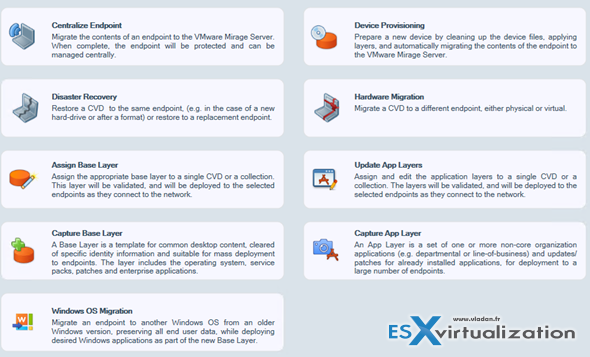
- Hands-On Evaluation Exercises for Mirage – Provides detailed steps for most of the use cases and functionality of Mirage 5.0: image management, layer management, OS migration, endpoint provisioning, data recovery, disaster recovery, driver management, file portal, and more.
VMware Mirage got upgraded in my lab few months back: VMware Mirage 5 How-to Upgrade From Previous Release
What’s new in VMware Mirage 5.0?
- Support for Upgrade endpoints up to W8.1 and provission W8.1 endpoints, supports for base layers and application layers
- Migrate user profiles from W7 to W8.1
- Migrate to W8.1 by using mass-migration utility, In-place upgrade from W7 to W8.1
- Cross migration support – x32 and x64 compatibility, where the reference DVD can be 32 bit and the target x64.
- No need migration preparation tool for capturing base layer before migration.
- Mirage Gateway is now an OVF Linux appliance which can be deployed in DMZ.
- New CVD Alarm feature. – ex. not enough space on endpoint, VSS failures, upload fails on volume.
- Device driver validation allows to check if endpoint has the particular drivers before pushing the layer to endpoint.
- Future upgrades via single MSI
Additionally, the 5.1 release of VMware Mirage brought 20 additional features including:
- IT managers can control the Mirage clients' bandwidth consumption from the Mirage Management console. You can limit bandwidth by subnet or by Active Directory site.
- Mirage now has an API that currently supports centralization and OS migration use cases. You can use the API to integrate Mirage with third-party systems, such as ticketing or help desk applications. Partners and customers can access and integrate with Mirage data and services.
- You can now install and configure the Mirage Gateway server by using a self-installed Web configuration portal.
- IT managers can generate a variety of reports from the Mirage Web Manager console. The reports provide analytics for Mirage operations. You can generate reports on demand, or save report parameters as a template and generate the report according to a specified schedule.
- You can provision a device with a base layer and app layers using a single wizard.
- Mirage now includes the VMware Customer Experience Improvement Program (CEIP). When you join CEIP, the CEIP tool collects technical data from the Mirage database and log files, and sends the data to VMware on a daily basis. Before the data is sent to VMware, it is made anonymous and is encrypted in your systems or servers.
- You can now protect all fixed drives by using the Mirage upload policy.
Update:
And the latest VMware Mirage 5.2 introduces features that improve management of Mirage components. Included are the following new features and improvements:
- Mirage can be used with restricted virtual machines, enabling administrators to manage BYOD devices using Horizon FLEX. Documentation for Horizon FLEX is located athttps://www.vmware.com/support/pubs/horizon-flex-pubs.html.
- Mirage supports upgrading WEPOS devices to POSReady 2009.
- Administrators can specify drives, including non-system drives, for the branch reflector cache. A new CVD alarm alerts administrators when a branch reflector cache is unavailable.
- Mirage uses persistent VSS on Windows 7, Windows 8, and Windows 8.1 machines, which enables Mirage to perform more efficient upload operations.
- Administrators can perform a centralization flow using Mirage PowerCLI cmdlets in Microsoft PowerShell.
- Web reports include increased functionality.
- Administrators can export reports in XLS format.
- Administrators can select a specific time for the report time frame and report schedule, for example, 12:30pm.
- Administrators can rename report templates.
- When administrators delete a report template, the reports that have been generated from that template are retained.
- The report template grid displays the report schedule interval and the report type icon.
- Administrators can manually change the IP address for the Mirage Gateway server using the Mirage Management console.
Download VMware Mirage 5.0 Reviewer Guide Here.

