
ESX Virtualization

VMware ESXi, vSphere, VMware Backup, Hyper-V... how-to, videos....

Menu
  • Shop
    • Datacenter
      • vSphere Essentials
      • vSphere Essentials PLUS
      • vSphere Standard
      • vSphere Enterprise Plus
      • vSphere ROBO Standard
      • vSphere ROBO Advanced
      • vSphere ROBO Enterprise
    • Desktop
      • VMware Workstation Pro
      • VMware Fusion Pro
      • VMware Fusion
      • Player Pro
    • VDI
      • VMware Horizon Standard
      • VMware Horizon Enterprise
      • VMware Horizon Advanced
    • Close
  • Certification
      • On Demand
          • vSphere Install, Configure, Manage [6.7]
          • vSphere Optimize And Scale [6.7]
          • VMware vSphere: What’s New [V5.5 to V6.7]
          • VMware vSAN: Deploy and Manage [V6.7]
          • VMware vSAN: Production Operations [V6.7]
          • VMware PowerCLI for vSAN
          • VMware NSX-T Data Center: Install, Configure, Manage
          • VMware NSX-T Data Center: Troubleshooting and Operations [V2.4]
          • VMware Horizon 7: What’s New [V6.x to V7.x]
          • VMware Horizon 7: Install, Configure, Manage [V7.7]
          • VMware Workspace ONE: Advanced Integration [V19.x]
          • VMware Workspace ONE: Design [V19.x]
          • VMware Cloud on AWS: Deploy and Manage 2019
          • VMware Integrated Openstack: Install, Configure, Manage [V5]
          • VMware Site Recovery Manager: Install, Configure, Manage [V8.2]
          • VMware vRealize Oprations: Install, Configure Manage [V7]
          • VMware vRealize Operations for Administrators [V7]
          • VMware vRealize Automation: Install, Configure, Manage
          • VMware vRealize Operations and vSAN Integration Workshop
        • Close
      • VCP6.7-DCV
          • VCP6.7-DCV 2019
        • Close
      • VCP6.5-DCV
          • VCP65-DCV-cert
        • Close
      • VCP6-DTM
          • VCP6-DTM
        • Close
    • Close
  • VMware
    • Configuration Maximums
    • vSphere
      • vSphere 7.0
      • vSphere 6.7
      • vSphere 6.5
      • vSphere 6.0
      • Close
    • VMworld
      • VMworld 2019
      • VMworld 2018
      • VMworld 2017
      • VMworld 2016
      • VMworld 2015
      • VMworld 2014
      • VMworld 2013
      • VMworld 2012
      • VMworld 2011
      • Close
    • Close
  • Microsoft
    • Windows Server 2012
    • Windows Server 2016
    • Windows Server 2019
    • Close
  • Categories
    • Tips – VMware, Microsoft and General IT tips and definitions, What is this?, How this works?
    • Server Virtualization – VMware ESXi, ESXi Free Hypervizor, VMware vSphere Server Virtualization, VMware Cloud and Datacenter Virtualization
    • Backup – Virtualization Backup Solutions, VMware vSphere Backup and ESXi backup solutions.
    • Desktop Virtualization – Desktop Virtualization, VMware Workstation, VMware Fusion, VMware Horizon View, tips and tutorials
    • How To – ESXi Tutorials, IT and virtualization tutorials, VMware ESXi 4.x, ESXi 5.x and VMware vSphere. VMware Workstation and other IT tutorials.
    • Free Stuff – Free virtualization utilities, ESXi Free, Monitoring and free backup utilities for ESXi and Hyper-V. Free IT tools.
    • Videos – VMware Virtualization Videos, VMware ESXi Videos, ESXi 4.x, ESXi 5.x tips and videos.
    • Home Lab
    • Reviews – Virtualization Software and reviews, Disaster and backup recovery software reviews. Virtual infrastructure monitoring software review.
    • Close
  • Partners
    • Altaro
    • Iperius
    • NAKIVO
    • StarWind
    • Veeam
    • Zerto
    • Close
  • This Web
    • News
    • ESXi Lab
    • About
    • Advertise
    • Archives
    • Disclaimer
    • PDFs and Books
    • Close
  • Free Tools

A Sneak Preview of Zimbra Collaboration Suite 7.0

By Vladan SEGET | Last Updated: May 7, 2020

Shares

Upcoming Zimbra Collaboration Suite 7.0

Today I received an e-mail from the Zimbra team for sneak preview of Zimbra Collaboration Suite 7.0.  In fact the Zimbra 7.0 will be the first Zimbra major upgrade since the VMware Acquisition earlier this year.

Zimbra Collaboration Suite 7.0 should be available in December 2010. Already the first community beta v. 7.0 is available through this link.

The Zimbra Server as an virtual appliance was released this summer, and I've done little video on the deployment process through the OVF appliance file.  Zimbra 7.0 will also have an appliance version and will be even more optimized for virtual environments running under VMware vSphere.

Access the rich content from any device is gonna be more easier, more developed.  Integration with twitter (Yes…), Webex, Tricipher (acquired by VMware for the Single Sigh-On capability….).

Drag and drop in web browser is really cool. Also tagging is interesting, since it can be useful when you want to find messages with certain tag in it. And the search engine is really fast. The presentation was done in through web browser by using MAC.

Topics covered in the video :

• How Zimbra 7.0 adds greater value to organizations
• Productivity enhancements including a re-designed Calendar and Scheduling Wizard
• Integrations (like WebEx, Email Attacher and Search Highlighter) now part of core product features
• New document work flow and management tools

New web client…
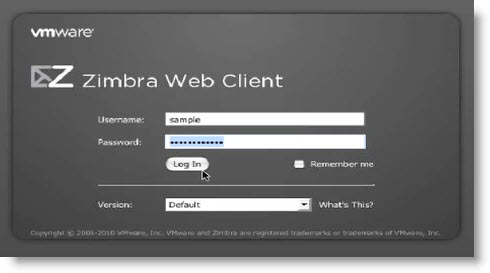
Zimbra Collaboration Suite 7.0 video

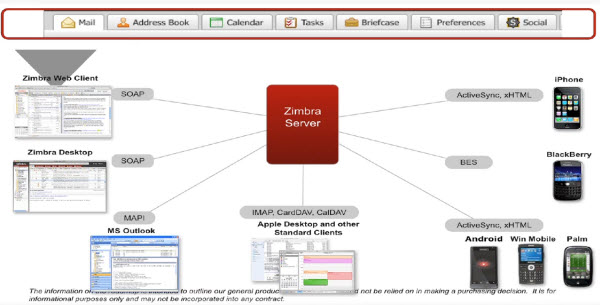
Support for lots of devices….-:)  Cross browser support, Outlook support,
But also some features which are not only cool, but really useful. For example If you delete you message, the message is in the trash. But If you empty the trash your message is gone, but you still have the possibility to recover it as an end user. You don't have to call your system or e-mail administrator to do it for you.
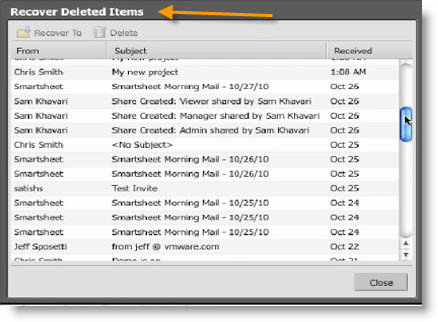
The time during the message is recoverable from there is configurable on the server side, so you as a system admin you'll want to check the value there and make sure it fits your needs.

This is a very helpful feature.

Also there is now possible to attach multiple attachments to your messages and also attaching contacts or even e-mails.

The support attaching files through the briefcase stays as it was already available in the 6.0 version of ZCS.

Another new feature is the delayed sending for your e-mail. This permits you to write your message and schedule the post for later time.

Really efficient search engine – able to search for keywords inside of file documents attachments.

New search in the GAL – global access list. Yes, Zimbra does have a Global access list in case you were not aware of that…

Some great changes in the Calendar, drag and drop, different views, trash for calendar too… . I really liked the presentation, but there are way too many topics for single blog post.

Source: Zimbra Overview and ZCS 7.0 Live Demo/Preview

Shares
0
Liked it? Take a second to support ESX Virtualization on Patreon!

| Filed Under: Featured Tagged With: Zimbra 7, Zimbra 7.0 beta, Zimbra Collaboration Suite Leave a Comment

About Vladan SEGET

This website is maintained by Vladan SEGET. Vladan is as an Independent consultant, professional blogger, vExpert x11, Veeam Vanguard x5, VCAP-DCA/DCD, VCP, ESX Virtualization site has started as a simple bookmarking site, but quickly found a large following of readers and subscribers.

Connect on: Facebook. Feel free to network via Twitter @vladan.

Trackbacks

  1. Mail Maintenance 12/16 10PM-11PM « Sononaco says:
    December 16, 2010 at 12:19 pm

    […] see some of the features coming up in the next version of the Mail/Calendar server (version 7.0), have a look here. And if you haven’t had the chance to download the new version of Zimbra Desktop it’s a […]

    0
    Reply

Leave a Reply Cancel reply

Your email address will not be published. Required fields are marked *

Nakivo Backup and Replication
Click to Become a Sponsor

Featured

  • Iperius Backup – Best Backup solution for VMware and Hyper-V
  • Free Backup for VMware and Hyper-V - NAKIVO Backup & Replication
  • FREE Forever—Back up VMware with Altaro VM Backup. Grab your Free copy now!

Most Recent

  • Nakivo Backup and Replication 9.4 New release
  • Understand Your IT Environment with Dell Live Optics – StarWind Webinar
  • StarWind V2V Converter and P2V Migrator As a Hypervisor Switch
  • How To Apply to become VMware vExpert and Why?
  • VMware Workstation FREE Update Released – 15.5.5
  • 5 Tips How to Secure Your Backups
  • Microsoft Surface Headphones 2 released
  • FREE Windows Terminal 1.0 GA Is Out – Get Your Copy
  • FREE VMware Learning Zone Access during 6 Month!
  • Download Latest FREE Trial of Runecast Analyzer – 100 %Compatible vSphere 7.0 Now

Most Liked

  • VCP6.7-DCV Study Guide - VCP-DCV 2019 certification
  • VCP6.5-DCV Study Guide
  • vSphere 6.5
  • ESXi FREE Web Client Interface
  • Paessler PRTG Monitoring for VMware

Fast NVMe Storage


Virtualization Software From VMware

  • VMware vSphere 7.0 "Essentials PLUS" - vMotion, vSphere Replication...Included
  • VMware vSphere 7.0 "Essentials" - 3 hosts, vCenter
  • vSphere Essentials Per Incident Support Click Here.
  • VMware Workstation 15.5 Pro and Upgrade - Best Desktop Virtualization Software
  • VMware Fusion 11.5 - Run Windows on MAC, and Upgrade
  • VMware Fusion 11 Professional - Restricted VMs, Virtualized VT-X/EPT... and Upgrades
**************************************************************************
  • Upgrade to vSphere Editions
  • Upgrade to vSphere Enterprise Plus

Free Software

Altaro VM Backup – Protect your VMware and Hyper-V VMs for Free with Altaro VM Backup. 2 VM for Free, forever. Grab your copy now!

Free Trials

Veeam Backup and Replication 9.5 Trial DownloadVeeam Backup & Replication 10 Full Version Download (30 Days Trial – Get Your Copy !
Runecast Analyzer Free TrialRunecast Analyzer FREE trial Registration link and download (15 Days Trial – Get Your Copy !

YouTube

Find us on Facebook

ESX Virtualization

Copyright © 2020 ·Dynamik-Gen · Genesis Framework · Hosted with HostColor.com

X
Veeam Backup 10 Trial Download FREE
Download NOW
