ESX Virtualization

VMware ESXi, vSphere, VMware Backup, Hyper-V... how-to, videos....

Nakivo Backup and Replication - #1 Backup solution for Virtual, physical, cloud, NAS and SaaS

Menu
  • Certification
      • VCP-VVF Administrator
          • vcp-vvf-2.
        • Close
      • VCP-DCV vSphere 8
          • vcp2024-125.
        • Close
    • Close
  • VMware
    • Configuration Maximums
    • vSphere
      • VVF 9 and VCF 9
      • vSphere 8.0
      • vSphere 7.0
      • vSphere 6.7
      • vSphere 6.5
      • vSphere 6.0
      • Close
    • VMworld
      • VMware EXPLORE 2024
      • VMware EXPLORE 2023
      • VMware EXPLORE 2022
      • VMworld 2019
      • VMworld 2018
      • VMworld 2017
      • VMworld 2016
      • VMworld 2015
      • VMworld 2014
      • VMworld 2013
      • VMworld 2012
      • VMworld 2011
      • Close
    • Close
  • Proxmox
    • Proxmox
    • Close
  • Microsoft
    • Windows Server 2012
    • Windows Server 2016
    • Windows Server 2019
    • Windows Server 2025
    • Close
  • Categories
    • Tips – VMware, Microsoft and General IT tips and definitions, What is this?, How this works?
    • Server Virtualization – VMware ESXi, ESXi Free Hypervizor, VMware vSphere Server Virtualization, VMware Cloud and Datacenter Virtualization
    • Backup – Virtualization Backup Solutions, VMware vSphere Backup and ESXi backup solutions.
    • Desktop Virtualization – Desktop Virtualization, VMware Workstation, VMware Fusion, VMware Horizon View, tips and tutorials
    • How To – ESXi Tutorials, IT and virtualization tutorials, VMware ESXi 4.x, ESXi 5.x and VMware vSphere. VMware Workstation and other IT tutorials.
    • Free – Free virtualization utilities, ESXi Free, Monitoring and free backup utilities for ESXi and Hyper-V. Free IT tools.
    • Videos – VMware Virtualization Videos, VMware ESXi Videos, ESXi 4.x, ESXi 5.x tips and videos.
    • Home Lab
    • Reviews – Virtualization Software and reviews, Disaster and backup recovery software reviews. Virtual infrastructure monitoring software review.
    • Close
  • Partners
    • NAKIVO
    • StarWind
    • Xorux
    • Close
  • This Web
    • News
    • ESXi Lab
    • About
    • Advertise
    • Archives
    • Disclaimer
    • Privacy policy
    • PDFs and Books
    • Close
  • Free

Clean Master for PC – Better than CC Cleaner?

By Vladan SEGET | Last Updated: June 5, 2020

Shares

Friday post will most likely be more “light” if I can say that as it's the end of a week and I still feel a bit tired from Barcelona. I wanted to shared my thoughts on this piece of free software  I just stumbled through. It's a free junk cleaner for PC called Clean Master. MAC user's don't read further. Windows users are facing usual problems when testing, installing, uninstalling new applications etc. Depending of your usage, in 6 month time you're ready for clean install because the PC slows down!

Well, in case you're using some software like Acronis so you can go back in time, then you're ok, but if you're not, then your PC over the time will get slow. Perhaps cleaning the junk on regular basis is the way to go? I've been long time user the free version of CC cleaner which does a good job, but I also like to test other solutions to see what they have to offer.

So today's freebie hit is Clean Master. It's 5.5 Mb download and it's free. It does not come out with any bloatware and the install is very fast and very fancy (you'll like it).

Clean Master for PC – Install and config

It's very strange to see this kind of installer which executes the program without user intervention and presents you with a scan results immediately (took like 7-8 seconds). I almost had no time to take a screenshot of the scan process so fast was it! The installer has also some kind of animations effects embedded too, but overall the 5.5 Megs installs fairly quick!

Here is the scanning process:
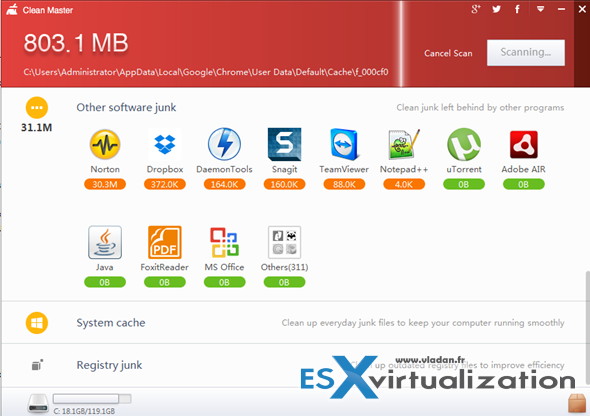
Clean Masteer for PC

As being said the program is very fast. There is a settings button which allows to tweak few things as well. The settings allows to change the boot settings (boot with Windows) or if you want to clean after boot.

There are also two sliders allowing to set up the reminder for notification settings and also config based on thresholds allowing to setup capacity. When reached, there is a notification.

You mey also want to change the default behavior which adds a context file menu to Recycle bin's context menu but I did not mind on that.
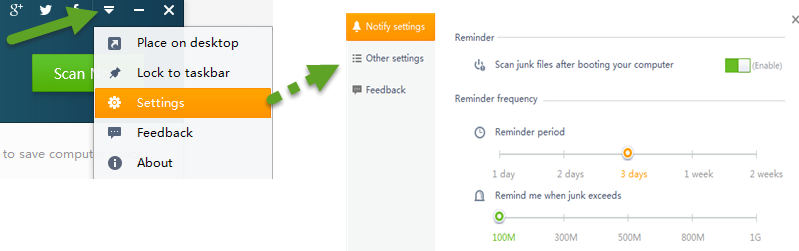
Clean Master settings

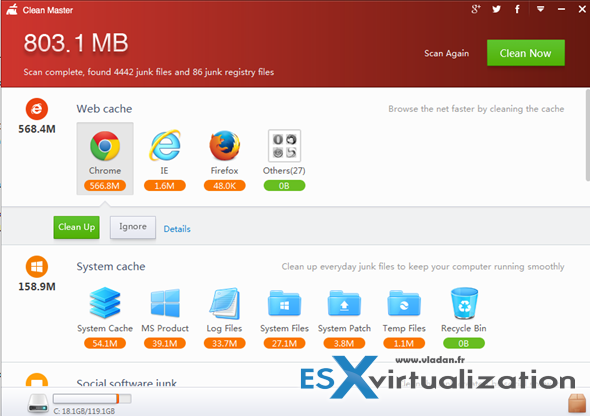
And here is the results screen where you can choose what you want or do not want to clean. On the right hand side there is a slider where you can slide down to see other categories. The program has 4 main categories:

  • Web Cache
  • System Cache
  • Other software junk
  • Social Network junk
  • Registry junk (allows restore registry)
  • video audio junk
  • Social software junk
  • Online games junk

Clean Master for PC

You simply needs to hit the clean button and off you go. Five seconds later the PC is clean presenting you with a results…. Neat. I like this software -:)
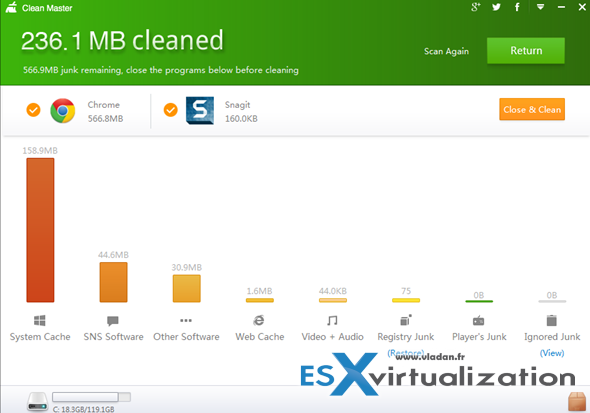
Clean Master for PC

With that said I can only say good things about Clean Master. So far it's been a pleasure to work with. Fast install and scans, no hassle and easy settings. Perhaps not so configurable as CC cleaner but getting the work done!

Stay tuned and have a great WE. After last week's Barcelona VMworld 2014  event I still needs some rest to recover from all those emotions too -:).

Clean Master for PC is work done by Cheetah Mobile. Get your copy of Clean Master for PC here.

Vote !
Shares

| Filed Under: Free Stuff Tagged With: Clean Master for PC

About Vladan SEGET

This website is maintained by Vladan SEGET. Vladan is as an Independent consultant, professional blogger, vExpert x17, Veeam Vanguard x11, VCAP-DCA/DCD, ESX Virtualization site has started as a simple bookmarking site, but quickly found a large following of readers and subscribers.

Connect on: Facebook. Feel free to network via Twitter @vladan.

Comments

  1. carlcbadger says

    August 16, 2015 at 4:01 pm

    I simply want to say I am newbie to blogging and site-building and truly loved your website. Most likely I’m likely to bookmark your blog . You absolutely have exceptional articles and reviews. Many thanks for sharing your web-site.

Private Sponsors


Featured

  • Thinking about HCI? G2, an independent tech solutions peer review platform, has published its Winter 2023 Reports on Hyperconverged Infrastructure (HCI) Solutions.
Click to Become a Sponsor

Most Recent

  • Reviving Old School Laptops with PrimTux: Battling Obsolescence on a Budget
  • Proxmox Datacenter Manager 1.0 released – a real vCenter Server Alternative?
  • Recovering a Corrupted Exchange Database with Stellar Repair for Exchange
  • Commvault at AWS re:Invent 2025: Pioneering AI-Enhanced Cyber Resilience with Cloud Unity
  • How to Set Up pfSense Community Edition as a Firewall Using VMware Workstation Pro 17 (2025 Edition)
  • HPE Morpheus VM Entreprise and Morpheus VM Essentials updates released – v8.0.11
  • Veeam Backup and Replication Upgrade on Windows – Yes we can
  • Commvault’s Cloud Unity Platform: Revolutionizing Enterprise Resilience in the AI Era
  • Securing Your Backups On-Premises: How StarWind VTL Fits Perfectly with Veeam and the 3-2-1 Rule
  • 3 New Advanced Certifications from VMware/Broadcom Released

Get new posts by email:


Deals

Support us on Ko-Fi


Buy Me a Coffee at ko-fi.com

VMware Engineer Jobs

VMware Engineer Jobs

YouTube

…

Find us on Facebook

ESX Virtualization

…

Copyright © 2025 ·Dynamik-Gen · Genesis Framework · Hosted with HostColor.com