
ESX Virtualization

VMware ESXi, vSphere, VMware Backup, Hyper-V... how-to, videos....

Nakivo Backup and Replication - #1 Backup solution for Virtual, physical, cloud, NAS and SaaS

Menu
  • Certification
      • VCP-VVF Administrator
          • vcp-vvf-2.
        • Close
      • VCP-DCV vSphere 8
          • vcp2024-125.
        • Close
    • Close
  • VMware
    • Configuration Maximums
    • vSphere
      • VVF 9 and VCF 9
      • vSphere 8.0
      • vSphere 7.0
      • vSphere 6.7
      • vSphere 6.5
      • vSphere 6.0
      • Close
    • VMworld
      • VMware EXPLORE 2024
      • VMware EXPLORE 2023
      • VMware EXPLORE 2022
      • VMworld 2019
      • VMworld 2018
      • VMworld 2017
      • VMworld 2016
      • VMworld 2015
      • VMworld 2014
      • VMworld 2013
      • VMworld 2012
      • VMworld 2011
      • Close
    • Close
  • XCP-NG
    • XCP-NG
    • Close
  • Proxmox
    • Proxmox
    • Close
  • Microsoft
    • Windows Server 2012
    • Windows Server 2016
    • Windows Server 2019
    • Windows Server 2025
    • Close
  • Categories
    • Tips – VMware, Microsoft and General IT tips and definitions, What is this?, How this works?
    • Server Virtualization – VMware ESXi, ESXi Free Hypervizor, VMware vSphere Server Virtualization, VMware Cloud and Datacenter Virtualization
    • Backup – Virtualization Backup Solutions, VMware vSphere Backup and ESXi backup solutions.
    • Desktop Virtualization – Desktop Virtualization, VMware Workstation, VMware Fusion, VMware Horizon View, tips and tutorials
    • How To – ESXi Tutorials, IT and virtualization tutorials, VMware ESXi 4.x, ESXi 5.x and VMware vSphere. VMware Workstation and other IT tutorials.
    • Free – Free virtualization utilities, ESXi Free, Monitoring and free backup utilities for ESXi and Hyper-V. Free IT tools.
    • Videos – VMware Virtualization Videos, VMware ESXi Videos, ESXi 4.x, ESXi 5.x tips and videos.
    • Home Lab
    • Reviews – Virtualization Software and reviews, Disaster and backup recovery software reviews. Virtual infrastructure monitoring software review.
    • Close
  • Partners
    • NAKIVO
    • StarWind
    • Xorux
    • Close
  • This Web
    • News
    • ESXi Lab
    • About
    • Advertise
    • Archives
    • Disclaimer
    • Privacy policy
    • PDFs and Books
    • Close
  • Free

OCZ RevoDrive 400 Crystal Mark 2.6GB/s read and 1.6GB/s write

By Vladan SEGET | Last Updated: February 17, 2017

Shares

OCZ is showcasting at CES their upcoming Revodrive 400 PCIe NVMe drive. It seems that the Toshiba based 15 nm MLC NAND based SSD has some excellent performance. Hitting 2.6GB/s read and 1.6GB/s write in CrystalDiskMark.

As being said, the OCZ RevoDrive 400 PCIe NVMe SSD has been benchmarked during CES 2016 show and it has sequential read and write performance of up to 2,400 MB/s and 1,500 MB/s and up to 210,000 IOPS of random 4K performance.

This SSD should hit the market in Q1 2016 with capacities up to 1TB. The pricing is still unknown. For users without the M2 slot on the motherboard, it's possible to use optional PCIe adapter….

(img. TechReport.com)
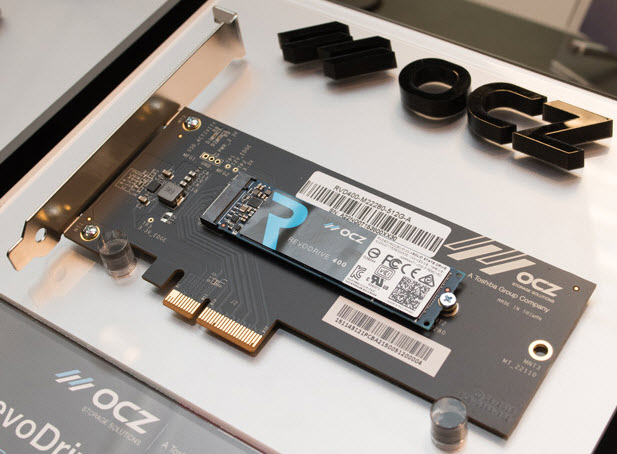
OCZ Revo Drive 400

NVMe is slowly becoming the next standard for high speed storage. Latest VSAN 6.1 has also added support for NVMe with lower than 5 microsec write latency on NVMe. NVMe can open up to 65536 queues, and up to 65536 commands per queue which has very large parallel access to flash and memory storage devices. From the CPU perspective, NVMe is also benefical as it brings significant CPU overhead reduction compared to traditional flash drives.

The NVMe standard has the following benefits over SATA:

  • Performance across multiple cores to quickly access critical data
  • An optimized register interface and command set that uses the minimum number of CPU clocks per IO for higher performance and lower power
  • Scalability with headroom for current and future NVM performance
  • End-to-end Data protection capabilities and support for standard security protocols, such as Trusted Computing Group
  • Lower power consumption resulting in a lower Total Cost of Ownership and carbon footprint

The OCZ RevoDrive 400 uses PCIe Gen3 x4 interface, is fully NVMe 1.1b compliant, has write cache enhancement technology and will have 5-year ShieldPlus warranty, which is basically based on the serial number of the device.

(Img. LegitReviews.com)
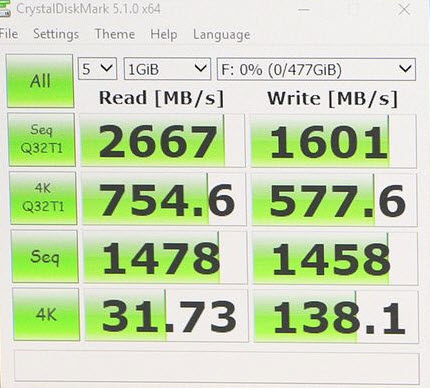
OCZ RevoDrive 400

In case you have a problem, just enter the serial number into a web form on OCZ website, and within 24 hours you'll be in touch with OCZ technician for help. If device problem, a pre-paid return label will be issued and a brand new advanced replacement OCZ SSD will be shipped within 24 hours.

(Img. LegitReviews.com)
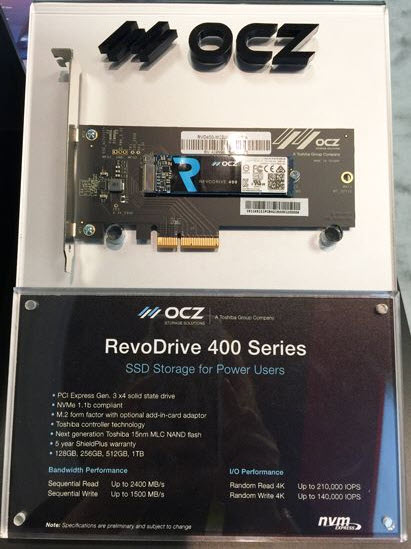
OCZ RevoDrive 400

Certainly a very nice piece of hardware that shall interest storage and virtualization enthusiasts… What's the next bottleneck?

5/5 - (1 vote)
Shares

| Filed Under: Home Lab Tagged With: OCZ, OCZ RevoDrive 400

About Vladan SEGET

This website is maintained by Vladan SEGET. Vladan is as an Independent consultant, professional blogger, vExpert x17, Veeam Vanguard x11, VCAP-DCA/DCD, ESX Virtualization site has started as a simple bookmarking site, but quickly found a large following of readers and subscribers.

Connect on: Facebook. Feel free to network via Twitter @vladan.

Private Sponsors


Featured

  • Thinking about HCI? G2, an independent tech solutions peer review platform, has published its Winter 2023 Reports on Hyperconverged Infrastructure (HCI) Solutions.
Click to Become a Sponsor

Most Recent

  • This is it – Most Popular Blog posts in 2025
  • VMware Releasing VMware ESXi 8.0 Update 3h and VMware vCenter 8.0 Update 3h
  • Veeam VBR 13 and Scality Artesca Integration: A Game-Changer for Cyber-Resilient Backups
  • Reviving Old School Laptops with PrimTux: Battling Obsolescence on a Budget
  • Proxmox Datacenter Manager 1.0 released – a real vCenter Server Alternative?
  • Recovering a Corrupted Exchange Database with Stellar Repair for Exchange
  • Commvault at AWS re:Invent 2025: Pioneering AI-Enhanced Cyber Resilience with Cloud Unity
  • How to Set Up pfSense Community Edition as a Firewall Using VMware Workstation Pro 17 (2025 Edition)
  • HPE Morpheus VM Entreprise and Morpheus VM Essentials updates released – v8.0.11
  • Veeam Backup and Replication Upgrade on Windows – Yes we can

Get new posts by email:


Deals

Support us on Ko-Fi


Buy Me a Coffee at ko-fi.com

Friendly Websites and Blogs

  • vBlog.io
  • VMware Engineer Jobs
 

YouTube

…

Find us on Facebook

ESX Virtualization

…

Copyright © 2025 ·Dynamik-Gen · Genesis Framework · Hosted with HostColor.com