Sometimes your VM gets stuck and you have no possibility to do graceful shutdown or power off through the vSphere client. Saying it differently, the VM is stuck and the only way is to reboot the whole ESXi host, which you certainly don't want to do.
But the unresponsive VM running there can be “killed” through the CLI, yes. This can be done several ways, but I'll show you a way of doing it through putty SSH session.
First thing to do is to enable SSH on your ESXi Box (select host > configuration > Security profile > Properties > SSh)
We will be using ESXTOP command.
There are different ways to stop ( “kill” ) a VM by using the vCLI, PowerCLI or the console session. In ESXi 5 it is possible to kill a running VM, the process of the VM concerned, by using the esxtop command.
ESXi 5 Unresponsive VM – How-to Power Off
Step 1 – connect via SSH by using puty for example and enter esxtop.
Enter “esxtop”, then press “c” for the CPU resource screen and shift + V to display VMs only.
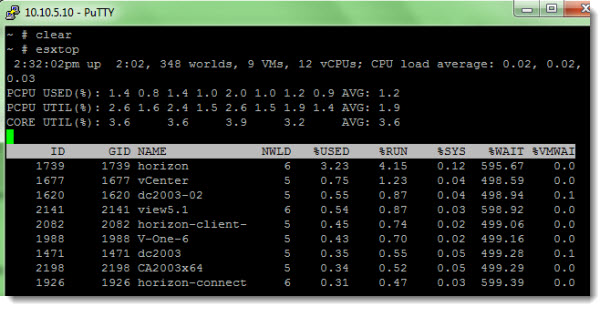
Step 2 – changing the display and locating the LWID number
Press “f” to change the display fields and press “c” in order to show the LWID (Leader World Id) and press ENTER.
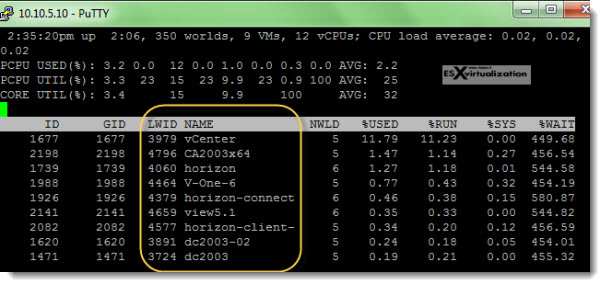
Step 3 – Invoking the k (kill) with the number does it…..
Now when you have the LWID column there, you can see the VM which interests you by the LWID number.
You can press “k” and enter the LWID number of the VM which you want to stop. Note that this is hard stop so, the next time that the VM will boot you'll probbably see this screen (depending on your guest OS of course).
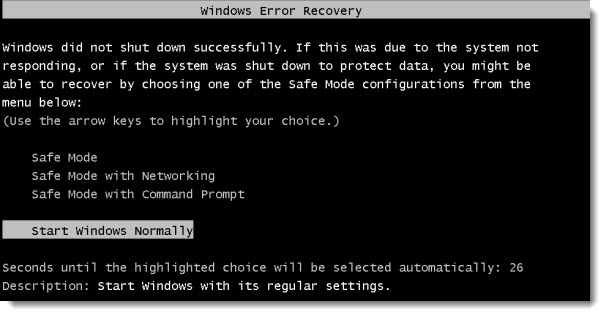
If this method don't work, you can't vmotion the VM elsewhere or any other option don't work either, there might be a hardware problem with the host which can lead into PSOD.
There is also this KB which discuses other methods including the one described here – ESXi Unresponsive VM – VMware Kb. Also you might want to check Using hardware NMI facilities to troubleshoot unresponsive hosts (1014767)









Great tuto. You save my day, thanks
Thanks. Very helpful !
Thanks for the article. It helped us on our 5.1 farm when the “VMX” method didn’t work. We are including it in our documentation. 8^)
Thank you. Worked like a charm.
Perfect. Nothing else worked. Spent days but this worked on very first try. I had a full backup of VM så deleted the old unresponsive one and restored the working one. Thanks for great help
great tutorial. thanks for sharing
Thank you so much! This helped me when my VM in ESXI Hypervisor 6 froze while in the middle of re-configuring a hard-drive upgrade in space.
Glad it helped. Thanks for your experience.
I wonder that this worked for so much… Didn’t help me in any way. Tried this way to kill an absolutely unresponsive machine again and again, didn’t work.
So I tried it the other way:
– show the LWID of all running machines via command: “esxcli vm process list”
– lookup the list for the ‘World ID’
– kill this LWID via command: “esxcli vms process kill –type=hard –world-id=World ID”
That did work. Than I tried your way again with some test machines, That did work. So it seems, that a machine must be at least responsive in some way to kill it with your receipt.
Great article! esxtop is a wonderful tool!
You can also kill an unresponsive VM via SSH or PowerCLI:
*** Vía SSH:
ps|grep vmx
kill -9 ID
or:
esxcli vm process kill -t=[soft,hard,force] -w=WorldIDNumber
*** Vía PowerCLI:
Stop-VM -kill VMNAME -Confirm:$false
Details here: http://www.sysadmit.com/2015/01/vmware-esxi-kill-vm.html