Disable ssh warning esxi 5 – how to disable this message. The other day when I updated my very old article on How to activate SSH on ESXi, I thought that I have posted already an article on the deactivation of the ssh for the host has been enabled warning message in vSphere 5. But I didn't. You could already find it on VMware communities or VMware KB articles, but this is also for my own bookmarking …. -:).
When you enable the local/remote SSH in ESXi 5, your host shows you that little yellow triangle, while you're connected with vSphere client… It's there as informative message that SSH has been activated on the host. So you might want to keep it to stay informed…., but usually it's just annoying….
For people wanting to get rid of this message, read on…
How to disable the message? Where to go?
Through the GUI, connect with vSphere Client.
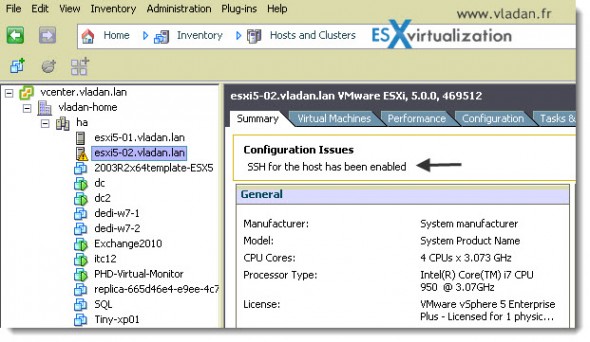
Here is the one simple step….
01. Connect to your vCenter with your vSphere Client and select the Configuration TAB > Advanced Settings > UserVars. Change the value of UserVars.SuppressShellWarning from 0 to 1 and click on the OK button to validate.
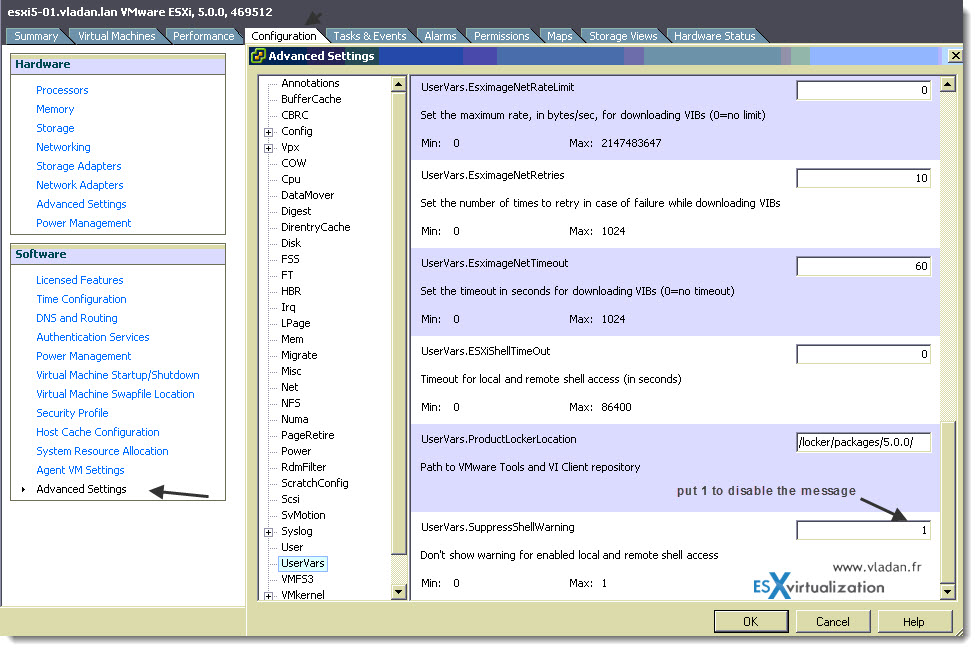
No need to reboot the host. The message should disappear immediately …
You might be also interested in on how to disable this message by using the CLI. Here is a quick quote from VMware KB article – Cluster warning shown in vCenter Server when Remote Tech Support Mode (SSH) or Local Tech Support Mode is enabled -which discusses just that:
To disable these warnings using esxcli:
Connect to the ESXi host through SSH using root credentials.
Run this command:
esxcli system settings advanced set -o /UserVars/SuppressShellWarning -i 1
To enable these warnings using esxcli:
Connect to the ESXi host through SSH using root credentials.
Run this command:
esxcli system settings advanced set -o /UserVars/SuppressShellWarning -i 0
Source: VMware Communities and VMware KB2003637
Additionnaly, you might want to look at the Eric Gray's blog where he explains, that actually this warning message will dissapear without the need to modify this advanced settings…. after rebooting the host -:). Here is Eric's article on that.
Enjoy… -:)









Vladan to the rescue, thanks. This was defiantly annoying.