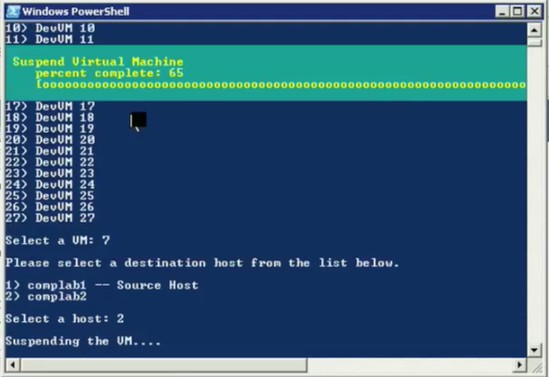
Quick Migration is a free feature which came from Microsoft's Hyper-V. VMware has VMotion but only in the Entreprise License. Which is quite costly for most small businesses. So one great guy find a nice way to make the same feature for VMware ESX hosts. It's a little script which is runned under Windows PowerShell and moves your VM from one ESX host to another. It's VERY FAST, but your VM's has to be stored on a shared storage. If not the downtime will be considerably longer due to copy operation from one local physical storage to the other. What this script basically does is:
1.) It suspends your running VM.
2.) It reasignes the VM with all the files to your second ESX host.
3.) It starts the VM which is now on the second ESX.
On Mike diPetrillo's website you'll find that you will need quite a few things before you can run the script.
Here is what isneeded:
- 2 VMware Infrastructure 3 hosts (2 ESX servers)
- Windows PowerShell (and all of the pre-requirements for that if needed)
- VMware Infrastructure Toolkit (for Windows)
- VM Migrator script from Mike
- Running VM which you want to migrate from one ESX Server into another.
There is a little presentation video of that script that you can download here
Enjoy… -:)
If you like this post, consider subscribing for Free via RSS or by E-mail.
.
.









Testing my new disqus account….