
Starwindsoftware with active-active High Availability SAN storage solution.
Starwind active-active HA storage can be implemented as a storage SAN solution for VMware ESX or Hyper-V from Microsoft. This high availability storage solution is installed on two Windows servers 2003 for exemple, can usually insure that the data won't get lost in case of one server failure.
What's the actual definition of active-active iSCSI cluster?
The Active-Active High Availability technology provides continuous availability by synchronously mirroring and distributing multiple copies of data across an active-active 2 node storage cluster in real time, eliminating any single point of failure.
In the event of power, network, disk or even entire storage node failure, the second storage node will remain online and will continue operating without any disruption, making data accessible at all times.
With this here is my general schema:
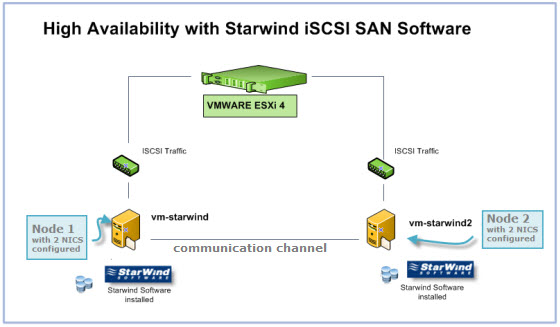
I have 2 Windows 2003 servers in my setup:
- 2 NICs (Network interface cards) each.
- Those two Windows servers will have a Starwind Entreprise Server HA installed each.
- Starwind active-active HA availability storage – this post
- Starwind with ISCSI SAN Software can do High Availability for you…
- Starwind iSCSI HA Connection to ESX Server
To be continued…. Stay tuned via RSS..








