Configuration RAID 1 Mirror and connection to VMware ESX 4.
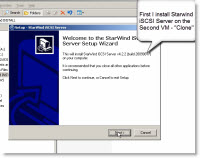 I wanted to test Starwind Entreprise Server – powerful iSCSI SAN software installing on your existing W2000/2003 Servers, which provides you with the possibility to create RAID1 Mirror. So whether you want to test this software this guide might help with the setup. You might also wan to try or use the Free version of Starwind iSCSI SAN which gives you 2 Terra of storage.
Compatible systems: W2k, W2003, W2008, Win XP, Vista. You don't need a super server for it. Even a Pentium 4 machine with 512Mb of RAM can do the job. All the RAM available will be used of I/O caching.
FYI – You don't need to buy 2 licenses for doing a 2 Nodes Mirror or remote replication….. One license is enough. See the PDF document here.
So in my tests I Installed a Starwind software inside of a 2 VMs running 2003 Server under VMware Workstation. I did not have 2 physical systems with Windows in my lab available so I used 2 Virtual Machines ( 2003 Servers) which had been running on my desktop computer under Windows Seven. So I created a RAID 1 mirror between these Two VMs. VM1 IP: 192.168.0.30 and VM2 IP: 192.168.0.31
On the schema there should be my Openfiler iSCSI NAS too but I took it out to make it simple.
This is my setup:
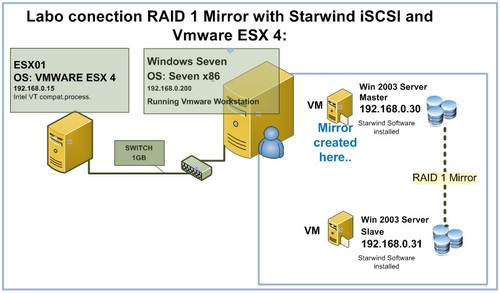
To make the things works you must install Starwind iSCSI SAN on the “Slave VM” and Starwind iSCSI SAN and Starport Driver on the “Master VM”.
I'll post a video link at the end of the article for detailed how-to Step-by-Step installation.
Once the Mirror created on the “Master VM” you present it to your ESX server as a new LUN. You configure your ESX 4 server to seek the Mirror as a new iSCSI target.
You must add a new iSCSI target. Open your Virtual Infrastructure client and Go to: Configuration > Storage Adapters > Properties
Just watch the video at the end of the article to see those steps.
Software mirror (RAID1) and iSCSI replication enable volume/site failover and recovery for uninterrupted storage operations and 24/7 business continuity. Mirroring protects data and keeps applications operational in the event of disk failure.
Data sheet for connection ESX/ESXi.
Starwind Enterprise Server does much more then just a RAID 1 mirror. Here are the functionalities of the Enterprise version:
- Synchronous Data Mirroring: eliminates single point of failure with real-time mirroring.
- Remote / Asynchronous Replication: replicates your storage remotely across a WAN.
- CDP & Snapshots: captures point-in-time snapshots with unlimited rollback points.
- Server Clustering: provides shared storage for High Availability server clustering.
- Thin Provisioning: allocates space dynamically for highly efficient disk utilization.
Here is the detailed video of all the necessary steps to make it work. Enjoy… If you liked this article you might want to subscribe via your Google Reader for free to my RSS Feed.
Click the Image below to see the video in new browser window.









Hi Vladan,
thanks for the great informations in your blog.
I like “software-based” SAN's (Datacore/Starwind) very much, but there is everytime one big problem: The write-cache
Storage vendors normaly use Mirrored Write-Cache/Dual-Controller or you can use BBWC (with very tiny RAM) to protect the write cache.
But the “software-based” SAN's use the server RAM for write-cache.
This creates high risk for potential/guaranteed data loss (faulty RAM or powerloss (can occurs even with a UPS))
Datacore not only mirrors the data volumes. Even the write-cache is mirrored when you have 2 servers (Synchronous Mirroring). So you should not activate write-caching in a Datacore-Environment if you have a single server (because it's not protected).
I can't find any informations how Starwind deals with write-cache protection (or supports write-cache mirroring).
I think everyone should consider this, or live with the (huge) write-performance penalty when not enabling write-cache.
Bj
Greetings from Germany
Bj,
you right but you could also use servers with “protected” memory (it's like RAID 1 for RAM if you don't know), you got twice less memory but no SPOF 🙂
@NiTRo
Thanks for pointing this out. With, for example, a DL380 G6 you can use Mirrored memory mode or even better Lockstep Mode to minimize the risk and build a very reliable/powerful software-based SAN.
But you've still the SPOF/risk. If the hole server goes down(OS failure, HW failure, etc.) the actual write-cache content isn't saved (or synced to the second node(Starwind?)) and therefore there is the risk of potential data loss.
Thanks bj28 for pointing this out. Maybee someone from Starwind could respond to this? I'm sure the post was seen…. -:)
Nitro: That's right, with memory prices down this might be an option too….
Thanks
Vladan
Hello! For now I can say, that in StarWind 5.1 we will implement mirrored cache.
Great post, Vladan!
Constantin, as I heard in version 5 there will be active-active HA? If yes, then the question about Business Continuity for SMB will be solved.
Thanks girtscipulus,
Me too I'm waiting for the version 5 as it should also simplify the installation process with including the Starport Driver in it…!!!