Veeam Backup and recovery was during the last week in the center of tweets and forum posts. The announced new version of VEEAM backup I already talked about in my blog post few weeks ago has finally arrived. What makes VEEAM so desired by all the virtual community? What's hot?

Earlier this year the 3.1 release was already success. Easy to navigate interface and solid and reliable backups. Now with the 4.0 release, VEEAM has confirmed that VEEAM backup and recovery is one of the leaders on the virtualization market.
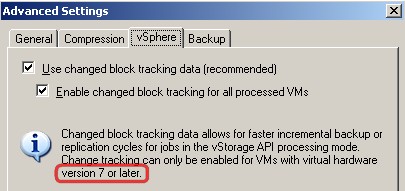
Changed block tracking
- Incremental backup and replication is 10 or more times faster (for typical VMs and workloads)
- Full backup and replication is up to five times faster
- Changed block tracking allows for replication cycles as fast as one to three minutes, resulting in near continuous data protection (CDP) – NOTE that the VM's must be VM's Version 7.
- Primary and backup storage costs decreased by nearly 30 percent
That's really what the users and customers were waiting for.
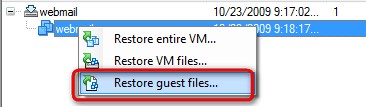 Also, the file level restore feature is helpfull when restoring individual files which are located inside of your VM. This feature works for Windows, Linux, Unix, BSD and MAC too. (NOTE: VMware Data Recovery does not have this feature at the moment).
Veeam backup is using the vSphere 4 storage API so the need for using VMware Consolidated Backup (VCB) is not necessary any more as also the VCB is going to dissapear.
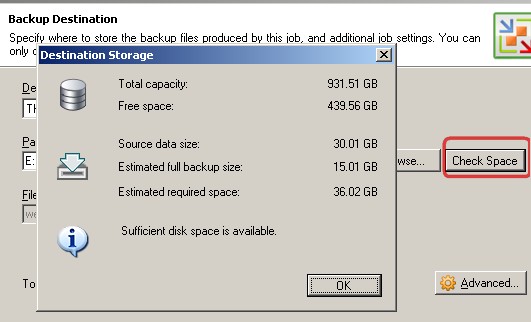
There is one more little cool feature. To check the available place at the destination….. and you can see also the estimates for the size of your backup file.
Some other new features of Veeam Backup and Recovery 4.0:
- PowerShell scripting support.
- Exclusion of virtual machine (VM) log files from backup and replication.
- Exclusions of Disks from VMs.








