VMware Converter 4.0.1 and Thin provisionning
VMware Converter 4.0.1 is Free Tool now fully compatible with vSphere 4. One of the great features is Thin Provisionning. What is this? The name is a bit confusing, but in real it’s really great, because it saves you tonnes of diskspace. Oh yes!!
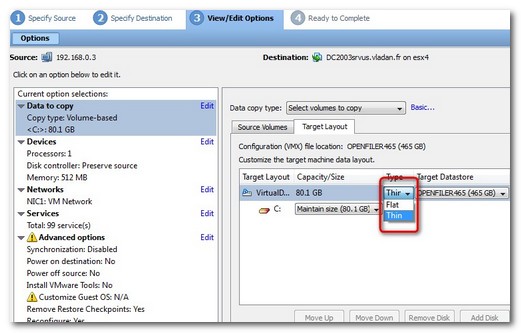
When you converting your physical server into virtual, you can chose whether or not to use thin provisioned disks. In my example I was converting a server with 80 Go of physical disk and I chose to use thin provisioned disk in my Virtual Environement, because the VMDK file after conversion is not 80 GO but only something like 8 Go. You see…? Then it will expand (grow) as you install more and more applications inside of your virtual machine server.
Related Posts :
There are 150 new features in vSphere 4 If you are having VI 3 entreprise with an suppor it's ...
ESXi 4.0 - the free version of ESX is available since several days from VMware Website. With t ...
vSphere 4 offers 30 % greater consolidation. If in your existing ESX Server infrastructure you ...
Thin provisioning can save you a LOTs of SAN space. You know that storage space on a SAN its exp ...
What about Thin provisionning? Thin provisioning, new feature in vSphere 4 is great, but it's n ...
Other posts from Server Virtualization
- Adding second service console via CLI
- Disable web access on VMware vCenter
- VMware ESX - Configuration of Service console via CLI
- Basic VMware ESX CLI networking commands
- How to change the default location of updates in vCenter
- Did you know that ESX 3.5 general support will end in less than 90 days?
- Starwind iSCSI HA Connection to ESX Server
- See a list of Storage Array Type Plugins on ESX Server
- New whitepaper released on PVSCSI
- Enable Jumbo Frames in ESXi 4
- How-to troubleshoot iSCSI connection to your SAN
- Starwind with ISCSI SAN Software can do High Availability for you...
- Overview Video from the new vSphere Pro video training from Train Signal
- New upgrade webpage for ESXi 4 pushes us to the right direction?
- You know how to collect diag information when your ESXi does PSOD?
- Use PVSCSI or not for lower intensive workloads
- Hardening guides for vSphere 4
- NTLDR missing - silly but can happend
- How To Shrink VMware Virtual Disk Files and disable shrinking
- vSphere Quick Start guide bonus download..
- ESXi - the past, the present and the future
- Farm commander - management tool for VI and TS or Citrix Farms
- How to collect log information from vCenter Server 4
- How to know where is my VM if vCenter is down?
- New patches for ESX 4 and ESXi 4
- Use VMware Converter to import 3rd party VMs, for example Virtual Iron's VMs
- Windows XP installation as a VM - trouble to see the disk or not?
- Vmware HCL for ESXi 4
- Time keeping for Windows VM's best practices
- Virtu-Al releasing 3rd update of PowerPack


per the release notes, P2V is NOT supported with thin provisioned target disks…



