
ESX Virtualization

VMware ESXi, vSphere, VMware Backup, Hyper-V... how-to, videos....

Nakivo Backup and Replication - #1 Backup solution for Virtual, physical, cloud, NAS and SaaS

Menu
  • Certification
      • VCP-VVF Administrator
          • vcp-vvf-2.
        • Close
      • VCP-DCV vSphere 8
          • vcp2024-125.
        • Close
    • Close
  • VMware
    • Configuration Maximums
    • vSphere
      • VVF 9 and VCF 9
      • vSphere 8.0
      • vSphere 7.0
      • vSphere 6.7
      • vSphere 6.5
      • vSphere 6.0
      • Close
    • VMworld
      • VMware EXPLORE 2024
      • VMware EXPLORE 2023
      • VMware EXPLORE 2022
      • VMworld 2019
      • VMworld 2018
      • VMworld 2017
      • VMworld 2016
      • VMworld 2015
      • VMworld 2014
      • VMworld 2013
      • VMworld 2012
      • VMworld 2011
      • Close
    • Close
  • Proxmox
    • Proxmox
    • Close
  • Microsoft
    • Windows Server 2012
    • Windows Server 2016
    • Windows Server 2019
    • Windows Server 2025
    • Close
  • Categories
    • Tips – VMware, Microsoft and General IT tips and definitions, What is this?, How this works?
    • Server Virtualization – VMware ESXi, ESXi Free Hypervizor, VMware vSphere Server Virtualization, VMware Cloud and Datacenter Virtualization
    • Backup – Virtualization Backup Solutions, VMware vSphere Backup and ESXi backup solutions.
    • Desktop Virtualization – Desktop Virtualization, VMware Workstation, VMware Fusion, VMware Horizon View, tips and tutorials
    • How To – ESXi Tutorials, IT and virtualization tutorials, VMware ESXi 4.x, ESXi 5.x and VMware vSphere. VMware Workstation and other IT tutorials.
    • Free – Free virtualization utilities, ESXi Free, Monitoring and free backup utilities for ESXi and Hyper-V. Free IT tools.
    • Videos – VMware Virtualization Videos, VMware ESXi Videos, ESXi 4.x, ESXi 5.x tips and videos.
    • Home Lab
    • Reviews – Virtualization Software and reviews, Disaster and backup recovery software reviews. Virtual infrastructure monitoring software review.
    • Close
  • Partners
    • NAKIVO
    • StarWind
    • Xorux
    • Close
  • This Web
    • News
    • ESXi Lab
    • About
    • Advertise
    • Archives
    • Disclaimer
    • Privacy policy
    • PDFs and Books
    • Close
  • Free

Cross vCenter Workload Migration Utility – Free Tool

By Vladan SEGET | Last Updated: June 26, 2018

Shares

There is a new update on Cross vCenter Workload Migration Utility, which is a free tool for VMware vSphere. The tool is free but is not intended to be used in the production system, because it's only experimental. The same for all the other VMware Flings. Download only when accepting the checkbox….

The latest update has brought some scale improvements where now you can migrate up to 100 VMs (previously you were limited to 10). You need Java to be able to work with the utility.

I haven't personally tested, but as far as the comment section goes (over 150 comments) it's very popular and in active development. With each release, there are some bug fixes, and new bugs which appears too, so it's up to you. This release is a v 2.1.

Cross vCenter Workload Migration Utility – What can you do with this tool?

  • Migrate VMs from one vCenter to another – Completely UI-driven workflow for VM migration.
  • Provides REST API for managing migration tasks.
  • Works with vCenters not part of the same SSO domain only.
  • Support for batch migration of multiple VMs in parallel (up to 100 VMs in this release).
  • Auto-populate inventory for ease of management – you can select network at the destination, as well as a cluster, storage etc…
  • vMotion across vCenters – Supports both live as well as the cold migration of VMs.
  • Performs storage vMotion, not requiring shared storage.
  • Flexible network mappings between source/destination sites.

There is a nice video on the site which I'm embedding to my post. Unfortunately, there is no sound (no comments or speech by the developer)

Screenshot from the VMware site:
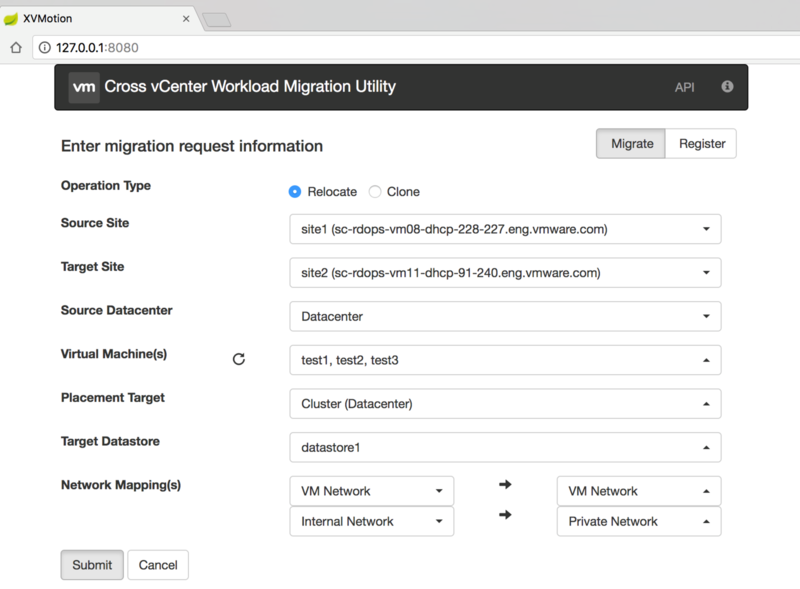
cross vcenter workload migration

Here is the video which shows how it works. First, you have to open a command prompt window and call the utility jar file. After you'll open a web browser to continue the rest of the work within a browser window. Pretty easy.

Here is the video:


There is a VMware KB article for supported configurations (different version of vSphere) for Cross vCenter vMotion https://kb.vmware.com/kb/2106952. Please note that vSphere 5.5 is NOT supported by this utility. vSphere 6.0 and higher are supported.

Cross vCenter Workload Migration Utility – Requirements:

  • vCenter Servers 6.0 or higher
  • Java Runtime Environment 1.8 (some comments says that there are problems. So use this exact version).
  • Web Browser
  • Please review https://kb.vmware.com/kb/2106952 for Cross vCenter vMotion requirements

Source: VMware Labs

It is certainly a very useful utility allowing to do a datacenter migration from one site to another via user-friendly GUI. There can be a variety of scenarios. It can be during an onboarding to another site on remote datacenter, cloud, or migration from one datacenter to another.

More from ESX Virtualization

  • vSphere 6.7 dedicated page
  • VMware vSphere 6.7 Security Features
  • VMware vSphere 6.7 Released – vCSA 6.7 Details
  • How To do a Dry Run of an esxcli Installation or Upgrade on VMware ESXi
  • What is VMware Per-VM EVC? (vSphere 6.7)
  • How To Upgrade ESXi 6.x to 6.7 via ISO
  • What is vCenter Embedded Linked Mode in vSphere 6.7?

Stay tuned through RSS, and social media channels (Twitter, FB, YouTube)

Vote !
Shares

| Filed Under: Free Stuff Tagged With: Cross vCenter Workload Migration Utility

About Vladan SEGET

This website is maintained by Vladan SEGET. Vladan is as an Independent consultant, professional blogger, vExpert x17, Veeam Vanguard x11, VCAP-DCA/DCD, ESX Virtualization site has started as a simple bookmarking site, but quickly found a large following of readers and subscribers.

Connect on: Facebook. Feel free to network via Twitter @vladan.

Private Sponsors


Featured

  • Thinking about HCI? G2, an independent tech solutions peer review platform, has published its Winter 2023 Reports on Hyperconverged Infrastructure (HCI) Solutions.
Click to Become a Sponsor

Most Recent

  • Reviving Old School Laptops with PrimTux: Battling Obsolescence on a Budget
  • Proxmox Datacenter Manager 1.0 released – a real vCenter Server Alternative?
  • Recovering a Corrupted Exchange Database with Stellar Repair for Exchange
  • Commvault at AWS re:Invent 2025: Pioneering AI-Enhanced Cyber Resilience with Cloud Unity
  • How to Set Up pfSense Community Edition as a Firewall Using VMware Workstation Pro 17 (2025 Edition)
  • HPE Morpheus VM Entreprise and Morpheus VM Essentials updates released – v8.0.11
  • Veeam Backup and Replication Upgrade on Windows – Yes we can
  • Commvault’s Cloud Unity Platform: Revolutionizing Enterprise Resilience in the AI Era
  • Securing Your Backups On-Premises: How StarWind VTL Fits Perfectly with Veeam and the 3-2-1 Rule
  • 3 New Advanced Certifications from VMware/Broadcom Released

Get new posts by email:


Deals

Support us on Ko-Fi


Buy Me a Coffee at ko-fi.com

VMware Engineer Jobs

VMware Engineer Jobs

YouTube

…

Find us on Facebook

ESX Virtualization

…

Copyright © 2025 ·Dynamik-Gen · Genesis Framework · Hosted with HostColor.com