
ESX Virtualization

VMware ESXi, vSphere, VMware Backup, Hyper-V... how-to, videos....

Nakivo Backup and Replication - #1 Backup solution for Virtual, physical, cloud, NAS and SaaS

Menu
  • Certification
      • VCP-VVF Administrator
          • vcp-vvf-2.
        • Close
      • VCP-DCV vSphere 8
          • vcp2024-125.
        • Close
    • Close
  • VMware
    • Configuration Maximums
    • vSphere
      • VVF 9 and VCF 9
      • vSphere 8.0
      • vSphere 7.0
      • vSphere 6.7
      • vSphere 6.5
      • vSphere 6.0
      • Close
    • VMworld
      • VMware EXPLORE 2024
      • VMware EXPLORE 2023
      • VMware EXPLORE 2022
      • VMworld 2019
      • VMworld 2018
      • VMworld 2017
      • VMworld 2016
      • VMworld 2015
      • VMworld 2014
      • VMworld 2013
      • VMworld 2012
      • VMworld 2011
      • Close
    • Close
  • Proxmox
    • Proxmox
    • Close
  • Microsoft
    • Windows Server 2012
    • Windows Server 2016
    • Windows Server 2019
    • Windows Server 2025
    • Close
  • Categories
    • Tips – VMware, Microsoft and General IT tips and definitions, What is this?, How this works?
    • Server Virtualization – VMware ESXi, ESXi Free Hypervizor, VMware vSphere Server Virtualization, VMware Cloud and Datacenter Virtualization
    • Backup – Virtualization Backup Solutions, VMware vSphere Backup and ESXi backup solutions.
    • Desktop Virtualization – Desktop Virtualization, VMware Workstation, VMware Fusion, VMware Horizon View, tips and tutorials
    • How To – ESXi Tutorials, IT and virtualization tutorials, VMware ESXi 4.x, ESXi 5.x and VMware vSphere. VMware Workstation and other IT tutorials.
    • Free – Free virtualization utilities, ESXi Free, Monitoring and free backup utilities for ESXi and Hyper-V. Free IT tools.
    • Videos – VMware Virtualization Videos, VMware ESXi Videos, ESXi 4.x, ESXi 5.x tips and videos.
    • Home Lab
    • Reviews – Virtualization Software and reviews, Disaster and backup recovery software reviews. Virtual infrastructure monitoring software review.
    • Close
  • Partners
    • NAKIVO
    • StarWind
    • Xorux
    • Close
  • This Web
    • News
    • ESXi Lab
    • About
    • Advertise
    • Archives
    • Disclaimer
    • Privacy policy
    • PDFs and Books
    • Close
  • Free

Nakivo Backup 7 with Hyper-V Support is coming

By Vladan SEGET | Last Updated: January 13, 2017

Shares

Big news coming from Nakivo today. Their upcoming release will have Hyper-V 2016 support. Nakivo Backup 7 with Hyper-V Support is coming in few weeks time (1st of February). Currently, you can sign up for the beta through this link. Nakivo has announced that v7.0 will add Microsoft Hyper-V 2016 (and also 2012 R2) support. The product will be able to backup Hyper-V VMs and it will also support Application Aware backups for Hyper-V. Other features, such as Instant recovery of individual items (Exchange, AD, files) for Hyper-V VMs is also part of the v7.0 release.

This is interesting as, during a long time, Nakivo has only supported VMware hypervisor. We can see Hyper-V gaining some traction too, so having a Hyper-V support is only a logical step forward for this company which is very dynamic and has fast releasing cycles. Not so long time ago they also added Amazon AWS allowing to back up paid AWS EC2 instances which are sold through the AWS Marketplace.

Nakivo UI is a very fast HTML 5 web-based interface. Love it or hate it, personally, I don't usually like web based UIs with exceptions the ones that are fast and responsive. And that's the case for Nakivo. Their UI is fast so it almost let you forgot that you're navigating through web UI.

Concerning the installation platforms, this product is very flexible, as it allows to be installed not only on Windows platforms but also deployed as Linux appliance (via OVA file), on dedicated Linux hosts or even on sam NAS hardware (some WD and Synology). This flexibility with a unified clean UI, including low pricing, has been strong arguments in very competitive data protection market.

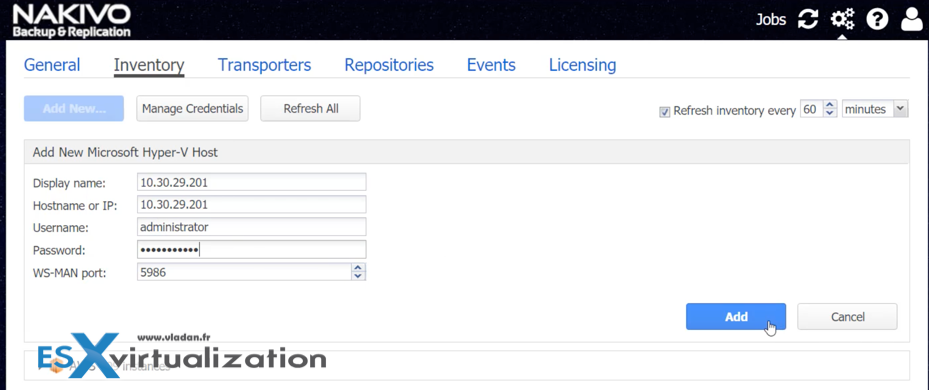
Screenshot from Nakivo.
Nakivo Backup 7 with Hyper-V Support

Nakivo Backup and Replication 7.0 What's new?

  • Support for backing up Hyper-V VMs – the product supports Hyper-v 2016 and 2012R2 of Microsoft's hypervizor.
  • Forever Incremental support – First full backup is followed by incremental backups which are faster as only what's changed gets backed up.
  • Application consistent backups – consistency of DB backups, applications using DBs, AD, Exchange….
  • Compressed, deduplicated – backup files are deduplicated and compressed across the whole repository.

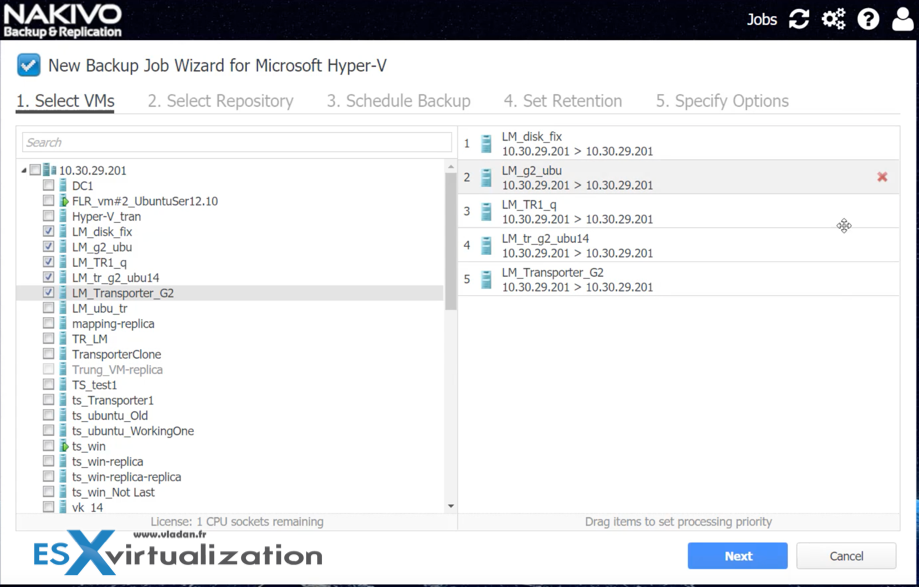
Let's have a look at how the UI manages the Microsoft Hyper-V environment. It is a bit early as the final release has not been out just yet, but it seems that only individual Hyper-V hosts can be added. This might not concern VMware users which has just a couple of individual isolated Hyper-V hosts within their environments, but how can you backup VMs within clustered environment or withing an environment managed via SCVMM?
Nakivo Backup 7 with Hyper-V Support

I hope that this will come up in a later stage of the developpement.

Nakivo Recovery

Individual Items (Individual files, Exchange objects, AD objects) can be recovered from within the Hyper-V VMs directly from backups by using Instant recovery. This feature simply mounts the VM directly from the backup repository, and you have the option to browse for those objects and (or) files, then launch a recovery operation. Or, you can recover the whole VM from the backup repository to the production storage.

Backup Copy

A backup copy jobs are also in allowing you to setup a secondary storage where those files are sent. This can be another remote site in another office, remote datacenter, Amazon AWS or Microsoft Azure cloud storage repos.

Backup copy jobs are usually used for archiving, but also DR scenarios where, in case your production backup storage gets corrupted, attacked by virus or malware, you still have another “clean” copy elsewhere.

You may also want to check my other posts about Nakivo Backup and Replication Software:

  • Nakivo Backup and Replication (NBR) Appliance – Easy deploy and config
  • Nakivo Flash VM Boot and how to configure and use
  • How To Recover a vCenter VM if vCenter Is Down – With Nakivo
  • Nakivo Backup and Replication 6.2 Embracing Amazon AWS
  • Nakivo Backup 7 with Hyper-V Support is coming – [This Post]

Stay tuned through RSS, and social media channels (Twitter, FB, YouTube)

Source: Nakivo Blog

4/5 - (1 vote)
Shares

| Filed Under: Backup

About Vladan SEGET

This website is maintained by Vladan SEGET. Vladan is as an Independent consultant, professional blogger, vExpert x17, Veeam Vanguard x11, VCAP-DCA/DCD, ESX Virtualization site has started as a simple bookmarking site, but quickly found a large following of readers and subscribers.

Connect on: Facebook. Feel free to network via Twitter @vladan.

Private Sponsors


Featured

  • Thinking about HCI? G2, an independent tech solutions peer review platform, has published its Winter 2023 Reports on Hyperconverged Infrastructure (HCI) Solutions.
Click to Become a Sponsor

Most Recent

  • Reviving Old School Laptops with PrimTux: Battling Obsolescence on a Budget
  • Proxmox Datacenter Manager 1.0 released – a real vCenter Server Alternative?
  • Recovering a Corrupted Exchange Database with Stellar Repair for Exchange
  • Commvault at AWS re:Invent 2025: Pioneering AI-Enhanced Cyber Resilience with Cloud Unity
  • How to Set Up pfSense Community Edition as a Firewall Using VMware Workstation Pro 17 (2025 Edition)
  • HPE Morpheus VM Entreprise and Morpheus VM Essentials updates released – v8.0.11
  • Veeam Backup and Replication Upgrade on Windows – Yes we can
  • Commvault’s Cloud Unity Platform: Revolutionizing Enterprise Resilience in the AI Era
  • Securing Your Backups On-Premises: How StarWind VTL Fits Perfectly with Veeam and the 3-2-1 Rule
  • 3 New Advanced Certifications from VMware/Broadcom Released

Get new posts by email:


Deals

Support us on Ko-Fi


Buy Me a Coffee at ko-fi.com

VMware Engineer Jobs

VMware Engineer Jobs

YouTube

…

Find us on Facebook

ESX Virtualization

…

Copyright © 2025 ·Dynamik-Gen · Genesis Framework · Hosted with HostColor.com