
ESX Virtualization

VMware ESXi, vSphere, VMware Backup, Hyper-V... how-to, videos....

Nakivo Backup and Replication - #1 Backup solution for Virtual, physical, cloud, NAS and SaaS

Menu
  • Certification
      • VCP-VVF Administrator
          • vcp-vvf-2.
        • Close
      • VCP-DCV vSphere 8
          • vcp2024-125.
        • Close
    • Close
  • VMware
    • Configuration Maximums
    • vSphere
      • VVF 9 and VCF 9
      • vSphere 8.0
      • vSphere 7.0
      • vSphere 6.7
      • vSphere 6.5
      • vSphere 6.0
      • Close
    • VMworld
      • VMware EXPLORE 2024
      • VMware EXPLORE 2023
      • VMware EXPLORE 2022
      • VMworld 2019
      • VMworld 2018
      • VMworld 2017
      • VMworld 2016
      • VMworld 2015
      • VMworld 2014
      • VMworld 2013
      • VMworld 2012
      • VMworld 2011
      • Close
    • Close
  • Proxmox
    • Proxmox
    • Close
  • Microsoft
    • Windows Server 2012
    • Windows Server 2016
    • Windows Server 2019
    • Windows Server 2025
    • Close
  • Categories
    • Tips – VMware, Microsoft and General IT tips and definitions, What is this?, How this works?
    • Server Virtualization – VMware ESXi, ESXi Free Hypervizor, VMware vSphere Server Virtualization, VMware Cloud and Datacenter Virtualization
    • Backup – Virtualization Backup Solutions, VMware vSphere Backup and ESXi backup solutions.
    • Desktop Virtualization – Desktop Virtualization, VMware Workstation, VMware Fusion, VMware Horizon View, tips and tutorials
    • How To – ESXi Tutorials, IT and virtualization tutorials, VMware ESXi 4.x, ESXi 5.x and VMware vSphere. VMware Workstation and other IT tutorials.
    • Free – Free virtualization utilities, ESXi Free, Monitoring and free backup utilities for ESXi and Hyper-V. Free IT tools.
    • Videos – VMware Virtualization Videos, VMware ESXi Videos, ESXi 4.x, ESXi 5.x tips and videos.
    • Home Lab
    • Reviews – Virtualization Software and reviews, Disaster and backup recovery software reviews. Virtual infrastructure monitoring software review.
    • Close
  • Partners
    • NAKIVO
    • StarWind
    • Xorux
    • Close
  • This Web
    • News
    • ESXi Lab
    • About
    • Advertise
    • Archives
    • Disclaimer
    • Privacy policy
    • PDFs and Books
    • Close
  • Free

VMware vCenter Converter Standalone 9.0 Released

By Vladan SEGET | Last Updated: September 14, 2025

Shares

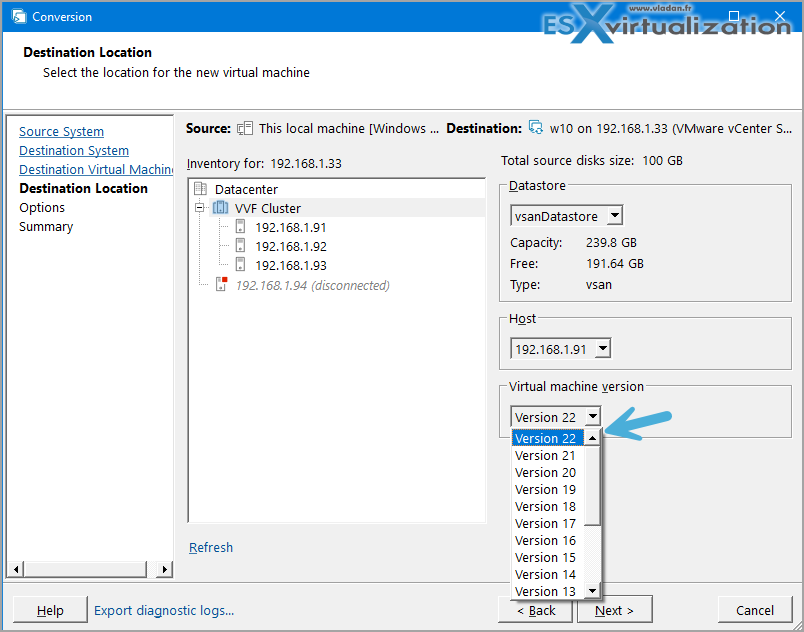
New update for old tool from VMware! Yes, VMware Converter 9.0 is out and supports latest virtual hardware 22, as well as VCF 9.0. Also, broadens support for Linux VMs which are now available for synchronization after initial cloning. This is quite cool as it allows you to do the final cut-off with much less downtime.

Concernign guest OS, the

The updated product also fixes some issues with network-mapped drivers.

From the release notes:

VMware vCenter Converter Standalone provides an easy-to-use solution that automates the process of creating VMware virtual machines from physical machines (running Windows and Linux) and other virtual machine formats. Through an intuitive wizard-driven interface and a centralized management console, Converter Standalone can quickly and reliably convert multiple local and remote physical machines without any disruptions or downtime.

  • Convert physical machines running Windows or Linux operating systems to VMware virtual machines quickly and without any disruption or downtime.
  • Enable centralized management of remote conversions of multiple physical servers or virtual machines simultaneously.
  • Ensure conversion reliability through quiesced snapshots of the guest operating system on the source machine before data migration.
  • Enable non-disruptive conversions through hot cloning, with no source server downtime or reboot

Screenshot from the lab
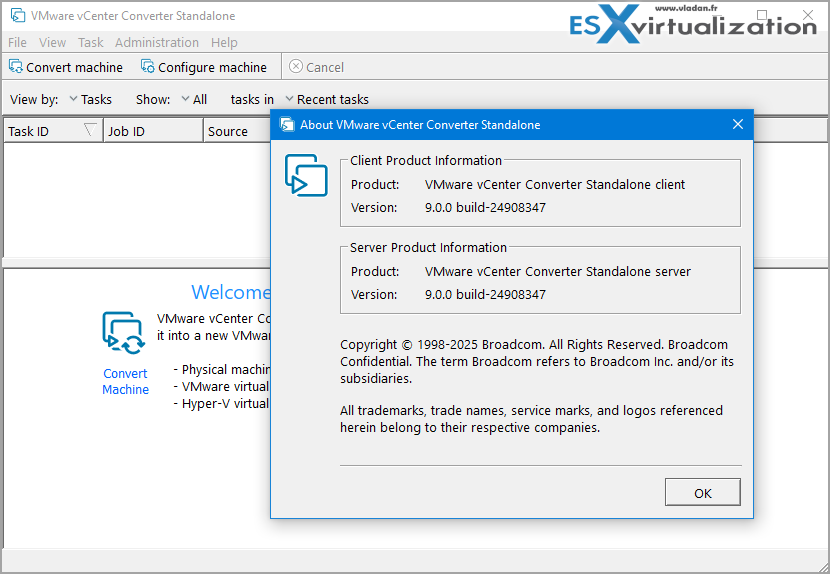
Example of conversion my Workstation VM (converter installed inside the VM), targetting VSAN Cluster on vSphere 9, with Virtual Hardware 22.
This is not new, but for people willing to learn.

VMware Converter Converter Standalone has a manager for managing conversion and configuration jobs and tasks. After you create a conversion or configuration job by using the Converter Standalone wizards, you can use the Task View and the Job View of the Converter Standalone manager to monitor and manage the existing jobs and their tasks.

Scheduled synchronized conversion jobs can contain multiple tasks.
  • Source Download Link
  • Documentation Link

You can only convert into VMware. The tools does not allow you to convert VMware VMs into something else. Still, a nice refresh -:).

More posts from ESX Virtualization:

  • 5 New VMware Certifications for VVF and VCF
  • VMware Alternative – OpenNebula: Powering Edge Clouds and GPU-Based AI Workloads with Firecracker and KVM
  • Proxmox 9 (BETA 1) is out – What’s new?
  • Another VMware Alternative Called Harvester – How does it compare to VMware?
  • VMware vSphere 9 Standard and Enterprise Plus – Not Anymore?
  • VMware vSphere Foundation (VVF 9) and VMware Cloud Foundation (VCF 9) Has been Released
  • Vulnerability in your VMs – VMware Tools Update
  • VMware ESXi FREE is FREE again!
  • No more FREE licenses of VMware vSphere for vExperts – What’s your options?
  • VMware Workstation 17.6.2 Pro does not require any license anymore (FREE)
  • Migration from VMware to another virtualization platform with Veeam Backup and Replication
  • Patching ESXi Without Reboot – ESXi Live Patch – Yes, since ESXi 8.0 U3
  • Update ESXi Host to the latest ESXi 8.0U3b without vCenter
  • Upgrade your VMware VCSA to the latest VCSA 8 U3b – latest security patches and bug fixes
  • VMware vSphere 8.0 U2 Released – ESXi 8.0 U2 and VCSA 8.0 U2 How to update
  • What’s the purpose of those 17 virtual hard disks within VMware vCenter Server Appliance (VCSA) 8.0?
  • VMware vSphere 8 Update 2 New Upgrade Process for vCenter Server details
  • What’s New in VMware Virtual Hardware v21 and vSphere 8 Update 2?
  • vSphere 8.0 Page
  • ESXi 7.x to 8.x upgrade scenarios
  • What is The Difference between VMware vSphere, ESXi and vCenter
  • How to Configure VMware High Availability (HA) Cluster
5/5 - (1 vote)
Shares

| Filed Under: Featured, Free Stuff, Tips Leave a Comment

About Vladan SEGET

This website is maintained by Vladan SEGET. Vladan is as an Independent consultant, professional blogger, vExpert x17, Veeam Vanguard x11, VCAP-DCA/DCD, ESX Virtualization site has started as a simple bookmarking site, but quickly found a large following of readers and subscribers.

Connect on: Facebook. Feel free to network via Twitter @vladan.

Leave a Reply Cancel reply

Your email address will not be published. Required fields are marked *

Private Sponsors


Featured

  • Thinking about HCI? G2, an independent tech solutions peer review platform, has published its Winter 2023 Reports on Hyperconverged Infrastructure (HCI) Solutions.
Click to Become a Sponsor

Most Recent

  • Reviving Old School Laptops with PrimTux: Battling Obsolescence on a Budget
  • Proxmox Datacenter Manager 1.0 released – a real vCenter Server Alternative?
  • Recovering a Corrupted Exchange Database with Stellar Repair for Exchange
  • Commvault at AWS re:Invent 2025: Pioneering AI-Enhanced Cyber Resilience with Cloud Unity
  • How to Set Up pfSense Community Edition as a Firewall Using VMware Workstation Pro 17 (2025 Edition)
  • HPE Morpheus VM Entreprise and Morpheus VM Essentials updates released – v8.0.11
  • Veeam Backup and Replication Upgrade on Windows – Yes we can
  • Commvault’s Cloud Unity Platform: Revolutionizing Enterprise Resilience in the AI Era
  • Securing Your Backups On-Premises: How StarWind VTL Fits Perfectly with Veeam and the 3-2-1 Rule
  • 3 New Advanced Certifications from VMware/Broadcom Released

Get new posts by email:


Deals

Support us on Ko-Fi


Buy Me a Coffee at ko-fi.com

Friendly Websites and Blogs

  • vBlog.io
  • VMware Engineer Jobs
 

YouTube

…

Find us on Facebook

ESX Virtualization

…

Copyright © 2025 ·Dynamik-Gen · Genesis Framework · Hosted with HostColor.com