
In ESX 4.0 SSH is blocked by default for the root user so you need to activate the root login on the console of the ESX server.
Note that instead of activating ssh for the root, which is not really recommended you can connect to your ESX server with a normal account (which you added during the installation process) and use a linux command su – (switch user) to became a root. However, if you just testing stuff and want to log in directly as root, here is how to do it.
If you found this website useful and want to comeback for more, consider subscribing for FREE via RSS. If you don't know what is RSS, don't worry, I wrote a little guide what is RSS and how it saves your daily time.
Way ago I wrote an article about how-to activate SSH for the rooin ESX 3 and ESX 3.5 here. With ESX 4.0 it is the same way.
So I'll try to repeat the steps here for the new people which does not have much experience and coming to learn some more about ESX Virtualization. I suppose that you're already installed your ESX Server correctly and you don't need help with this.
01.) First you must login as a root at the console of your ESX 4 Server.
02.) Then you must navigate to the /etc/ssh directory. Just type in: cd /etc/ssh
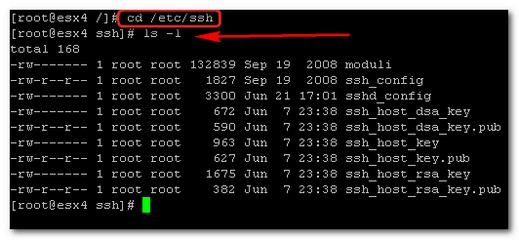
03.) Open nano (text editor, easy to use…) type: nano sshd_config
Navigate to the line saying PermitRootLogin no and change it to Yes.
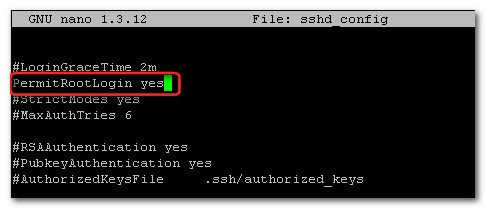
04.) Type then CTRL+X to exit. On the prompt answer Y (as Yes to save the modified file).

05.) Then you'll need to restart the sshd service typing: service sshd restart.
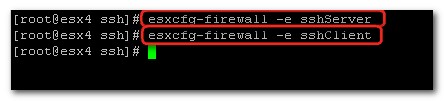
06.) While you are in the cosole just type in the following two commands to open firewall ports:
esxcfg-firewall -e sshServer
esxcfg-firewall -e sshClient





No, DO NOT DO THIS!
Root account should not be used for SSH access.
What you should do is to create an personal user account into service console and set permissions on datastores so that you can write onto those with our account.
Tomi,
The way that your are describing doing this ist that it might be the right way to do it in production environements. Why not? I’m not saying trying to do on your production servers. But after all, what do you risk. It’s like the admin password for your domain….. Not to give it into everybody’s hands….. -:)
My way of doing it.
When log in to server
type: nano /etc/ssh/sshd_config
change allow root login to yes
close nano
then type: /etc/init.d/sshd restart
to be honest, I do not think to enable root is require for test, development or production. You can always do a su – when you had SSH to your ESX host. At the same time, you may execute most of the stuff from vCenter rather than command prompt. Should try to avoid enable root on SSH.
Thanks for your comments guys.
Dizel247: This how-to tutorial is ment to be for a newbie….
Craig: You’re right doing su – does that. -:)
Thanks for the info! Worked great. Needed to scp an iso over.
Thank you!