How misleading Model numbers can make you choose the wrong switch.
This is a real life story. This adventure happened to me few weeks ago and I thought that an article on my blog could interest other people willing to build a VMware vSphere Home lab.
I'm like you guys, I'm reading my fellow blogger's posts and comments. I see the experience you're sharing in your blogposts and see the reaction of your readers. Today I'll tell you a story which happened to me few weeks ago when I was about to buy myself a switch for my home lab. That's where I was reading a post of fellow blogger Kendrick Coleman about his homelab and green machines, the way he went for a switch for his home lab. Then one of those comments was signed by a commenter named Andy and which was basically saying that instead going for layer 2 switch and routing the traffic between VLANS with another device, there is a way with Cisco SRW 2008 device which can be put in layer 3 mode and enable inter VLAN routing.
The switch Andy was describing was like this :
The SRW2008 is actually layer 3 switch. It defaults to L2 mode but can be changed to “routed” mode (ie L3) and it works great. I am using one in my lab.
So I said to myself. Ok let's see where I can get this model. Unfortunately only Ebay was the place where I could find such a switch. I was hesitating since the shipping costs here to Reunion (Fr) were almost the same as the price of the model actually… (about $200). But finally I went and I bought the switch. The material was new, still in the original box, from a professional vendor and the transaction went smooth. About a month later the switch showed up….
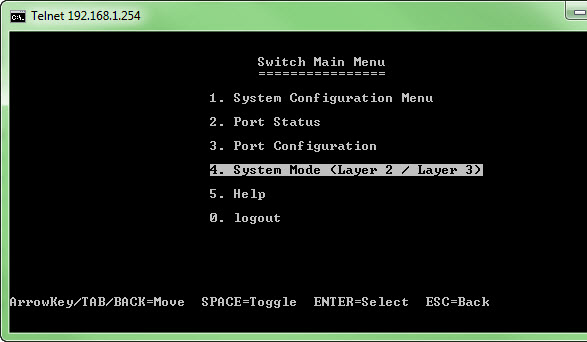
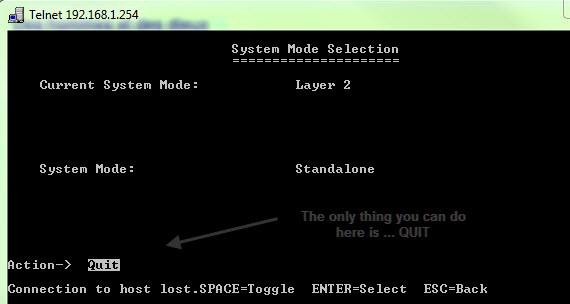
So I went and fired on the Web interface, where you can't see the option putting the switch in the layer 3 mode, so I went and tried Telnet. Ok, find the option, but there was not any other option on that menu, but QUIT…. I was like.. what the h.ll I'm gonna do? I tried SSH and created different accounts to see if I could make appear the EDIT button on that menu, but in all the efforts were just useless and time waste. I tried and check for newer firmware on the cisco's website, but the switch had already the latest…
As you can see on the image below, there is a menu where it says Layer2/Layer3 ..
And on the next menu you cannot do anything… I was quite frustrated…. 😥
That's where I though, Lets ask that Andy how he did it. Ok, but he did not left a link back to his blog (he does not have one), and there was no way I could find that person without his help. So I went and left a comment with my e-mail address on Kendrick's article to see if Andy gonna check back (if subscribed to comment) and reply. He did few hours later and reply by e-mail. He was kind enough and tried to help me to put the switch to Layer 3 mode. He even did go much further with hist help and sent me his running configuration file from his switch so I could actually test on my switch.
It did not worked.
I was like…hm… Let's do the opposite, and I sent my configuration file to Andy to see. But already when I saved my configuration file (there was almost nothing configured yet) I saw that there is something wrong somewhere. Andy's config file was readable. It was clear text and I could read the config of his switch. That was not the case with my configuration file. There were some bizarre characters in it that was all… I attached a few screenshots from the management web interface and sent the e-mail to Andy. Since then I started to doubt about the model and Andy has confirmed that in the e-mail. I did not bought the model Andy mentioned in his original comment on Kendric's blog…….
In fact there is a bit of confusion in the model numbers, since the model Andy bought for his home lab was a model with both model numbers. The SRW 2008 and also the SG 300.
https://www.cisco.com/en/US/prod/collateral/switches/ps5718/ps9967/ps9971/data_sheet_c78-502486.html
https://www.cisco.com/en/US/prod/collateral/switches/ps5718/ps10898/data_sheet_c78-610061.html
As you can see on the image bellow I now have 2 switches. The Cisco/Linksys is the SRW 2008 model, and the Cisco Small business has got Both model numbers SRW 2008 and SG 300.
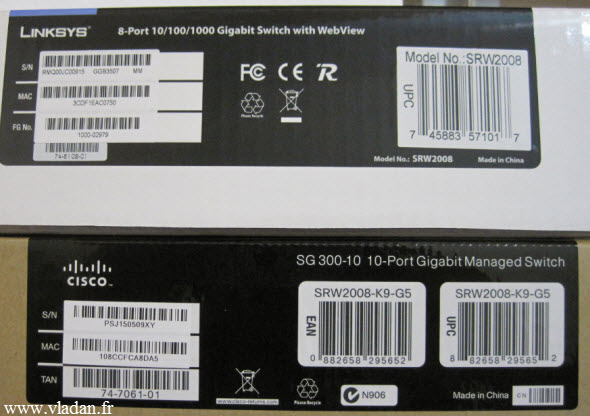
So I ended up with 2 new switches for my home lab, which of course is too many so I'll probably sell the Cisco/Linksys here on a local market as a second hand…… Never mind. It was just a post about real life experience….
But if anybody uses the Cisco/linksys SRW 2008 as a Layer 3 switch I'm curious to see where to hack the device….. -:)
Update: You can read the follow up on this article about the configuration of the “real” Cisco SG 300 in this article:
My homelab – The Network design with Cisco SG 300 – a Layer 3 switch for €199.
If you want to stay updated you can subscribe via RSS, or you can have a weekly updates by e-mail.








