
Use VMware Update Manager for patching of your Virtual Infrastructure.
This is done by using a special patching network for suspended or offline systems. Yes the VMs which are stopped are scanned and patched as well! That's simply amazing. I thought that VMware Update Manager was just some kind of better WSUS like direcly integrated into Virtual Center. (Windows Server Update Service).
The technology behind used for offline patching of your VMs uses Shavlik patch management technology. It works together with Update Manager and the virtual machine . It's possible to patch correctly Windows virtual machines for Microsoft, Adobe, and Mozilla updates and a scanning only capability Linux.
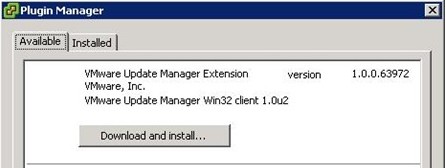
It acts as a plugin for vCenter Server or VI client.
This following matrix commes from VMware website and lists the compatibility of Update Manager versions against VirtualCenter Server and VI Client:
|
Compatibility Matrix
|
||||||||||
|
VirtualCenter Server
|
VI Client
|
|||||||||
|
2.5
|
2.5
Update 1 |
2.5
Update 2 |
2.5
Update 3 |
2.5
Update 4 |
2.5
|
2.5
Update 1 |
2.5
Update 2 |
2.5
Update 3 |
2.5
Update 4 |
|
|
Update Manager 1.0
|
Yes
|
No
|
No
|
No
|
No
|
Yes
|
No
|
No
|
No
|
No
|
|
Update Manager 1.0 Update 1
|
No
|
Yes
|
No
|
No
|
No
|
No
|
Yes
|
No
|
No
|
Yes*
|
|
Update Manager 1.0 Update 2
|
No
|
No
|
Yes
|
No
|
No
|
No
|
No
|
Yes
|
No
|
Yes*
|
|
Update Manager 1.0 Update 3
|
No
|
No
|
No
|
Yes
|
No
|
No
|
No
|
No
|
Yes
|
Yes*
|
|
Update Manager 1.0 Update 4
|
No
|
No
|
No
|
No
|
Yes
|
No
|
No
|
No
|
No
|
Yes
|
You can have a look at VMware website to learn more about patch manager here.
Microsoft has a similar tool too, which you can freely download here, but you must have SCVMM 2007 or 2008 to be able to use it.
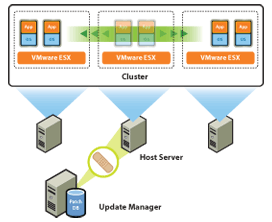
Source: Itknowledgexchange.com


Hi,
It’s not a comment but some queries. I am new to virtualization. I have recently seen this important information regarding the offline patch management by VMWare in your site. But I have two queries-
1. How VMWare is doing the patching of offline VM. Does it directly injects the patch files into vmdk image or it injects it by mounting the virtual partition or any other way.
2. Does the patch get installed when the updated VM makes up or it gets installed at the time of patch deployment.
I will be very grateful if you could spare some time to put some light on that.
Thanks in advance.
Regards,
Deepak