
Some more from my Home Lab and vSphere 5 concerning the onboard Realtec NIC cards. During period running my Lab with vSphere 4.1 there was no way to run the onboard Realtek NIC cards without hacking some of the files present on the original vSphere 4.1 iso. Maybe I should take even more time to do a research before I built such a system (and I really recommend that)
Well I knew that the built-in NICs won't work and I did not even bother trying. I could see in some cases it worked but in some cases it didn't even if the NIC showed in the GUI through the vSphere Client and some pings commands were successful. The configuration “hacked” like this, even for a homelab was really not sure.
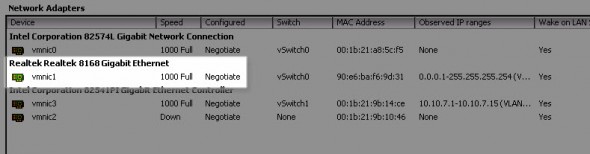
With the vSphere 5 there is some more built-in NIC cards supported now. I bring here my own contribution and since in my lab I run 2 whiteboxes and both have a built-in Realtek NIC cards. With the 3 PCI based NIC cards from Intel I do have 4 NICs present in each box. The first box is based on Asus P6T SE board and the second is based on Asus Sabertooth X58 board.
I'm running vSphere 5.0 built 441354 running in my lab can see those NICs without difficulties, and so those NICs are also used in my lab.
Realtec onboard NICs supported in vSphere 5 as for now:
Realtek 8168 – Asus P6T SE board
Realtek 8169 – Asus Sabertooth X58 board
Realtek 8111E – Shuttle SH55 (see Kendrick's post on that)
UPDATE: Check out my post about Realtek 8169 support in ESXi 5.5 (vSphere 5.5)
See more compatible hardware on vm-help.com
 |
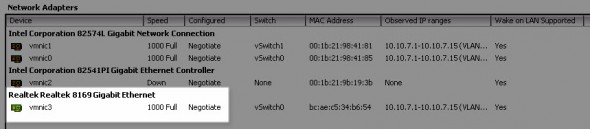 |
This brings the NIC counts to 4 so I have a few options there, but I think the best way will be to double the storage network…
Happy home labbing with vSphere 5…. -:)
Enjoy..


Just noticed it myself after upgrading, quite nice as I plan on needing it sometime soon.
Unfortunately the 8112L is NOT supported..which seems to be common on slightly older Asus MBs.
Does Vsphere 5 support onboard Intel® 82579V Gigabit Ethernet Controller?
8111E does seem to work, which I describe here:
http://tinkertry.com/asrock-fatal1ty-z68-professional-gen3likesanddislike
For the 82579V question (released 1Q2011), it’s tricky, zero results doing a search for 82579:
http://www.vmware.com/resources/compatibility/vcl/result.php?search=82579&searchCategory=all
but searching for 825xx comes up with many hits:
http://www.vmware.com/resources/compatibility/vcl/result.php?search=825xx&searchCategory=all
See also this thread:
http://communities.vmware.com/thread/327853
I just installed a Realtek 8168 card into my ESXi Hyperviser box, but even after several reboots it is not appearing, even in the lspci output. Do i need to re-install ESX for it to be recognized?