
If you just starting with VMware Virtualization and want to learn some new features comming with vSphere 4 just read on.
Thin provisioning feature which comes with vSphere 4 is cool enough to talk about . Actually I'm even asking myself how come that I could live without it? Thin provisioning can save you a lots of disk space.
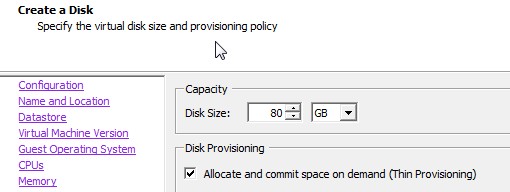
To get you started and create Thin provisioned disk, you can install any version of vSphere 4. NOTE that you can even use ESXi 4 (the free version of VMware) to create and use Thin provisioned disks. Then when you first create your Virtual machine, just choose Thin provisioned disk during the process. (NOTE that you can't choose Fault Tolerance for that VM, because FT don't support Thin Provisionned disks. ) For our example (the Free version of ESXi 4, we don't use FT anyway, because we don't have the Entreprise Version of vSphere.
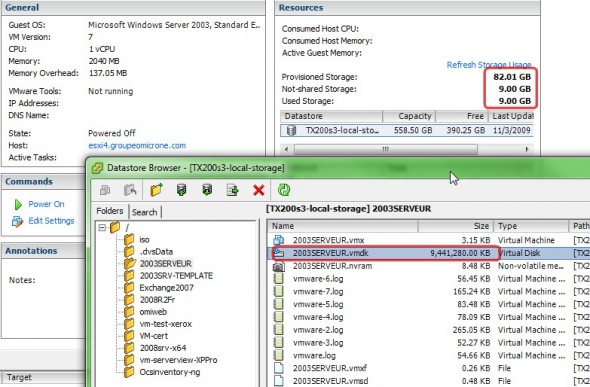
In case you still don't see the benefit using Thin provisioned disks, just have a look at the image below. The VM on the example has 80Gigs virtual disk created and this is a Thin provisioned disk. So when you look by browsing via the Datastore Browser, you see that the the actual size of that disk is 9Gigs… So there is 71 Gigs of saved space on my SAN . Without this technology I would have to reserve 80 Gigs on my SAN and that space would have been
Is there is a catch?
Well not really, but you have to monitor your disk space usage more closely. Why? Because what you are actually doing is that you over provision the space for your VMs. You must keep a close eye on the available disk space especially if you know that in vSphere the VM swap files are deleted when you power down your VM. And when you power up the VM, the swap file is recreated.
So if you don't keep enough space on your storage you might end up with a situation that you can't start your VM, because the swap file can't be created because of not having enough disk space !!! ( NOTE that you have the possibility to store your swap files elsewhere, as these are usually stored with your virtual machines vmdk files).
To closely monitor you free space on your SAN, vCenter provides you with new alars for low storage. Or you can use a recenly released free tool from Xtravirt which shows a nice and fancy pop-up alarms from your vCenter on your desktop.

