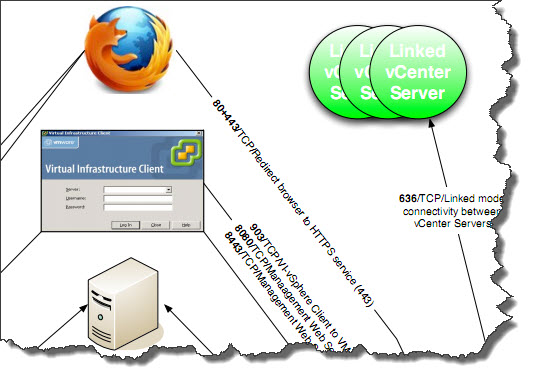
vCenter Ports used in vCenter Server. In case you study for a VCP exam and preparing your VCP 4 certification, you will certainly stumble during browsing the VCP blueprint through the vCenter port requirements. You can get a diagram from Virtualinsanity.com, where Dudley Smith did a great job with his diagram in PDF format. You can see all the ports used in vCenter, but not only…
When Installing vCenter server, bring it to the domain, since it's strongly recommended by Microsoft. This will provide better security and domain capabilities to services that require it.
vCenter port requirements:
80 – Required for direct HTTP connections. Port 80 redirects requests to HTTPS port 443.
443 – Listens for connections from the vSphere Client, vSphere Web Access Client, and other SDK clients. Open port 443 in the firewall to enable the vCenter Server system to receive data from the vSphere Client.
389 – This port is used for Lightweight Directory Access Protocol (LDAP) services. Who says LDAP, says Active Directory Services for the vCenter Server group.
636 – SSL port of the local instance for vCenter Linked Mode. It's the port of the local vCenter Server ADAM Instance.
902 – Used to send data to managed hosts. To send data to your ESX or ESXi hosts. Also this port is used for remote console access to virtual machines from vSphere Client. This port must not be blocked by firewalls between the server and the hosts or between hosts.
902/903 – Used by the vSphere Client to display virtual machine consoles.
8080 – vCenter Management Webservices HTTP.
8443 – Secure connections for vCenter Management Webservices HTTPS.
60099 – Used to stream inventory object changes to SDK clients. Firewall rules for this port on the vCenter Server can be set to block all, except from and to localhosts if the clients are installed on the same host as the vCenter Server service.
Get the diagram from Virtualinsanity.com website below.