
Manual Download of VMware Tools. Here is the URL you need to know, in case you want to download VMware tools manually. VMware tools differ for each specific OS. You can if you want to store all those VM tools packages on your network share for later usage.
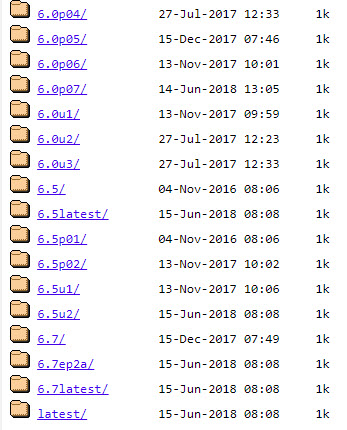
In this remote location, you'll find the VMware tools for all versions of ESXi. You can check and Manually Download VMware Tools there.
https://packages.vmware.com/tools
You'll end up with ISO packages which can be mounted/extracted or stored locally to suits your needs.
VMware tools differ in size. For example, the ISO package of VMware tools for Windows 2003 standard is about 45Mb. You can present and mount this ISO to the VM where you need to install this package.
You install the tools directly by executing the setup.exe inside the Virtual machine. You don't need to be connected to the console.
By installing the latest version of VMware tools, you enhance several features and functionalities of the VM, like improved video performance, mouse, and keyboard sync.
When you don't have VM tools installed at all, the performance of the VM is not optimal and you mouse gets stuck inside. The way out is through Alt + TAB keystroke…
This multiple packages of VMware tools are necessary because VMware supports many guest operating systems. Many more than the competition…
Soon there you should see perhaps the .NEXT release in the list, which should be released anytime soon.
Update: VMware has released an independent package VMware Tools 11.0.5. Since several releases, VMware tools are released independently from ESXi hypervisor images.
VMware Tools are important to vSphere infrastructure as they are tightly integrated and part of a vSphere environment. VMware Tools enhance the performance of virtual machines and adds functionalities like host time synchronization for example. They also allow quiesced snapshots used for snapshots or by your backup software to do backups or replication.
VMware Workstation, a desktop virtualization product from VMware supports more than 600 OS! See my article….
Enjoy…
Source: https://www.vmware.com/download/packages.html
https://packages.vmware.com/tools
More posts from ESX Virtualization:
- Free Up Disk Space On Windows 10 – The New Way
- Free Tools Page
- Three Ways to Enable ESXi Shell and Timeout
- How To Create VMware ESXi ISO With Latest Patches
- Upgrade Windows Server 2012R2 AD to Server 2016
Stay tuned through RSS, and social media channels (Twitter, FB, YouTube)


Nice post. One thing to note is that if you use the Linux VM tools from this website in vSphere managed VMs the tool status will show up as “Unmanaged” rather than “OK”.
That seems a bit strange…. , but nothing is perfect….
Very helpful, downloading and search for downloads at vomware.com is a mess! 😉
i was looking for windows 8 package thanks man
Thanks for posting the link!
Thank you for your article.
Hi Vladan,
I am searching the right vmware tools package for Windows XP.
The application on which runs is VMWare Workstation Player 14.
Thank you
Andrew
VMware Workstation software has that VMtools ISO available for most of the Windows OS. Including Win XP. You can update your VMware tools of your Windows XP VM with VMware Workstation.
Thank you for great article.
The Latest VM Tools Version 11.1.1 are not inside https://packages.vmware.com/tools/esx/ as linked at the beginning of your article.
The reason is described here https://packages.vmware.com/tools/versions
But all the VM Tools since Version 10.0.0 are under https://packages.vmware.com/tools/releases/
including the latest Versions
Another link to the latest VM Tools is https://www.vmware.com/go/tools
Hi Michel, yeah, it’s an old post. Thanks for the update. Much appreciated.
Hi Michel, yes, it’s an old post it seems. Thanks for the information. Much appreciated.