
vCenter 2.5 update 5 is available
There is an 5th update for vCenter 2.5 available since few days. What’s new? Much higher consolidation ration ratio in VMware HA (high availability) clusters. High availability is a feature in ESX server architecture, which enables failover (with interrruption of service) on your physical hosts running ESX. If one physical ESX server goes down the VMs which are stored on shared storage automaticaly starts on the Second physical ESX automaticaly. (if you have only 2 ESX in your cluster, for example)
Support for High Consolidation in VMware HA Clusters - VirtualCenter 2.5 Update 5 includes significant performance and scalability improvements to VMware HA. Use VirtualCenter 2.5 Update 5 for environments with more than 35 virtual machines per host in an HA cluster.
VMware-VIMSetup-2.5.0-U5-English.iso is the file you need to download.
See the compatibility matrix pdf here. And also:
- “Licensing” in the Installation Guide
- “Networking” in the ESX Server 3 Configuration Guide
- For firewall ports, “Security” in the ESX Server 3 Configuration Guide
Upgrading or Migrating to VirtualCenter 2.5 Update 5
This release supports upgrading from VirtualCenter 1.4.1, VirtualCenter 2.0.2 (including Update 1, Update 2, Update 3, Update 4, and Update 5), VirtualCenter 2.5, VirtualCenter 2.5 Update 1, VirtualCenter 2.5 Update 2, VirtualCenter 2.5 Update 3, or VirtualCenter 2.5 Update 4, to VirtualCenter 2.5 Update 5.
There is a KB article you should see read here, because to achieve the 80 VMs per host you’ll need to do a special configuration……… KB 1012002.
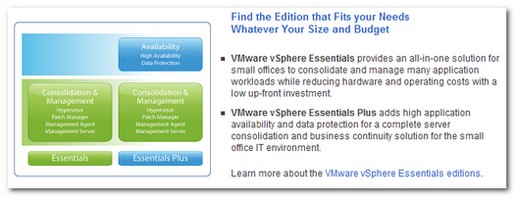
FYI : High availability is available in vSphere Essential plus version.
Related Posts :
Change the default path for updates and patches. For the updates: It can be useful many times ...
VMware vSphere Agent Pre-upgrade Check One of the visible thinks you can see when you first exe ...
Use VMware Update Manager for patching of your Virtual Infrastructure. This is done by using a ...
ESXi 4.0 - the free version of ESX is available since several days from VMware Website. With t ...
VMware has announced at VMworld 2009 already, and now it's available. vCenter Server Heartbeat i ...
Other posts from Server Virtualization
- Adding second service console via CLI
- Disable web access on VMware vCenter
- VMware ESX - Configuration of Service console via CLI
- Basic VMware ESX CLI networking commands
- How to change the default location of updates in vCenter
- Did you know that ESX 3.5 general support will end in less than 90 days?
- Starwind iSCSI HA Connection to ESX Server
- See a list of Storage Array Type Plugins on ESX Server
- New whitepaper released on PVSCSI
- Enable Jumbo Frames in ESXi 4
- How-to troubleshoot iSCSI connection to your SAN
- Starwind with ISCSI SAN Software can do High Availability for you...
- Overview Video from the new vSphere Pro video training from Train Signal
- New upgrade webpage for ESXi 4 pushes us to the right direction?
- You know how to collect diag information when your ESXi does PSOD?
- Use PVSCSI or not for lower intensive workloads
- Hardening guides for vSphere 4
- NTLDR missing - silly but can happend
- How To Shrink VMware Virtual Disk Files and disable shrinking
- vSphere Quick Start guide bonus download..
- ESXi - the past, the present and the future
- Farm commander - management tool for VI and TS or Citrix Farms
- How to collect log information from vCenter Server 4
- How to know where is my VM if vCenter is down?
- New patches for ESX 4 and ESXi 4
- Use VMware Converter to import 3rd party VMs, for example Virtual Iron's VMs
- Windows XP installation as a VM - trouble to see the disk or not?
- Vmware HCL for ESXi 4
- Time keeping for Windows VM's best practices
- Virtu-Al releasing 3rd update of PowerPack


