
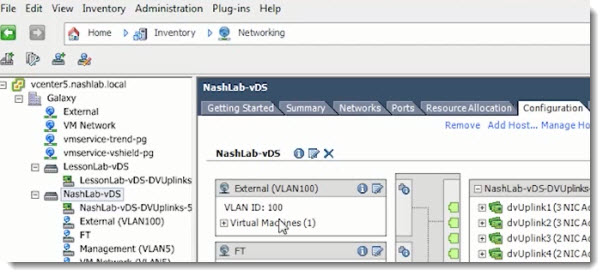
VMware vDS – Distributed Virtual Switch. The new free video has come out from the latest TrainSignal Training course called vSphere Advanced Networking. This training focuses on networking, and especially on those more advanced networking features which are present in vSphere 5. One of them is vDS.
vDS compared to standard virtual switch is managed and configured not at the host level (per host) but it's managed through a GUI section in vCenter. The ESX/ESXi hosts that belong to a dvSwitch don't need any further configuration. That's why in larger environments with a lot of ESX/ESXi hosts it's really interesting to have vDS instead of standard switches.
There are features that are available in both – standard switches and vDSs. Here is recap what's available at both:
These features are available with both types of virtual switches:
– There is a possibility to forward L2 frames
– Traffic can be segmented into VLANs
– There is a possibility encapsulate VLANs with 802.1q
– Configuration of more than one uplink (NIC Teaming)
– Traffic shaping for the outbound (TX) traffic – Egress
The vDS can do more than starndard switch:
– Can shape inbound (RX) traffic – Ingress
– There is a central unified management interface through vCenter
– Supports Private VLANs (PVLANs)
Jason Nash will walk you through the vDS, all it's configuration possibilities. Fairly quick walk, but at the end you'll see that it's not that bad, I mean not so difficult… -:). vDS is a feature of VMware vSphere present in Enterprise Plus lisensing of vSphere only.
The latest VMware vSphere Training from TrainSignal focuses on every single aspect of advanced networking and provides also troubleshooting lessons.
Here is the course Outline:
Lesson 1 – Getting Started With vSphere Advanced Networking Training
Lesson 2 – Lab Setup and Recommendations
Lesson 3 – Let’s Talk About vSphere Networking
Lesson 4 – The Ins and Outs of VLANs
Lesson 5 – vSphere Network Security Considerations
Lesson 6 – Physically Connecting vSphere Hosts
Lesson 7 – vSphere Distributed Switch – In Depth
Lesson 8 – Migration to the vDS
Lesson 9 – Traffic Shaping and Resource Pools
Lesson 10 – Troubleshooting Network Connectivity
Check out the latest Pluralsight Training course called vSphere Advanced Networking.
VMware vSphere Distributed Switch – what's new
– Network health check
– Backup/restore configuration of VDS
– Backup/restore configuration of dvPortgroup
– Revert to the previous dvPortgroup configuration
Check more articles from ESX Virtualization:
- vSphere 6.5
- How to Configure VMware High Availability (HA) Cluster
- Free Tools
- How to Migrate Windows Based vCenter to VCSA 6.5 [Lab] – Windows to Linux
- VMware VCSA 6.5 Active-Passive Setup with Simple Configuration – [LAB]
- VMware vCSA 6.5 HA Failover Test – Video
Stay tuned through RSS, and social media channels (Twitter, FB, YouTube)

