
RSS Feed Reader for Google Chrome enables you to follow your favorite sites within Chrome browser. It installs from the Google Store as a one click. You can get instantly notified when a website present in your list updates its content. The notification can be easily turned On or Off, because it can be disturbing to see a pop-ups when you're working on the computer all the day long.
If you're not using RSS at all, you missing out. Read on to see how this extension works and how it can save you tons of your time.
RSS Feed Reader for Google Chrome – How-it works?
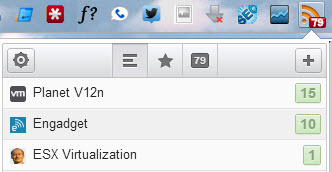
After the easy installation from the Google store, when you visit a website or blog which offers subscription via RSS, you can just click the Plus sign and add new feed (you'll see a quick video at the bottom of the article as well). You can also add the feed manually, but don't have to, because the URL of the feed gets automatically populated.
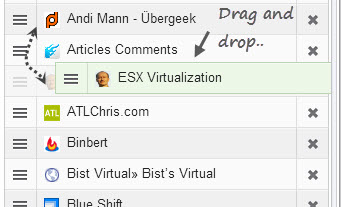
The feeds can be organized by drag and drop, and you can also create folders to store the feeds inside. Further, you can personalize the Feed update interval and how many posts to display.
Another option is, if you're Already using Google Reader for your RSS feeds, you can connect the Google Reader to the RSS Feed Reader extension and sync your Feeds. This might seems to be powerful feature, but If you want just to have the most important feeds up to date in Chrome, than I would not recommend that option (I tried) as it brings all the feeds, even from sites that did not updated their content since ages…. You can also revoke that connection at any time.
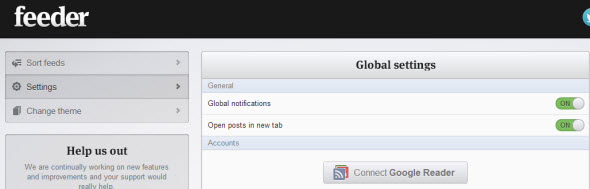
You can enable/disable the global notification, change theme, sort feeds at the global settings page, or you can do it as well by clicking on RSS icon > the options icon > and Organize your feeds. You stay within the small window without opening the big tab with the global options.
The RSS Feed Reader for Google Chrome is cool extension allowing to choose between interconnection with Google Reader or just adding individual RSS feeds for sites that you need (want) to follow daily. Websites which brings content on daily basis.
The Extension is also available on Safari. The feed subscriptions are stored in the browser. The work with the feed is really enjoyable and with single click you can check out to see if your favorite websites pushed up some new content.
Here is a quick video on how it gets installed and how it works.
Hope it helps!

