
ESX Virtualization

VMware ESXi, vSphere, VMware Backup, Hyper-V... how-to, videos....

Nakivo Backup and Replication - #1 Backup solution for Virtual, physical, cloud, NAS and SaaS

Menu
  • Certification
      • VCP-VVF Administrator
          • vcp-vvf-2.
        • Close
      • VCP-DCV vSphere 8
          • vcp2024-125.
        • Close
    • Close
  • VMware
    • Configuration Maximums
    • vSphere
      • VVF 9 and VCF 9
      • vSphere 8.0
      • vSphere 7.0
      • vSphere 6.7
      • vSphere 6.5
      • vSphere 6.0
      • Close
    • VMworld
      • VMware EXPLORE 2024
      • VMware EXPLORE 2023
      • VMware EXPLORE 2022
      • VMworld 2019
      • VMworld 2018
      • VMworld 2017
      • VMworld 2016
      • VMworld 2015
      • VMworld 2014
      • VMworld 2013
      • VMworld 2012
      • VMworld 2011
      • Close
    • Close
  • Proxmox
    • Proxmox
    • Close
  • Microsoft
    • Windows Server 2012
    • Windows Server 2016
    • Windows Server 2019
    • Windows Server 2025
    • Close
  • Categories
    • Tips – VMware, Microsoft and General IT tips and definitions, What is this?, How this works?
    • Server Virtualization – VMware ESXi, ESXi Free Hypervizor, VMware vSphere Server Virtualization, VMware Cloud and Datacenter Virtualization
    • Backup – Virtualization Backup Solutions, VMware vSphere Backup and ESXi backup solutions.
    • Desktop Virtualization – Desktop Virtualization, VMware Workstation, VMware Fusion, VMware Horizon View, tips and tutorials
    • How To – ESXi Tutorials, IT and virtualization tutorials, VMware ESXi 4.x, ESXi 5.x and VMware vSphere. VMware Workstation and other IT tutorials.
    • Free – Free virtualization utilities, ESXi Free, Monitoring and free backup utilities for ESXi and Hyper-V. Free IT tools.
    • Videos – VMware Virtualization Videos, VMware ESXi Videos, ESXi 4.x, ESXi 5.x tips and videos.
    • Home Lab
    • Reviews – Virtualization Software and reviews, Disaster and backup recovery software reviews. Virtual infrastructure monitoring software review.
    • Close
  • Partners
    • NAKIVO
    • StarWind
    • Xorux
    • Close
  • This Web
    • News
    • ESXi Lab
    • About
    • Advertise
    • Archives
    • Disclaimer
    • Privacy policy
    • PDFs and Books
    • Close
  • Free

VMware vCenter Multi-Hypervisor Manager

By Vladan SEGET | Last Updated: February 27, 2013

Shares

VMware vCenter Multi-Hypervisor Manager 1.0 released.

VMware has released VMware vCenter Multi-Hypervisor Manager version 1.0 today. Managing several hypervisors through a single pane of glass, that's something that quite expected today, and it seems that VMware has reacted by publishing new plugin for VMware vSphere 5.1 called VMware vCenter Multi-Hypervisor Manager Plugin (MHM). This plugin can get installed on the new vSphere Windows client only.

On the other hand, several tasks are possible to do only through the new vSphere Web client only. Good read over at VMware blog – Which vSphere client should I use and when?

Quick quote from the product page:

The vCenter Multi-Hypervisor Manager plug-in provides a separate inventory tree and management functionality for third-party hypervisors in the vSphere Client.

VMware vCenter Multi-Hypervisor Manager – the capabilities and features.

  • Third-party host management including add, remove, connect, disconnect and view the host configuration.
  • Ability to provision virtual machines on third-party hosts.
  • Ability to edit virtual machine settings.
  • Integrated vCenter Server authorization mechanism across ESX and third-party hosts inventories for privileges, roles, and users.
  • Automatic discovery of pre-existing third-party virtual machines
  • Ability to perform power operations with hosts and virtual machines.
  • Ability to connect and disconnect DVD, CD-ROM, and floppy drives and images to install operating systems.

VMware vCenter Multi-Hypervisor Manager has two parts. A server part and client part. The client part installs on the same machine as the vSphere client.

The server part can be installed on vCenter server or on separate server. Note that only vCenter Server 5.1 is supported.

How to get through the installation?

I had to search a bit since the domain admin account, which I'm using to connect to vCenter server, did not have enabled logon as a service priviledge. Once enabled, the installer (of the server part) continues without trouble.

(To enable this privilege, just follow this Microsoft Technet article).

The vCenter Multi-Hypervisor plugin (client part) gets installed in this way:

01. Through the vSphere Client, connect to the vCenter Server system > Menu Plugins > Manage Plug-ins.

02. Click Download and Install for the VMware vCenter MHM plug-in. The installation wizard for the vCenter Multi-Hypervisor Manager client plug-in opens. Agree to the lic. agrement > click next > Install > Finish > Close window > Done.

Which hypervisors are supported?

  • Microsoft Hyper-V Server 2008
  • Microsoft Hyper-V Server 2008 R2

As for now, as you can see, the windows server 2012 Hyper-V is not supported.

The vCenter Multi-Hypervisor Manager plug-in is installed in the vSphere Client, and the Third-Party Hosts icon appears under Inventory in the vSphere Client.
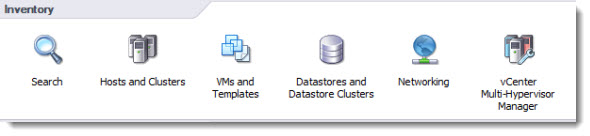
VMware vCenter Multi-Hypervisor Manager

Where to get the product?

VMware vCenter Multi-Hypervisor Manager 1.0 | 19 Nov 2012 | Build 901315 | Product Download


The Full Release Notes of the VMware vCenter Multi-Hypervizor Manager.

Few KBs from VMware where you'll learn the ins and outs for VMware vCenter Multi-Hypervizor Manager.

  • vCenter Multi-Hypervisor Manager FAQ
  • Installing vCenter Multi-Hypervisor Manager best practices
  • Installing vCenter Multi-Hypervisor Manager plug-in best practices

Source: VMware

Vote !
Shares

| Filed Under: Server Virtualization Tagged With: VMware vCenter Multi-Hypervisor Manager

About Vladan SEGET

This website is maintained by Vladan SEGET. Vladan is as an Independent consultant, professional blogger, vExpert x17, Veeam Vanguard x11, VCAP-DCA/DCD, ESX Virtualization site has started as a simple bookmarking site, but quickly found a large following of readers and subscribers.

Connect on: Facebook. Feel free to network via Twitter @vladan.

Private Sponsors


Featured

  • Thinking about HCI? G2, an independent tech solutions peer review platform, has published its Winter 2023 Reports on Hyperconverged Infrastructure (HCI) Solutions.
Click to Become a Sponsor

Most Recent

  • Reviving Old School Laptops with PrimTux: Battling Obsolescence on a Budget
  • Proxmox Datacenter Manager 1.0 released – a real vCenter Server Alternative?
  • Recovering a Corrupted Exchange Database with Stellar Repair for Exchange
  • Commvault at AWS re:Invent 2025: Pioneering AI-Enhanced Cyber Resilience with Cloud Unity
  • How to Set Up pfSense Community Edition as a Firewall Using VMware Workstation Pro 17 (2025 Edition)
  • HPE Morpheus VM Entreprise and Morpheus VM Essentials updates released – v8.0.11
  • Veeam Backup and Replication Upgrade on Windows – Yes we can
  • Commvault’s Cloud Unity Platform: Revolutionizing Enterprise Resilience in the AI Era
  • Securing Your Backups On-Premises: How StarWind VTL Fits Perfectly with Veeam and the 3-2-1 Rule
  • 3 New Advanced Certifications from VMware/Broadcom Released

Get new posts by email:


Deals

Support us on Ko-Fi


Buy Me a Coffee at ko-fi.com

VMware Engineer Jobs

VMware Engineer Jobs

YouTube

…

Find us on Facebook

ESX Virtualization

…

Copyright © 2025 ·Dynamik-Gen · Genesis Framework · Hosted with HostColor.com
