
Another VMware alternative dropped into the open-source world in August 2026, and this one is worth a serious look. In fact, ZSvirt (zsvirt.io / GitHub: ZSvirt/zsvirt) is the community edition of ZStack’s production-hardened ZSphere engine, released under GPL-3.0 with no limits on hosts, VMs, or features for production use.
It manages KVM-based infrastructure through a single control plane that is claimed to scale to 10,000+ hosts and Large VM support (with up to 768 vCPUs). The architecture is modular, asynchronous, plugin-based, and comes with a full web UI, 2,000+ REST/OpenAPI endpoints, Terraform provider, and Go/Python/Java SDKs.
There are two very easy test deployment paths as there is an ISO or OVA file provided. I tested the bare metal option in my VMware Workstation lab only (nested), as unfortunately, I don’t have spare hardware laying around.
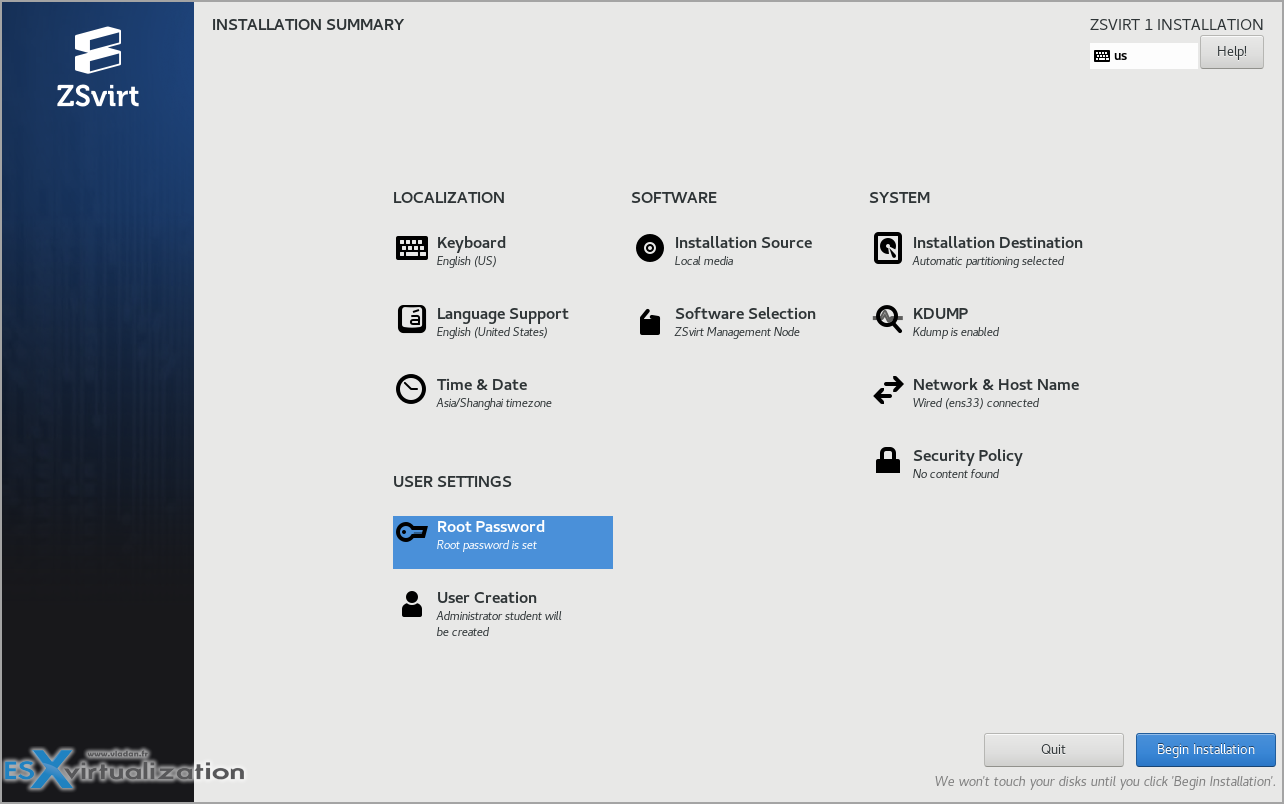
The ISO is a clean installer based on a hardened Linux base.
Boot it (USB or virtual media), choose “ZSvirt Management Node”. As you can see, Compute and Expert Mode type installation modes gives you install as compute only or with minimal footprint only the base operating system, providing the most minimal footprint. It is suitable for administrators who require full control over node configuration, such as for specialized compute, storage, or monitoring nodes.
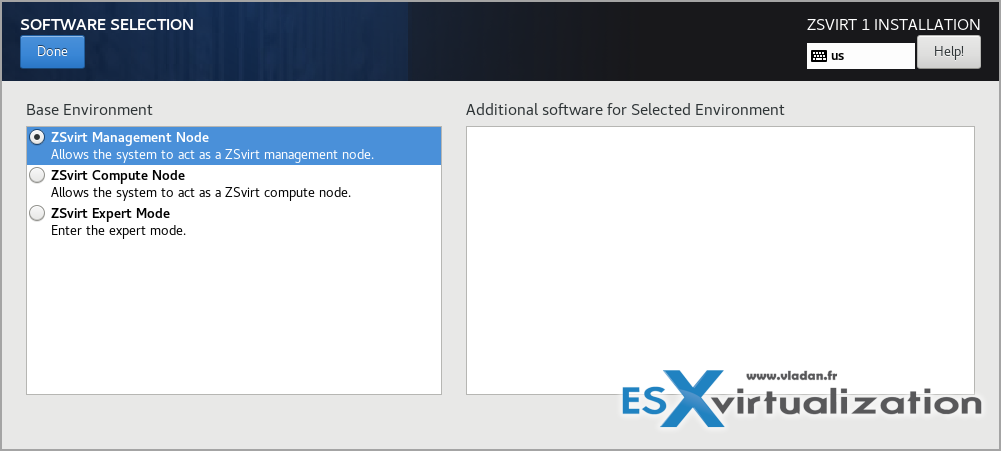
Chose the option you need. For start, pick the Management Node option
Configure where the install the system, assign a static IP on the management NIC, set the root password, and let it install. After the automatic reboot the management services come up automatically.
You can think of it as an install of VMware ESXi AND vCenter Server from one single ISO, because when the installation is finished, you’ll find creating a datacenter, then creating a cluster and adding a host into the cluster – the exact same way as you do when dealing with VMware infrastructure.
The console looks like this:
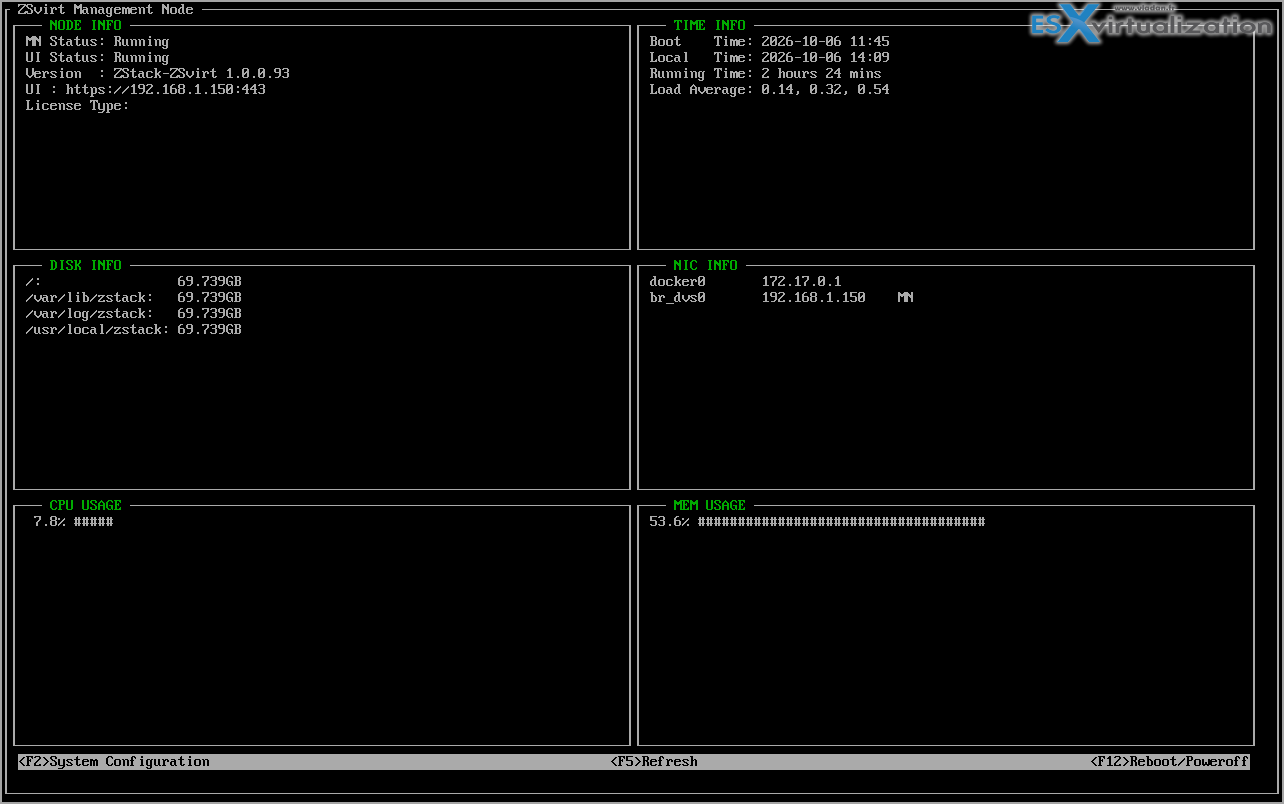
The ZSvirt console view
Note: when you create a new user during the installation process, and then assign this user a password, this user is only used for the console usage. The UI user (admin) is already created and “baked in within the ISO” so its default UI login/password combination is already assigned. You just must change it during the UI initialization phase.
So for the login into the UI, go to the https://IP_of_zsvirt:443 and login with admin as a user.
Default login/pass: admin/password – change it immediately.
Once you are logged in, you can start the assistant and finish the guided initialization:
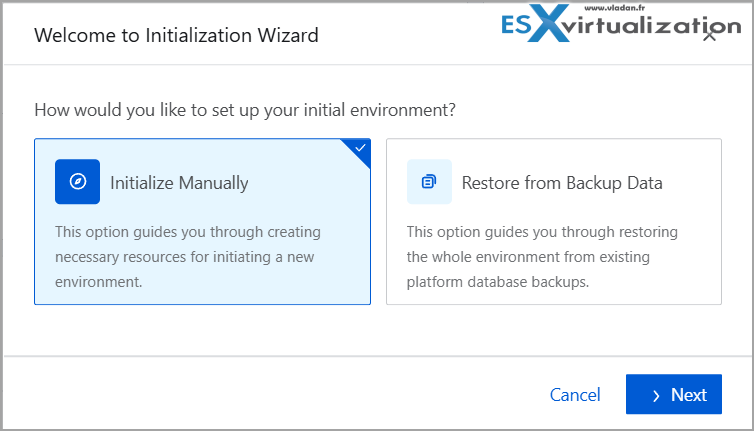
After the first login, the initialization Wizard starts
- Create Datacenter + Cluster
- Add the host (the same machine for All-in-One)
- Add local (or shared) primary storage / datastore
- Add image storage
- Create distributed switch + port group
- Upload a system image (qcow2/raw)
- Launch the first VM
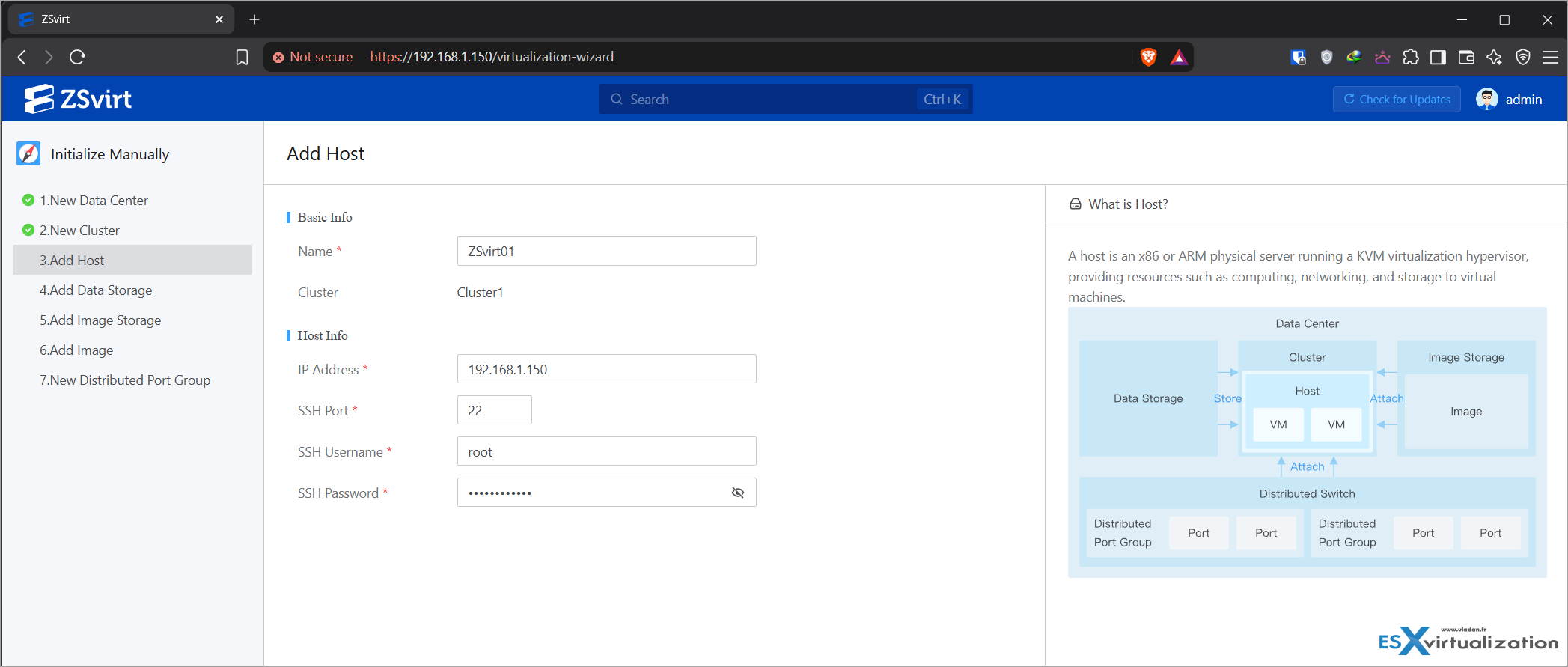
The initialization wizard
So, as you can see, not much different when installing VMware vCenter server. zsvirt.io
Once the management node is up you can add pure compute nodes later. The UI feels fast and responsive.
It is more a lightweight than vCenter server experience (we all know that vCenter Server VM is a hungry piece of software eating up resources, right?)
ZSvirt feels like a lightweight UI/Linux admin tool: You’ll find the that within inventory you can create clusters, you’ll find distributed networking, snapshots, alarms, auditing, and HA/DRS-style policies. All those are present, at your fingertips.
The UI is very fast. In fact, a bit faster than vCenter server (if you’re VMware admin).
Note: you can add additional management node and have kind of vCenter HA capability too.
Additional compute nodes follow basically the same installation steps, just pick the radio button ZSvirt Compute Node as shown on the first image in this post.
ZSvirt management node can be put in HA with another management node. The workflow assistant facilitates it, but we kept a single node for our lab.
Storage, Networking, and Day-2 Operations
Primary storage supports local directories, NFS, iSCSI, Ceph, and other plugins. There is a dedicated backup-storage concept (including SFTP) and full volume/snapshot lifecycle management.
Networking gives you distributed switches, port groups, security groups, and SR-IOV with live-migration support.
The look and feel are pretty familiar to what you know from VMware vSphere or other similar looking virtualization platforms.
ZSvirt system management is very complete and detailed and based on policies. Check the image below for different options.
Note: All images are clickable – click to an overlay pop-up for details.
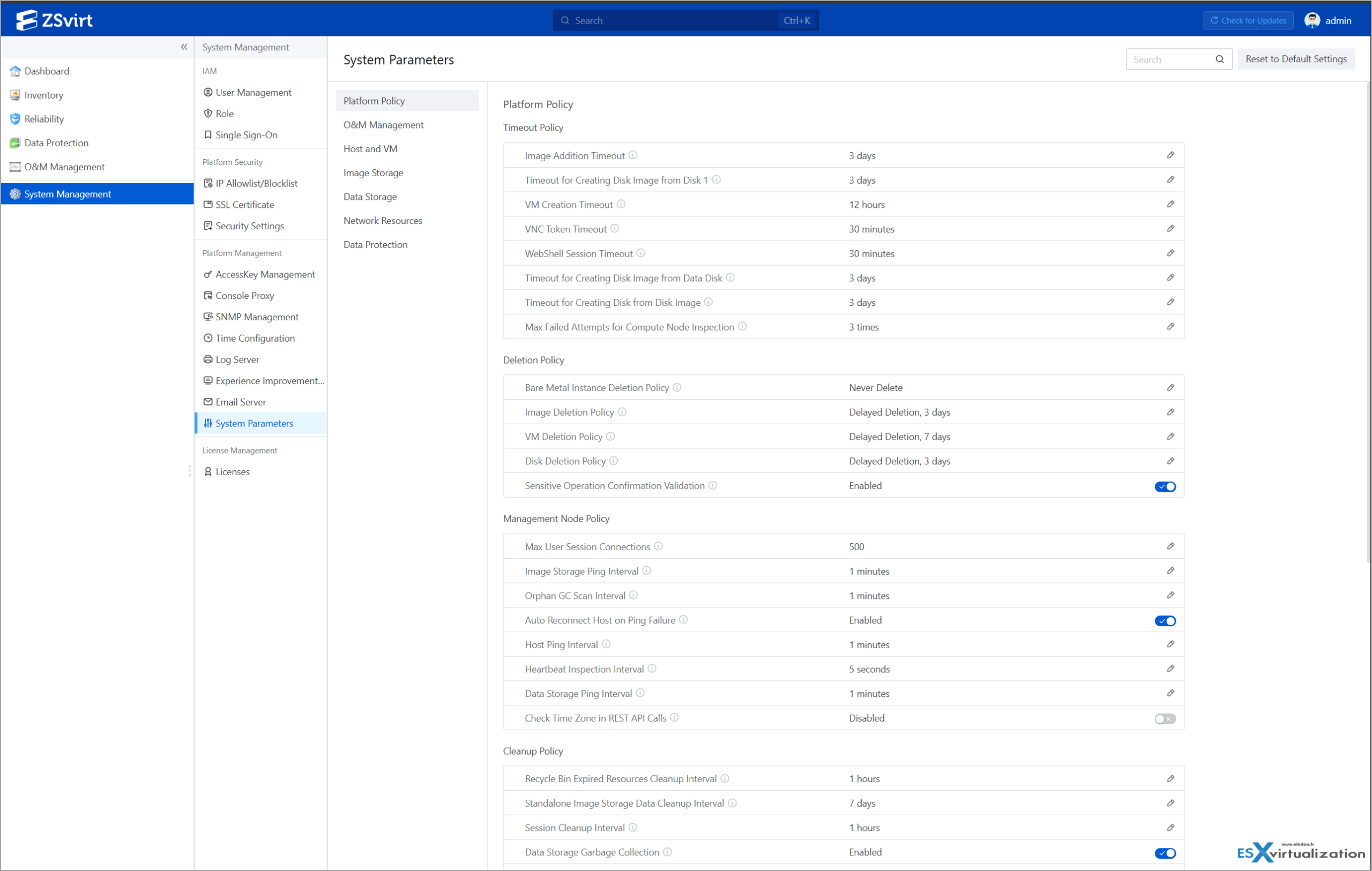
System Management Options
Create your first new VM
A VM creation can be done through wizard by creating a VM from scratch, import or from a template.
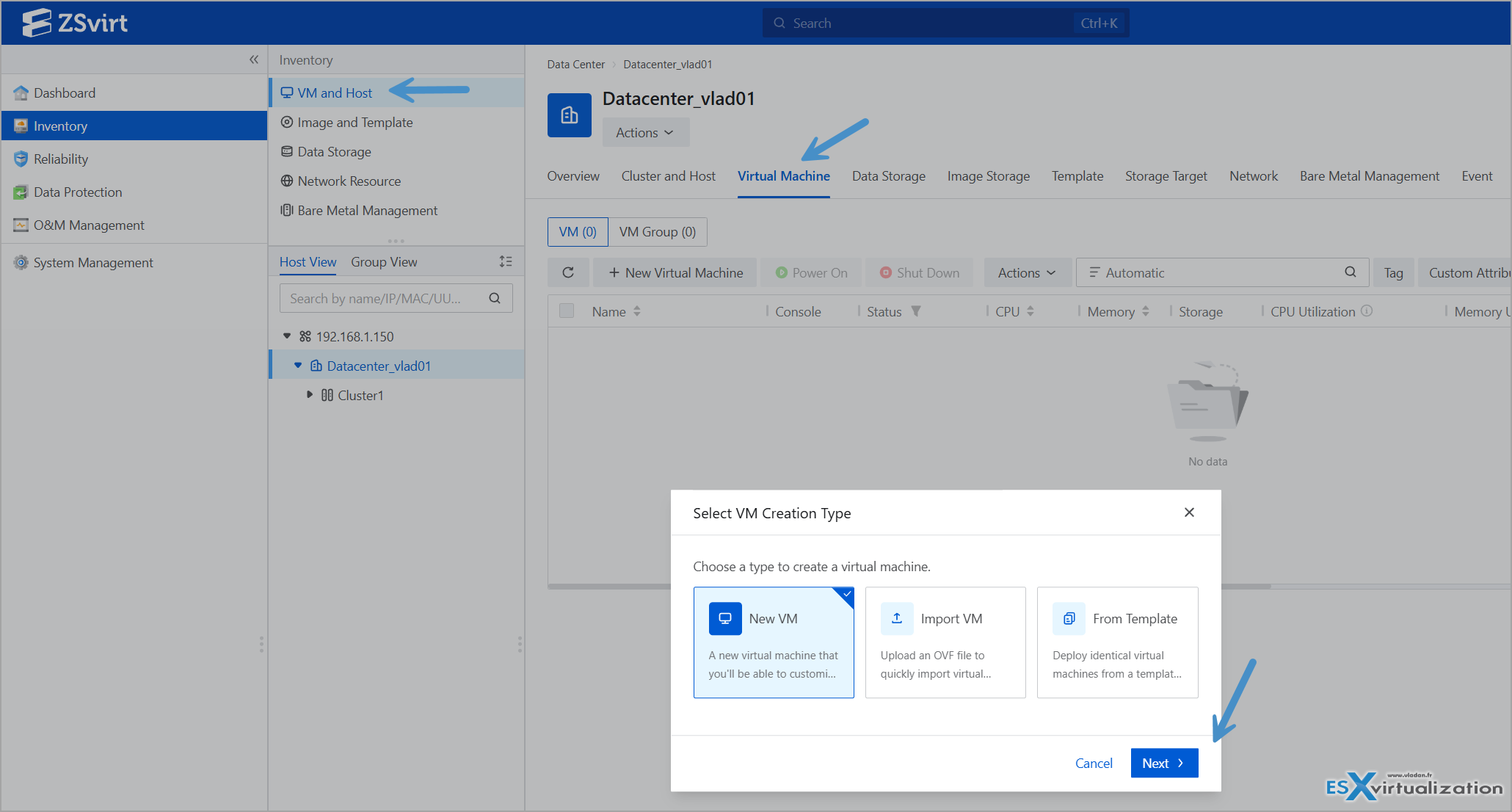
Create new VM wizard
The process seems very familiar, with slight advantage here where you have the wizard option which gives the initial options first. But overall kind of similar what we all know from VMware vSphere, or Proxmox.
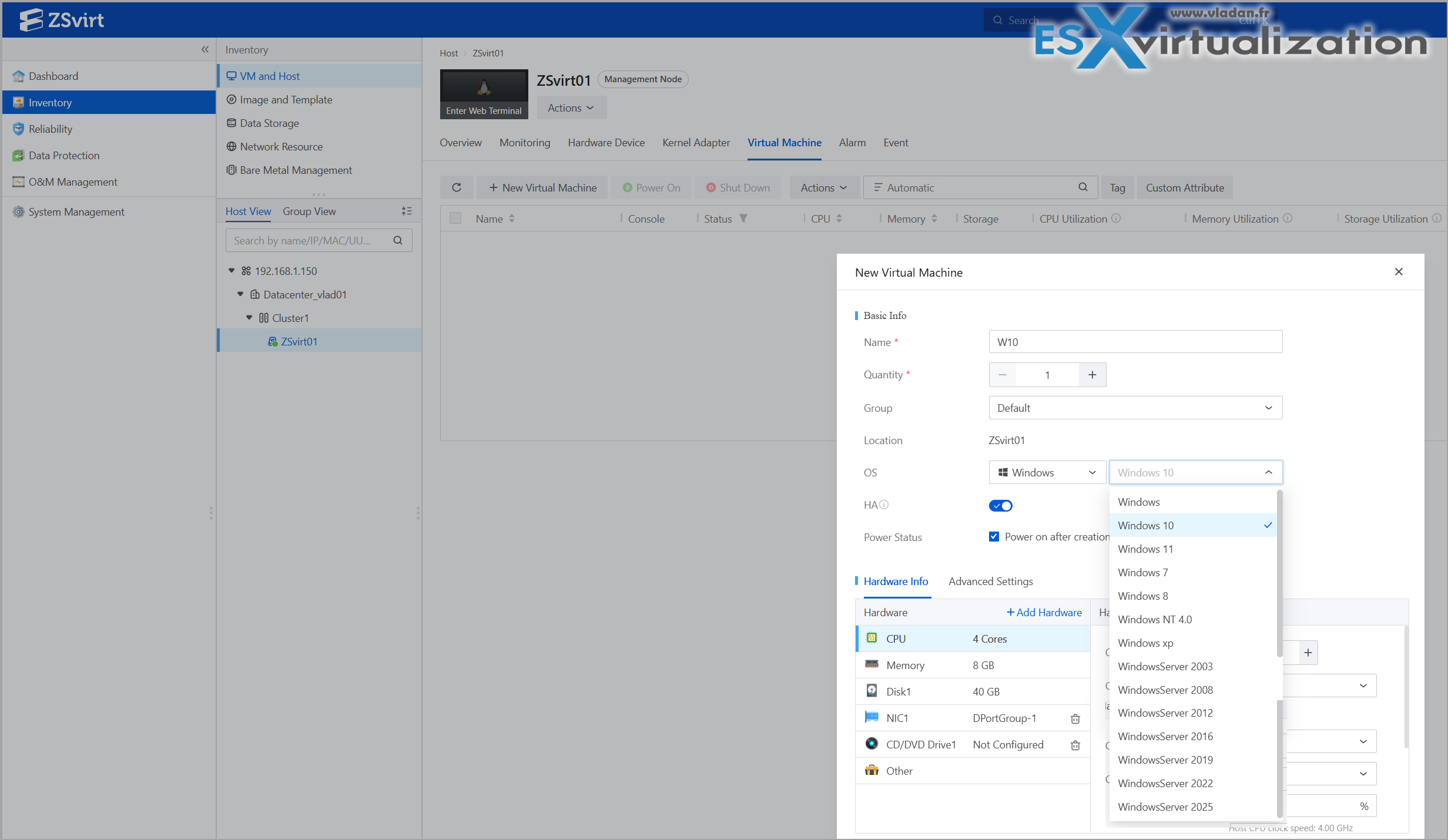
Creation of a test VM Windows – Windows Options
The VM creation, example from the lab, running W10 VM. After installing the OS, all you need to do is to install VM tools (similarly like in VMware vSphere).
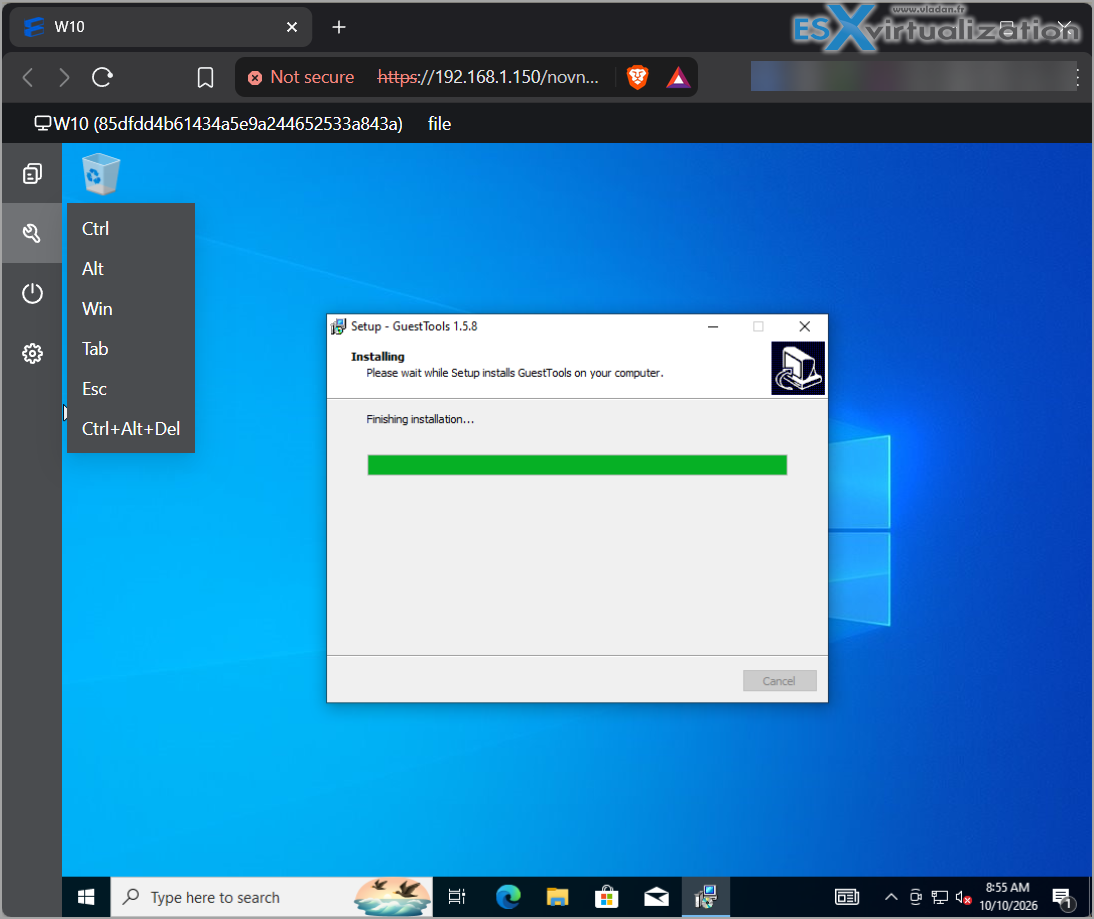
Install VM Guest Tools after your system installation finishes
High Availability (HA) for Business Continuity
ZSvirt HA (High Availability) policy is one of the enterprise features inherited from the production-hardened ZSphere engine. It is available in the open-source community edition and is designed to keep VMs running when hosts or related infrastructure fail.
How ZSvirt HA Works?
ZSvirt continuously monitors the health of hosts and VMs inside a cluster. When it detects that a host has failed (or certain resource paths are broken), the management plane automatically restarts the affected VMs on healthy hosts in the same cluster.
Key characteristics:
- NeverStop mode (the main HA mode) — If a VM stops abnormally (host crash, power loss, etc.), the platform restarts it automatically. Planned shutdowns (manual stop, guest shutdown/poweroff, or scheduled tasks) do not trigger a restart.
- None mode — No automatic restart.
- Fault-migration / restart policies based on specific resource checks. You can define behavior for different failure combinations:
- Management network connectivity (host management node)
- Storage network connectivity (host access to the VM’s system disk / primary storage)
- Business NIC status (guest network path)
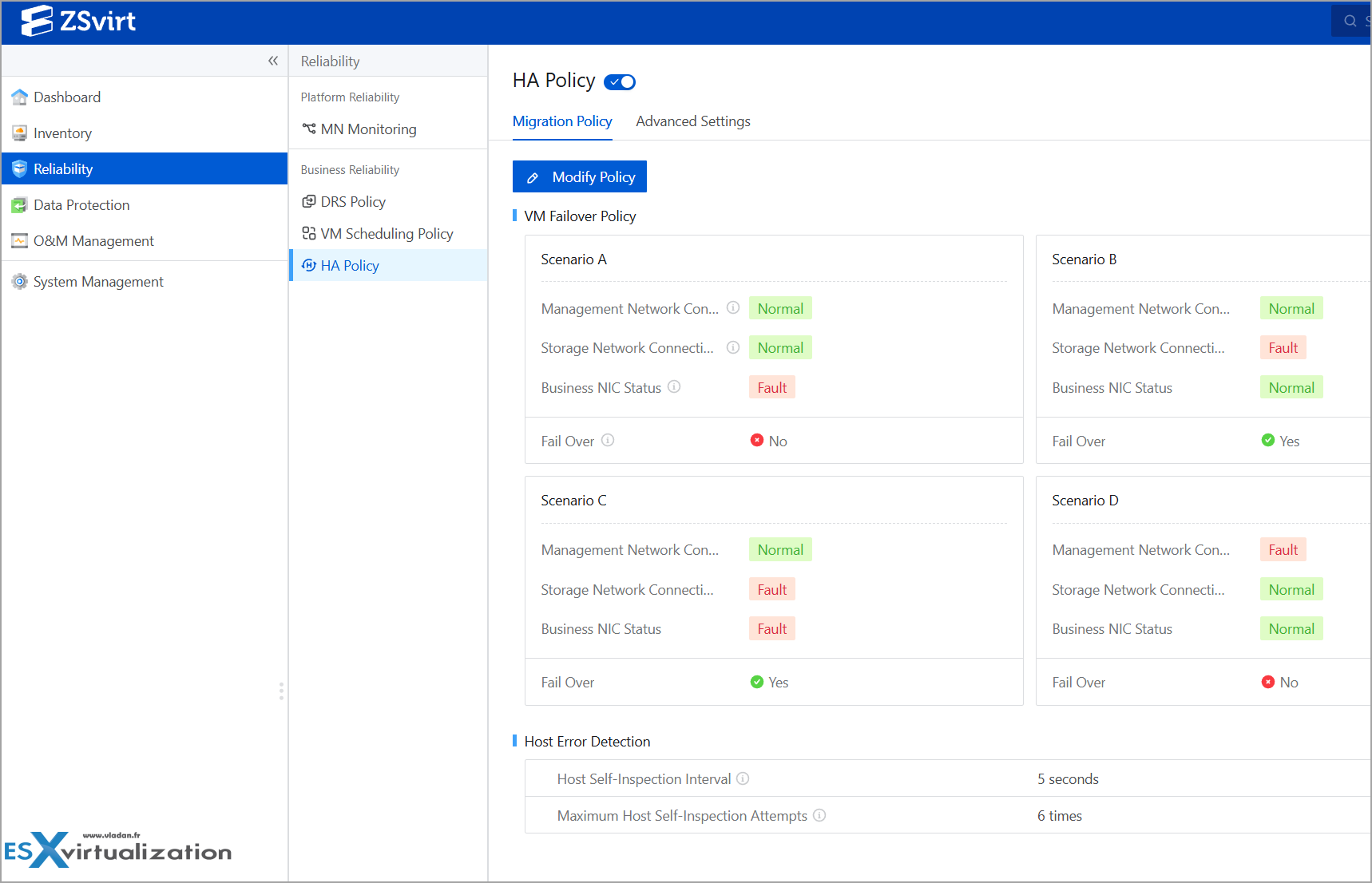
Platform Reliability – HA options
Typical configurable scenarios include cases such as “management and storage networks are healthy but the business NIC is down → restart/migrate or not”. This level of scenario-based policy is frequently highlighted by users as more granular than the basic HA toggles found in some other open-source platforms.
- Requires shared storage (NFS, iSCSI, Ceph, etc.) for the VMs to be restarted on another host. Local storage only supports single-host restart (limited usefulness).
- Works together with live migration and the platform’s DRS-style scheduling.
- Management plane itself supports dual-node HA (VIP + automatic failover of the control plane). For this, you must install a second management node and activate its HA, but this workflow is also wizard driven.
Backup of Your VMs – what offers ZSVirt?
This is the question many of you will ask first before testing any new virtualization platform. In fact, it much easier to change virtualization platform and keep your same backup server. Think of all legal purposes, such as that some of your business needs to keep backup data for over 10 years.
ZSvirt integrates with Veeam Backup & Replication v12 and v13, as well as Commvault 11.40.51. The Veeam integration supports agentless VM backup, full and incremental backups, full VM recovery, and file-level recovery, allowing users to restore entire virtual machines or individual files without installing backup agents inside guest operating systems.
VMware VMs backed up by Veeam can also be restored to ZSvirt for platform migration and disaster recovery. Veeam backup components can be deployed and upgraded independently. The Commvault integration supports backup and recovery of ZSvirt VMs, enabling enterprises to include them in their existing data protection infrastructure.
Veeam’s supported KVM targets remain limited to specific platforms that expose the required APIs and Change block tracking (CBT) mechanisms.
ZSvirt includes solid built-in protection at the infrastructure level:
- Snapshots of individual VMs or individual volumes (point-in-time, crash-consistent).
- Dedicated backup storage objects (local directory, SFTP, etc.).
- Backup plans / policies in the UI — you can select specific VMs, set schedules, retention, and target backup storage.
- Full VM restore or volume restore from those snapshots/backups.
So, you can protect individual VMs without any third-party tool. This is perfectly usable for simple Linux/Windows workloads, labs or test systems where crash-consistent recovery is enough. However, for granularity and application-aware processing you need a third-party backup tool.
What you do have out of the box:
- Native snapshots and volume management inside ZSvirt.
- Dedicated backup-storage objects (SFTP and others).
- Full REST API surface, so any backup product that can talk to an API or use guest agents can interact with the environment.
However, native ZSvirt snapshots/backups are crash-consistent only.
They do not provide:
- Application-aware processing (VSS writers, SQL log truncation, Exchange consistency checks, Active Directory-aware handling). Transactionally consistent databases.
- Granular restores (single database, single mailbox, single AD object, individual files/folders from inside the guest).
For these workloads you need one of the following:
- Guest-level agents (recommended short-term solution)
- Veeam Agent for Windows/Linux
- Any other application-aware agent (Commvault, Nakivo agent, etc.)
These run inside the VM, talk to the application, and give you proper consistency + file/item-level recovery.
- A full backup product with hypervisor integration (once available)
Right now there is no native Veeam Backup & Replication plug-in for ZSvirt (unlike Proxmox, which has been partly supported since Veeam 12.2). Until that appears, Veeam can still protect the VMs via agents or by treating them as generic Linux/Windows machines. - Hybrid approach – Use ZSvirt’s native snapshots for quick rollback / short-term protection, and layer a proper backup tool on top for long-term retention, offsite copies, and application-aware restores.
Until native support lands, ZSvirt can rely on guest agents for VMs with apps that needs application-aware processing, or snapshot orchestration while the platform matures. The built-in snapshot and backup-storage features already cover basic protection needs for labs and smaller production workloads.
But the lack of Veeam’s support is just temporary, in my honest opinion. As many KVM based platforms are brought to life, they will be supported all at once when Veeam (or other data protection platform) announces it.
Note: I based my findings on Veeam only, but hey, there are other backup tools around and you might (or might not) be using something else for your backups, right?
Who Should Look at ZSvirt Right Now?
- Teams that want a vSphere-like operational model (datacenter → cluster → host → VM, distributed switches, DRS-style policies) without the pricey license tax.
- Anyone already comfortable with KVM who needs better multi-host management than plain libvirt or early Proxmox Datacenter Manager.
- Shops planning a controlled VMware exit and who value an agentless migration path.
- Homelabbers and PoC teams who appreciate the five-minute nested evaluation images.
It is still early (v1.0.0 shipped mid-August 2026), so expect some rough edges in documentation and the occasional leftover ZStack naming. The core engine, however, has years of production use behind it under the commercial ZSphere brand.
That pedigree shows in the scale claims and the completeness of the feature set. It is a mature platform.
Download the OVA/QCOW2, spin it up nested or install on bare metal via the ISO, create a couple of VMs, and see by yourself. The entry barrier has never been lower for a platform of this quality. There is a community support all around the world as this platform is very popular in Japan and all over the Asia.
Migrate from vSphere
Quick word here about migration from vSphere. There is an agentless migration possible from VMware vSphere, other KVM-based platforms, Hyper-V or physical servers (agent based) and other supported platforms. In fact, you download and deploy a VM called ZMigrate, then follow the migration wizard. You do not need install any agent on source VMs.
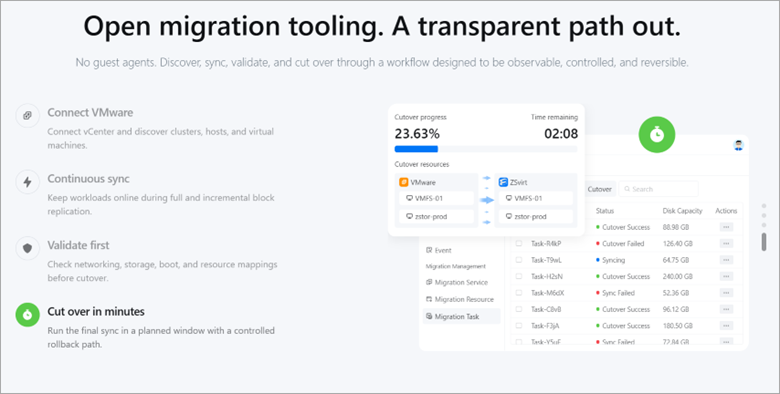
Screenshot from ZSvirt.io
It uses a block-level replication with cut-over in as little as five minutes, plus OVF import and VMDK upload. That alone makes it interesting for shops still running Broadcom-priced vSphere. Make sure to check the official documentation about the migration process.
Links:
As always, test thoroughly in your own environment before any production cut-over.
Final Words
I quickly deployed and tested the management node, created datacenter, cluster and created a simple W10 VM. The platform looks and feels robust, very fast, with UI very polished (I like it more than Proxmox UI tbh). The main advantage I see is the fact that it is easy to deploy the first management node in “all-in-one” scenario where you can test everything. Well, if you want a cluster, you need to deploy at least one more node.
I haven’t tested the ZMigrate as this post got already way too long, but perhaps at a later stage, I’ll give it a spin.
Would I recommend it for testing and POC? Absolutely. The fact that there is a dedicated VMware migration tool eases the pain for sure. And if you like the community edition and finally decide that you need a full support with SLAs and LTS releases, know that the enterprise version from ZStack at https://www.zstack-cloud.com/ uses the same engine but has more features, such as advanced multi-cluster /ZCenter portal, optional distributed storage modules, container-related modules, certain compliance and localization features.
More posts from ESX Virtualization:
- How to update your ESXi 7.x or 8.x to the latest ESXi 8.0U3k via command line
- Veeam Bare Metal Recovery from Recovery partition
- Veeam Backup and Replication Upgrade on Windows – Yes we can
- Securing Your Backups On-Premises: How StarWind VTL Fits Perfectly with Veeam and the 3-2-1 Rule
- VMware Alternative – OpenNebula: Powering Edge Clouds and GPU-Based AI Workloads with Firecracker and KVM
- Another VMware Alternative Called Harvester – How does it compare to VMware?
- VMware vSphere 9 Standard and Enterprise Plus – Not Anymore?
- Vulnerability in your VMs – VMware Tools Update
- VMware ESXi FREE is FREE again!
- No more FREE licenses of VMware vSphere for vExperts – What’s your options?
- VMware Workstation 17.6.2 Pro does not require any license anymore (FREE)
- Two New VMware Certified Professional Certifications for VMware administrators: VCP-VVF and VCP-VCF
- Patching ESXi Without Reboot – ESXi Live Patch – Yes, since ESXi 8.0 U3
- Update ESXi Host to the latest ESXi 8.0U3b without vCenter
- Upgrade your VMware VCSA to the latest VCSA 8 U3b – latest security patches and bug fixes
- VMware vSphere 8.0 U2 Released – ESXi 8.0 U2 and VCSA 8.0 U2 How to update
- What’s the purpose of those 17 virtual hard disks within VMware vCenter Server Appliance (VCSA) 8.0?
- VMware vSphere 8 Update 2 New Upgrade Process for vCenter Server details
- What’s New in VMware Virtual Hardware v21 and vSphere 8 Update 2?
- vSphere 8.0 Page
- ESXi 7.x to 8.x upgrade scenarios
- VMware vCenter Server 7.03 U3g – Download and patch
- Upgrade VMware ESXi to 7.0 U3 via command line
- VMware vCenter Server 7.0 U3e released – another maintenance release fixing vSphere with Tanzu
- What is The Difference between VMware vSphere, ESXi and vCenter
- How to Configure VMware High Availability (HA) Cluster
Stay tuned through RSS, and social media channels (Twitter, FB, YouTube)





Leave a Reply