
DataCore acquired StarWind Software in May 2025. For many of us who have followed StarWind Virtual SAN, their HCI appliances, Virtual Tape Library (VTL), and related tools over the years, the natural questions were immediate: What happens to the products we rely on? How do they fit into DataCore’s broader portfolio? And does this change anything for the two- or three-node clusters that keep remote offices and edge sites running quietly and reliably?
Months later, the picture is clear and reassuring. StarWind’s technology was brought in precisely because it fills a clear gap in DataCore’s vision — delivering flexible, software-defined storage from the core data center out to the edge and ROBO environments. The products continue. The focus on simplicity, multi-hypervisor freedom, and cost-effective high availability remains. In many ways, the combination gives current StarWind customers a stronger foundation and future customers more choice.
Strategic Fit: From Core to Edge Under One Roof
DataCore has long been strong in software-defined block storage with SANsymphony, later expanding into object storage (Swarm), parallel file systems, and container-native capabilities. What it lacked was a lightweight, purpose-built hyperconverged stack optimized for smaller footprints — exactly where StarWind has excelled for years.
StarWind brings proven HCI for edge, remote office/branch office (ROBO), and SMB environments. Think retail sites running real-time analytics, manufacturing floors monitoring equipment, healthcare clinics, or financial branches: places where rack space, power, cooling, and on-site IT expertise are limited. StarWind’s Virtual SAN turns local SSDs and HDDs into highly available shared storage using synchronous mirroring, with support for iSCSI, NVMe-oF, and RDMA. It runs on commodity hardware or as a pre-configured HCI appliance, and it works with VMware vSphere, Microsoft Hyper-V, and KVM-based platforms (including StarWind’s own stack, Proxmox, XCP-ng, etc.).
Note: the below image is AI generated. It's nice what we can do with AI now. A couple of years back one would have to create images like this from scratch, and now, to be honnest, we all are graphics designers …
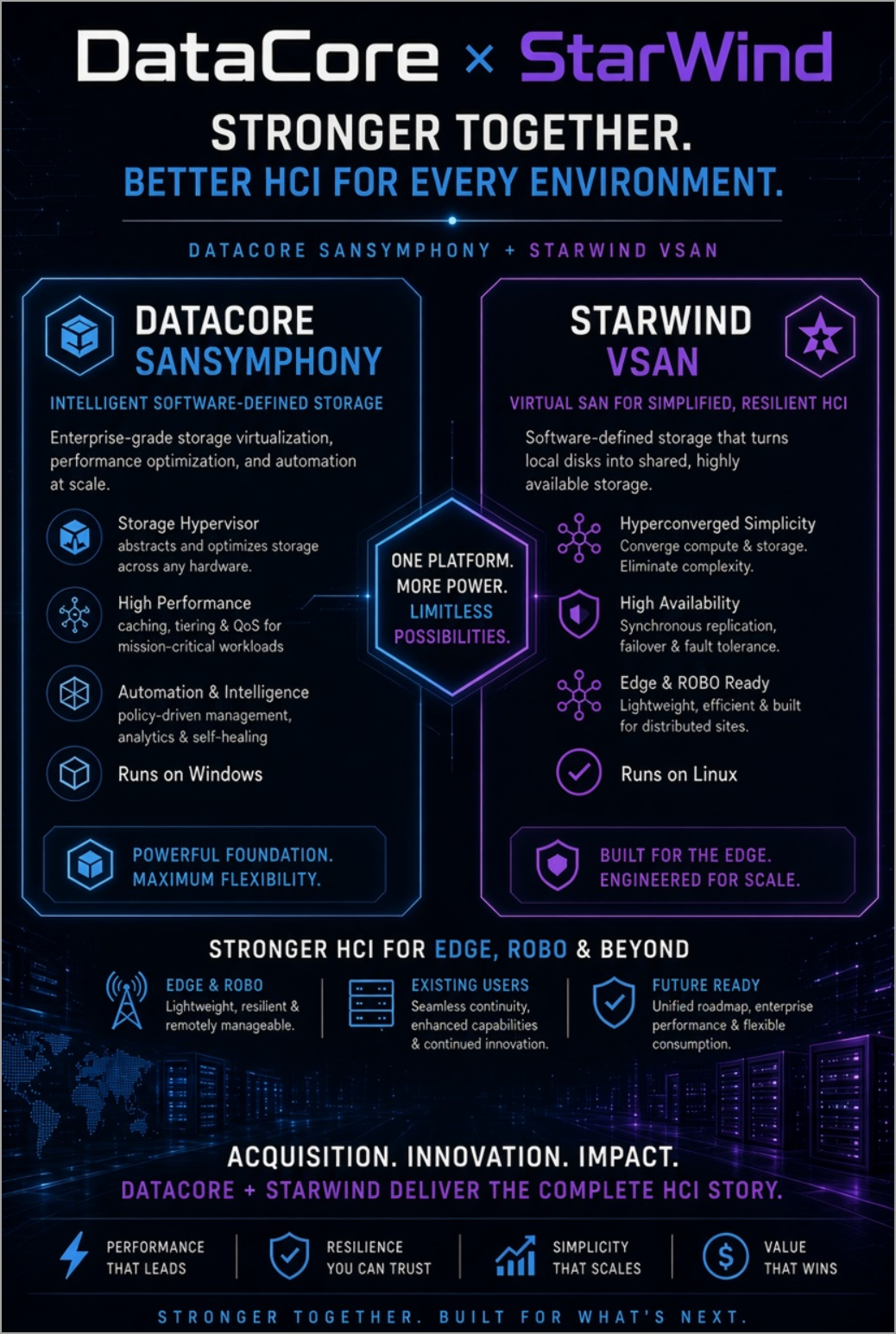
DataCore vs StarWind
I previously looked at the StarWind HCI Appliances and their synchronous replication strengths as well as the practical benefits in Exploring StarWind VSAN: High Availability, Cost Savings, and Performance.
This complements SANsymphony rather than overlapping it. SANsymphony targets core data centers and larger enterprise deployments. It scales to dozens of nodes (up to 64 in a cluster), emphasizes advanced data services such as auto-tiering, thin provisioning, deduplication, compression, sophisticated caching, continuous data protection, asynchronous replication, and centralized management across heterogeneous storage. It has historically run on Windows Server and shines in mixed SAN/HCI/storage-virtualization environments where you want to pool existing arrays and extend their life.
StarWind, by contrast, is Linux-based, optimized for focused 2–3 node clusters, and prioritizes straightforward site-level high availability with minimal complexity. Official positioning from the combined company makes the distinction clear: StarWind for edge/ROBO/SMB and local HA; SANsymphony for core enterprise scale and advanced services. You choose the right tool for the environment, and both sit under the same broader DataCore umbrella that now spans block, file, object, and container-native storage.
This aligns directly with DataCore's vision that their software stack works across core, edge, and cloud without forcing hardware or hypervisor lock-in. In a post-Broadcom VMware landscape where licensing and pricing have pushed many organizations to reevaluate vSAN for distributed or cost-sensitive sites, the combination offers a practical alternative path.
Where StarWind vSAN Stands Out
StarWind Virtual SAN has always been strong in areas that matter for smaller or distributed deployments. True two-node high availability — synchronous replication that keeps things running even if you lose a node (and in many configurations without an absolute requirement for a third witness in the simplest setups). It extracts high performance from the local storage you already have, supports hybrid and all-flash configurations, and presents storage cleanly over standard protocols.
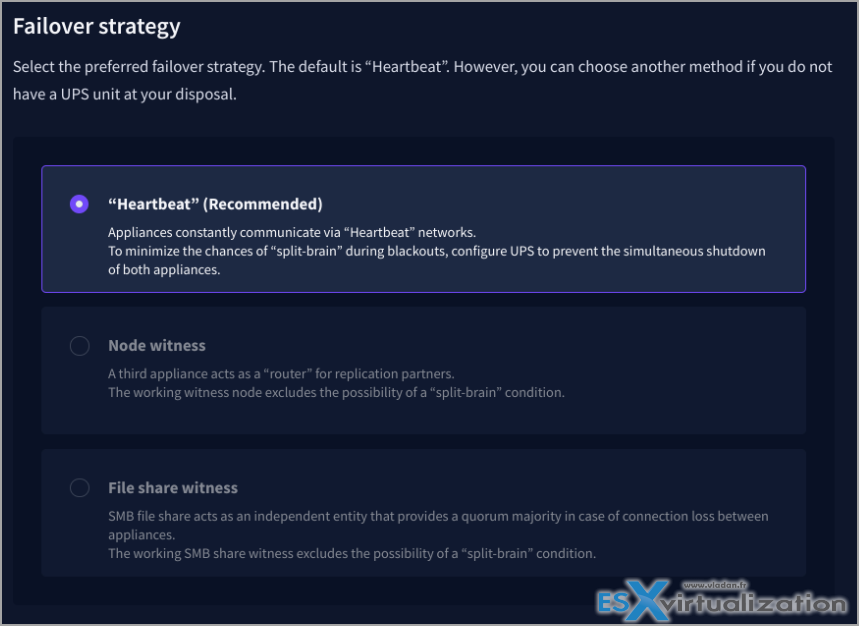
The HCI appliances (and virtual HCI options) package this into turnkey or near-turnkey systems with proactive support.
StarWind VTL as a Ransomware-proof storage
Then there is the Virtual Tape Library: an excellent tool for building ransomware-resistant backup architectures. It emulates physical tape libraries on disk (with WORM/immutability characteristics), integrates cleanly with Veeam and other backup software, and supports the classic 3-2-1 rule without requiring actual tape hardware.
I covered this in detail in StarWind Virtual Tape Library (VTL): Building Ransomware-Proof Backup Architectures Without Physical Tape Libraries and the related StarWind VTL: Boosting Immutability and Ransomware Protection in Your Own Datacenter.
StarWind also offers free utilities such as the V2V / P2V Converter that many admins keep in their toolbox for migrations, plus options like the StarWind Backup Appliance and the free Virtual Backup Appliance.
These capabilities do not disappear. DataCore has integrated the StarWind team and confirmed that the products continue as standalone solutions. Customers keep their existing deployments, support paths evolve under a larger organization with more resources, and the technology becomes a vehicle for delivering DataCore services further out to the edge.
In practical terms, an organization can run StarWind HCI or VSAN at branch sites for simple, resilient local storage and compute, while using SANsymphony (or other DataCore components) in the core for advanced services, larger scale, or heterogeneous storage pooling. Asynchronous replication or other data mobility options can link them for DR or centralized management where needed. The result is choice rather than forced consolidation onto a single architecture.
Looking Ahead: Continuity Plus Broader Options
For current StarWind customers the message is continuity first. Your VSAN clusters, HCI appliances, VTL setups, and free tools remain supported. The engineering focus on high performance, simplicity, and multi-hypervisor freedom continues. Joining DataCore brings additional R&D scale, a wider channel, and the ability to cross into complementary technologies (object storage for archives, advanced block services when a site grows, container-native options, etc.) without starting over.
For future customers or those evaluating alternatives to traditional HCI or VMware-centric stacks, the combined portfolio is more complete. You can start small and focused with StarWind’s edge-optimized approach and grow strategically into DataCore’s broader data infrastructure capabilities as requirements expand. Hardware independence and hypervisor flexibility remain central themes — important when budgets are watched closely and vendor lock-in is a real concern.
Final Words
I have covered StarWind products for a long time on my blog because they solve real problems for real environments without unnecessary complexity. And as you know, I’m focusing on the SMB (small business) rather than enterprise. The acquisition by DataCore does not change that fundamental character; it embeds it into a larger strategy that explicitly values those strengths for the distributed, edge-heavy world we operate in. Whether you run a pair of nodes in a remote office or are planning a mix of core and edge storage, the tools you already trust stay available, and the options around them have expanded.
That is good news for stability, for performance, and for keeping control of your infrastructure. As always, test in your own environment, review the current documentation from DataCore/StarWind, and validate support and licensing details for your specific setup. The combination looks well-positioned for the practical needs of admins who just want reliable, efficient storage that works — from the data center to the farthest branch.
More posts about StarWind:
- StarWind Virtual HCI Appliance Free: Turn Your Servers into a Full HCI Cluster Without Spending a Cent
- StarWind V2V / P2V Converter Version 9 (build 848) – Multi-VM Conversions, Full CLI Support, Hot Migrations, and Cloud Improvements Make This Free Tool a Datacenter Must-Have
- StarWind VSAN for Hyper-V: Synchronous Replication for High-Availability Shared Storage
- StarWind VTL: Boosting Immutability and Ransomware Protection in Your Own Datacenter
- StarWind HyperConverged Appliance with Proxmox VE: Perfect HCI Solution for Small Businesses
- Fortifying Your Backup Infrastructure Against Ransomware – StarWind VTL Best Practices
- FREE version of StarWind VSAN vs Trial of Full version
- Installation of StarWind VSAN Plugin for vSphere
- StarWind VSAN with new UI and deployment options
- Exploring StarWind VSAN: High Availability, Cost Savings, and Performance
- StarWind V2V Converter The Cutting-Edge Upgrade: StarWind V2V Converter’s April 2024 Innovations
- What is StarWind Tape Redirector (FREE) and what’s the benefits?
- 5 Easy Steps to be more resilient with Two Hosts only – StarWind VSAN
- How StarWind VSAN solution can save you money and energy in ROBO environments
- 2-Nodes clusters without Witness – StarWind VSAN Heartbeat Failover Strategy
- You can’t extend backup window – Check NVMe Backup Appliance from StarWind
- Replacing Aging Hardware SAN Device by a Software – StarWind VSAN
- StarWind V2V Converter (PV2 Migrator) FREE utility
- Cluster with 2-Nodes only – How about quorum?
- StarWind VSAN Latest update allows faster synchronization with storing synchronization journals on separate storage
- How to Update StarWind VSAN for VMware on Linux- Follow UP
- StarWind SAN & NAS software details for VMware and Hyper-V
- VMware vSphere and HyperConverged 2-Node Scenario from StarWind – Step By Step(Opens in a new browser tab)
- How To Create NVMe-Of Target With StarWind VSAN
- Veeam 3-2-1 Backup Rule Now With Starwind VTL
- StarWind and Highly Available NFS
- StarWind VSAN on 3 ESXi Nodes detailed setup
- VMware VSAN Ready Nodes in StarWind HyperConverged Appliance
More posts from ESX Virtualization:
- How to update your ESXi 7.x or 8.x to the latest ESXi 8.0U3k via command line
- Veeam Bare Metal Recovery from Recovery partition
- Veeam Backup and Replication Upgrade on Windows – Yes we can
- Securing Your Backups On-Premises: How StarWind VTL Fits Perfectly with Veeam and the 3-2-1 Rule
- VMware Alternative – OpenNebula: Powering Edge Clouds and GPU-Based AI Workloads with Firecracker and KVM
- Another VMware Alternative Called Harvester – How does it compare to VMware?
- VMware vSphere 9 Standard and Enterprise Plus – Not Anymore?
- Vulnerability in your VMs – VMware Tools Update
- VMware ESXi FREE is FREE again!
- No more FREE licenses of VMware vSphere for vExperts – What’s your options?
- VMware Workstation 17.6.2 Pro does not require any license anymore (FREE)
- Two New VMware Certified Professional Certifications for VMware administrators: VCP-VVF and VCP-VCF
- Patching ESXi Without Reboot – ESXi Live Patch – Yes, since ESXi 8.0 U3
- Update ESXi Host to the latest ESXi 8.0U3b without vCenter
- Upgrade your VMware VCSA to the latest VCSA 8 U3b – latest security patches and bug fixes
- VMware vSphere 8.0 U2 Released – ESXi 8.0 U2 and VCSA 8.0 U2 How to update
- What’s the purpose of those 17 virtual hard disks within VMware vCenter Server Appliance (VCSA) 8.0?
- VMware vSphere 8 Update 2 New Upgrade Process for vCenter Server details
- What’s New in VMware Virtual Hardware v21 and vSphere 8 Update 2?
- vSphere 8.0 Page
- ESXi 7.x to 8.x upgrade scenarios
- VMware vCenter Server 7.03 U3g – Download and patch
- Upgrade VMware ESXi to 7.0 U3 via command line
- VMware vCenter Server 7.0 U3e released – another maintenance release fixing vSphere with Tanzu
- What is The Difference between VMware vSphere, ESXi and vCenter
- How to Configure VMware High Availability (HA) Cluster
Stay tuned through RSS, and social media channels (Twitter, FB, YouTube)





Leave a Reply