
ESX Virtualization

VMware ESXi, vSphere, VMware Backup, Hyper-V... how-to, videos....

Nakivo Backup and Replication - #1 Backup solution for Virtual, physical, cloud, NAS and SaaS

Menu
  • Certification
      • VCP-VVF Administrator
          • vcp-vvf-2.
        • Close
      • VCP-DCV vSphere 8
          • vcp2024-125.
        • Close
    • Close
  • VMware
    • Configuration Maximums
    • vSphere
      • VVF 9 and VCF 9
      • vSphere 8.0
      • vSphere 7.0
      • vSphere 6.7
      • vSphere 6.5
      • vSphere 6.0
      • Close
    • VMworld
      • VMware EXPLORE 2024
      • VMware EXPLORE 2023
      • VMware EXPLORE 2022
      • VMworld 2019
      • VMworld 2018
      • VMworld 2017
      • VMworld 2016
      • VMworld 2015
      • VMworld 2014
      • VMworld 2013
      • VMworld 2012
      • VMworld 2011
      • Close
    • Close
  • XCP-NG
    • XCP-NG
    • Close
  • Proxmox
    • Proxmox
    • Close
  • Microsoft
    • Windows Server 2012
    • Windows Server 2016
    • Windows Server 2019
    • Windows Server 2025
    • Close
  • Categories
    • Tips – VMware, Microsoft and General IT tips and definitions, What is this?, How this works?
    • Server Virtualization – VMware ESXi, ESXi Free Hypervizor, VMware vSphere Server Virtualization, VMware Cloud and Datacenter Virtualization
    • Backup – Virtualization Backup Solutions, VMware vSphere Backup and ESXi backup solutions.
    • Desktop Virtualization – Desktop Virtualization, VMware Workstation, VMware Fusion, VMware Horizon View, tips and tutorials
    • How To – ESXi Tutorials, IT and virtualization tutorials, VMware ESXi 4.x, ESXi 5.x and VMware vSphere. VMware Workstation and other IT tutorials.
    • Free – Free virtualization utilities, ESXi Free, Monitoring and free backup utilities for ESXi and Hyper-V. Free IT tools.
    • Videos – VMware Virtualization Videos, VMware ESXi Videos, ESXi 4.x, ESXi 5.x tips and videos.
    • Home Lab
    • Reviews – Virtualization Software and reviews, Disaster and backup recovery software reviews. Virtual infrastructure monitoring software review.
    • Close
  • Partners
    • NAKIVO
    • StarWind
    • Xorux
    • Close
  • This Web
    • News
    • ESXi Lab
    • About
    • Advertise
    • Archives
    • Disclaimer
    • Privacy policy
    • PDFs and Books
    • Close
  • Free

How-to perform a manual integrity check in VDR when you have damaged restore point

By Vladan SEGET | Last Updated: April 19, 2013

Shares

Need to initiate a manual integrity check of your Deduplication store? The other day after I return from holidays, that one of the restore points was marked red color in our VDR (VMware Data Recovery) appliance and that the backups were not executed. The integrity check failed because of that damaged restore point. (BTW you can find which VM causing the integrity error check by double clicking the VDR report in the REPORTS TAB)

How-to perform a manual integrity check in VDR?
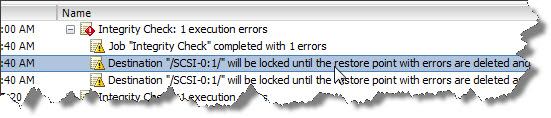
There is not any kind of reporting capability built into VDR so if your backups went wrong during a certain of period of time (you don't check them), you're not aware that you're running without backups. Maybe future release will implement this feature?

Fortunately, we do implement several backup product with different backup strategies in our environment sowe were not affected…. But I thought, It's a shame that VDR does not have a e-mail reporting capability built-in.

Which steps you need to take to “repair” this error in your VMware Data Recovery appliance?

01. First connect to your VDR and position yourself on the RESTORE tab. Expand the VM which has the damaged restore point and click inside the checkbox to make a selection. Then Right click and select Mark for Delete. The same as seen on the image below. There should appear a little RED cross …..
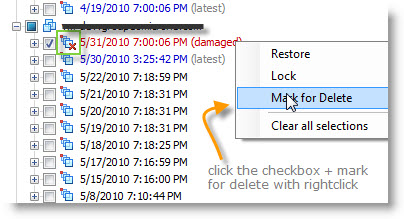
Vmware Data Recovery Damaged restore point

02. Then click on the CONFIGURATION Tab to see your destination – the virtual disk where is your deduplication store located. Do a right click > Integrity Check.
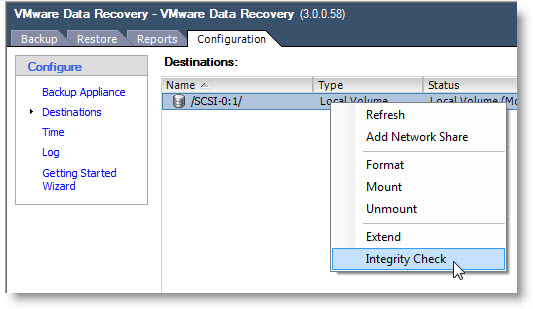
You'll see a window which will pop up asking you, if you want to initiate a manual integrity check. Click yes.
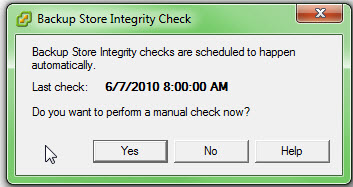
After a manual check you should be able to launch your backup of your VMs again and you should not encounter this error of Integrity check.

Vote !
Shares

| Filed Under: Backup Tagged With: How-to perform a manual integrity check in VDR, Integrity check Error VDR, Integrity check error VMware Data Recovery

About Vladan SEGET

This website is maintained by Vladan SEGET. Vladan is as an Independent consultant, professional blogger, vExpert x17, Veeam Vanguard x11, VCAP-DCA/DCD, ESX Virtualization site has started as a simple bookmarking site, but quickly found a large following of readers and subscribers.

Connect on: Facebook. Feel free to network via Twitter @vladan.

Comments

  1. jack says

    June 11, 2010 at 11:48 am

    Hi,

    This is a good article but for me and my companies money, we went with a Quantum Scalar i2000 tape backup system. Great price right now, excellent ease of use, and great security.

    Thanks,
    Jack

    http://budurl.com/scalarI2000

Private Sponsors


Featured

  • Thinking about HCI? G2, an independent tech solutions peer review platform, has published its Winter 2023 Reports on Hyperconverged Infrastructure (HCI) Solutions.
Click to Become a Sponsor

Most Recent

  • This is it – Most Popular Blog posts in 2025
  • VMware Releasing VMware ESXi 8.0 Update 3h and VMware vCenter 8.0 Update 3h
  • Veeam VBR 13 and Scality Artesca Integration: A Game-Changer for Cyber-Resilient Backups
  • Reviving Old School Laptops with PrimTux: Battling Obsolescence on a Budget
  • Proxmox Datacenter Manager 1.0 released – a real vCenter Server Alternative?
  • Recovering a Corrupted Exchange Database with Stellar Repair for Exchange
  • Commvault at AWS re:Invent 2025: Pioneering AI-Enhanced Cyber Resilience with Cloud Unity
  • How to Set Up pfSense Community Edition as a Firewall Using VMware Workstation Pro 17 (2025 Edition)
  • HPE Morpheus VM Entreprise and Morpheus VM Essentials updates released – v8.0.11
  • Veeam Backup and Replication Upgrade on Windows – Yes we can

Get new posts by email:


Deals

Support us on Ko-Fi


Buy Me a Coffee at ko-fi.com

Friendly Websites and Blogs

  • vBlog.io
  • VMware Engineer Jobs
 

YouTube

…

Find us on Facebook

ESX Virtualization

…

Copyright © 2025 ·Dynamik-Gen · Genesis Framework · Hosted with HostColor.com
