
ESX Virtualization

VMware ESXi, vSphere, VMware Backup, Hyper-V... how-to, videos....

Nakivo Backup and Replication - #1 Backup solution for Virtual, physical, cloud, NAS and SaaS

Menu
  • Certification
      • VCP-VVF Administrator
          • vcp-vvf-2.
        • Close
      • VCP-DCV vSphere 8
          • vcp2024-125.
        • Close
    • Close
  • VMware
    • Configuration Maximums
    • vSphere
      • VVF 9 and VCF 9
      • vSphere 8.0
      • vSphere 7.0
      • vSphere 6.7
      • vSphere 6.5
      • vSphere 6.0
      • Close
    • VMworld
      • VMware EXPLORE 2024
      • VMware EXPLORE 2023
      • VMware EXPLORE 2022
      • VMworld 2019
      • VMworld 2018
      • VMworld 2017
      • VMworld 2016
      • VMworld 2015
      • VMworld 2014
      • VMworld 2013
      • VMworld 2012
      • VMworld 2011
      • Close
    • Close
  • XCP-NG
    • XCP-NG
    • Close
  • Proxmox
    • Proxmox
    • Close
  • Microsoft
    • Windows Server 2012
    • Windows Server 2016
    • Windows Server 2019
    • Windows Server 2025
    • Close
  • Categories
    • Tips – VMware, Microsoft and General IT tips and definitions, What is this?, How this works?
    • Server Virtualization – VMware ESXi, ESXi Free Hypervizor, VMware vSphere Server Virtualization, VMware Cloud and Datacenter Virtualization
    • Backup – Virtualization Backup Solutions, VMware vSphere Backup and ESXi backup solutions.
    • Desktop Virtualization – Desktop Virtualization, VMware Workstation, VMware Fusion, VMware Horizon View, tips and tutorials
    • How To – ESXi Tutorials, IT and virtualization tutorials, VMware ESXi 4.x, ESXi 5.x and VMware vSphere. VMware Workstation and other IT tutorials.
    • Free – Free virtualization utilities, ESXi Free, Monitoring and free backup utilities for ESXi and Hyper-V. Free IT tools.
    • Videos – VMware Virtualization Videos, VMware ESXi Videos, ESXi 4.x, ESXi 5.x tips and videos.
    • Home Lab
    • Reviews – Virtualization Software and reviews, Disaster and backup recovery software reviews. Virtual infrastructure monitoring software review.
    • Close
  • Partners
    • NAKIVO
    • StarWind
    • Xorux
    • Close
  • This Web
    • News
    • ESXi Lab
    • About
    • Advertise
    • Archives
    • Disclaimer
    • Privacy policy
    • PDFs and Books
    • Close
  • Free

End of life ESX

By Vladan SEGET | Last Updated: August 31, 2010

Shares

ESX 4.1 is the latest update, there will be no more updates than that.

A strong message is being pushed to the customers about the End of the life the ESX 4.X classic. The full blown ESX with service console. The way to go is to use the VMware Hypervisor 4.1 based on the formerly ESXi 4.1. The benefits for the customers are numerous:

01. Less patching – only about 1/10th of patches comparing to the ESX Classic.
02. Scripting scalability – by using vCLI or PowerCLI against several ESXi hosts you have more benefits than only having the scripting possibility inside of one host's COS.
03. Security – without the COS, the security is reinforced because the product is much smaller.

This version does have a small busybox console to do a management tasks, and was enhanced with local/remote TSM support mode. TSM stands for Technical Support Mode. This mode can be activated via the VI client or at the console of the server.

You then have the possibility to use a SSH client like putty, which is one of must have free tools to manage your virtual infrastructure.
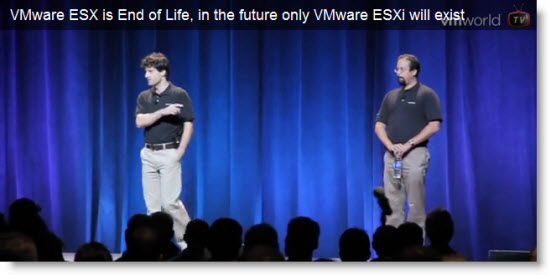
VMware ESX 4.1 is the last release of ESX Classic with service Console

There is a video from an interview between Dauglas Phillips, who interviewed Sean and Charu from the ESXi team. You'll see that the ESXi has all the necessary tools to do a troubleshooting in case you need to. Whether to use the vCLI and(or) PowerCLI installed on the management station, or also vMA 4.1 – a virtual Appliance deployed to your vCenter.

All those tools can be used to pass some CLI configuration and management commands.

Also you can have a look at the First Day Wrap up video :

Source: VMware TV and VMwold TV

Vote !
Shares

| Filed Under: Videos Tagged With: ESX 4.1 end of life, ESXi 4.1, VMworld 2010

About Vladan SEGET

This website is maintained by Vladan SEGET. Vladan is as an Independent consultant, professional blogger, vExpert x17, Veeam Vanguard x11, VCAP-DCA/DCD, ESX Virtualization site has started as a simple bookmarking site, but quickly found a large following of readers and subscribers.

Connect on: Facebook. Feel free to network via Twitter @vladan.

Private Sponsors


Featured

  • Thinking about HCI? G2, an independent tech solutions peer review platform, has published its Winter 2023 Reports on Hyperconverged Infrastructure (HCI) Solutions.
Click to Become a Sponsor

Most Recent

  • Nakivo 11.2 With Proxmox 9.1 and VMware vSphere 9 Support Released
  • Ready for Voyage? Try Voyager Linux Distro – A Slick, Hybrid Distro That Just Works
  • VMware Releases ESXi 8.0 Update 3i – Build 25205845: Bug Fixes, Security Patches, and How to Upgrade Your Hosts
  • WinBoat – Running Windows Apps on Linux with Seamless Integration? Yes, Please!
  • VMware Workstation Pro 25H2U1 Released: Why You Should Update Now
  • StarWind VSAN for Hyper-V: Synchronous Replication for High-Availability Shared Storage
  • Veeam Backup & Replication Cybersecurity Improvements – Recon Scanner 3.0 and Malware Scanning in Backups
  • Diving Deep into Nakivo Backup & Replication: Lesser-Known Features, Multiplatform Flexibility, and Licensing Options for Cost-Effective Data Protection
  • Thinware SimpleVM – A Free-Forever Hypervisor Alternative for VMware Admins Tired of Broadcom’s Rising Costs
  • Shadow Wearables in Enterprise Environments: The Hidden Risks of Connected Devices

Veeam Vanguard x12

Get new posts by email:


Deals

Support us on Ko-Fi


Buy Me a Coffee at ko-fi.com

Friendly Websites and Blogs

  • vBlog.io
  • VMware Engineer Jobs
 

YouTube

…

Find us on Facebook

ESX Virtualization

…

Copyright © 2026 ·Dynamik-Gen · Genesis Framework · Hosted with HostColor.com
