
ESX Virtualization

VMware ESXi, vSphere, VMware Backup, Hyper-V... how-to, videos....

Nakivo Backup and Replication - #1 Backup solution for Virtual, physical, cloud, NAS and SaaS

Menu
  • Certification
      • VCP-VVF Administrator
          • vcp-vvf-2.
        • Close
      • VCP-DCV vSphere 8
          • vcp2024-125.
        • Close
    • Close
  • VMware
    • Configuration Maximums
    • vSphere
      • VVF 9 and VCF 9
      • vSphere 8.0
      • vSphere 7.0
      • vSphere 6.7
      • vSphere 6.5
      • vSphere 6.0
      • Close
    • VMworld
      • VMware EXPLORE 2024
      • VMware EXPLORE 2023
      • VMware EXPLORE 2022
      • VMworld 2019
      • VMworld 2018
      • VMworld 2017
      • VMworld 2016
      • VMworld 2015
      • VMworld 2014
      • VMworld 2013
      • VMworld 2012
      • VMworld 2011
      • Close
    • Close
  • XCP-NG
    • XCP-NG
    • Close
  • Proxmox
    • Proxmox
    • Close
  • Microsoft
    • Windows Server 2012
    • Windows Server 2016
    • Windows Server 2019
    • Windows Server 2025
    • Close
  • Categories
    • Tips – VMware, Microsoft and General IT tips and definitions, What is this?, How this works?
    • Server Virtualization – VMware ESXi, ESXi Free Hypervizor, VMware vSphere Server Virtualization, VMware Cloud and Datacenter Virtualization
    • Backup – Virtualization Backup Solutions, VMware vSphere Backup and ESXi backup solutions.
    • Desktop Virtualization – Desktop Virtualization, VMware Workstation, VMware Fusion, VMware Horizon View, tips and tutorials
    • How To – ESXi Tutorials, IT and virtualization tutorials, VMware ESXi 4.x, ESXi 5.x and VMware vSphere. VMware Workstation and other IT tutorials.
    • Free – Free virtualization utilities, ESXi Free, Monitoring and free backup utilities for ESXi and Hyper-V. Free IT tools.
    • Videos – VMware Virtualization Videos, VMware ESXi Videos, ESXi 4.x, ESXi 5.x tips and videos.
    • Home Lab
    • Reviews – Virtualization Software and reviews, Disaster and backup recovery software reviews. Virtual infrastructure monitoring software review.
    • Close
  • Partners
    • NAKIVO
    • StarWind
    • Xorux
    • Close
  • This Web
    • News
    • ESXi Lab
    • About
    • Advertise
    • Archives
    • Disclaimer
    • Privacy policy
    • PDFs and Books
    • Close
  • Free

How to activate SSH for ESX Server

By Vladan SEGET | Last Updated: May 13, 2013

Shares

How to activate SSH for ESX Server. SSH is blocked by default for the root user, so if you want to access via SSH you must first enable it through the CLI. There is an updated post which shows How to activate SSH for ESXi host. The updated article shows the step by step process through the vSphere Client (via the GUI).

To enable the root access for SSH
You'll need to edit the file /etc/ssh/sshd_config.

You can use nano editor for example to do that.

You need to change the value PermitRootLogin to Yes

Save and enter this command to restart the daemon:

service sshd restart

To open the Firewall Ports on your ESX Host:

To allow access to ESX Server for a service or management agent.

1.) Log on to the VI Client and select the server from the inventory panel.
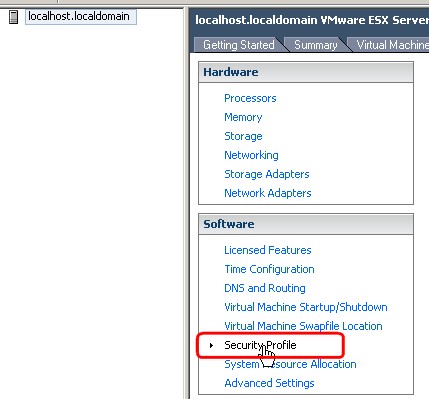
The hardware configuration page for this server appears.

2.) Click the Configuration tab and click Security Profile.

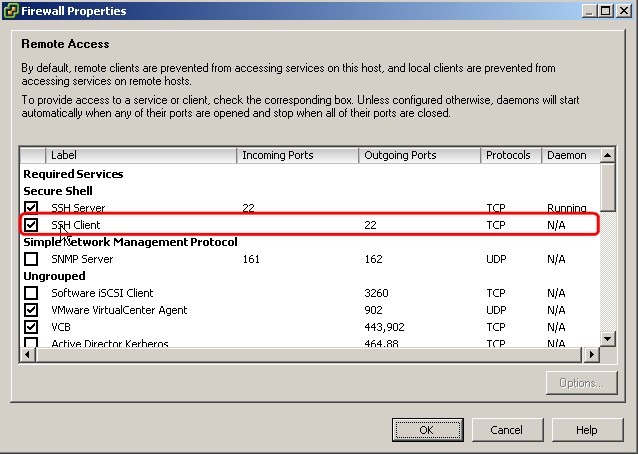
Select the SSH Client and SSH Server checkbox and click OK.
How to activate SSH for ESX Server was published at ESX Virtualization website first.

Then reboot your ESX Server or start the ssh client daemon.

Vote !
Shares

| Filed Under: Server Virtualization Tagged With: How to activate SSH for ESX Server

About Vladan SEGET

This website is maintained by Vladan SEGET. Vladan is as an Independent consultant, professional blogger, vExpert x17, Veeam Vanguard x11, VCAP-DCA/DCD, ESX Virtualization site has started as a simple bookmarking site, but quickly found a large following of readers and subscribers.

Connect on: Facebook. Feel free to network via Twitter @vladan.

Comments

  1. Vladan SEGET says

    December 6, 2008 at 3:52 am

    Hi Carter,

    thanks for this one. I was not sure about it…. -:)

  2. Eric Gray says

    December 7, 2008 at 7:43 pm

    Or even shorter: service sshd restart

    Eric Grays last blog post..Let them eat cake!

  3. Andrew says

    December 9, 2008 at 8:28 am

    Since you’re already at the command line, why not turn on firewall ports there as well:

    esxcfg-firewall -e sshServer
    esxcfg-firewall -e sshClient

    Andrews last blog post..Using

Private Sponsors


Featured

  • Thinking about HCI? G2, an independent tech solutions peer review platform, has published its Winter 2023 Reports on Hyperconverged Infrastructure (HCI) Solutions.
Click to Become a Sponsor

Most Recent

  • StarWind VSAN for Hyper-V: Synchronous Replication for High-Availability Shared Storage
  • Veeam Backup & Replication Cybersecurity Improvements – Recon Scanner 3.0 and Malware Scanning in Backups
  • Diving Deep into Nakivo Backup & Replication: Lesser-Known Features, Multiplatform Flexibility, and Licensing Options for Cost-Effective Data Protection
  • Thinware SimpleVM – A Free-Forever Hypervisor Alternative for VMware Admins Tired of Broadcom’s Rising Costs
  • Shadow Wearables in Enterprise Environments: The Hidden Risks of Connected Devices
  • Windows 11 26H1 Latest Build – Technical Deep Dive into OS Build 28000.1575
  • This Virtualization Platform from NexaVM will blow your mind
  • XorMon NG 2.1.0 – Enhanced Full-Stack Monitoring with New Backup, DB, and Storage Support
  • Ufficio Zero Linux: Boosting Productivity with an Italian Open-Source Desktop Built for Real Work – and Learn Italian!
  • LAB: Xen Orchestra 6 and XCP-NG – installation from the source via script from Roni Väyrynen

Get new posts by email:


Deals

Support us on Ko-Fi


Buy Me a Coffee at ko-fi.com

Friendly Websites and Blogs

  • vBlog.io
  • VMware Engineer Jobs
 

YouTube

…

Find us on Facebook

ESX Virtualization

…

Copyright © 2026 ·Dynamik-Gen · Genesis Framework · Hosted with HostColor.com