
If you've been following my blog over the years, you know I write a lot about virtualisation and data protection, and also about recovery, cyber resilience, and especially how these things play out in real enterprise environments – whether it's VMware, Hyper-V, cloud workloads, or now increasingly identity and AI-related systems.
Today we’ll talk about Commvault’s latest announcements at RSAC conference. Oh, by the way, if you’re wondering what RSAC is,the name is derived fromthe first letters of the last names of the three co-founders of RSA Security: Rivest, Shamir, and Adleman – who invented the RSA public-key encryption algorithm. In early 2025,, the conference was rebranded to “RSAC Conference”, with the “C” now representing “community”, reflecting the event’s mission to unite global cybersecurity professionals.
Last week I attended a closed Commvault analyst/partner briefing ahead of RSAC 2026 (March 23–26 in San Francisco), and it was packed with announcements that directly impact how we as admins think about resiliency, ransomware recovery, identity protection, and tying everything together in a more unified way. With cyberthreats increasingly prevalent, things are evolving fast fordefence mechanisms as well.
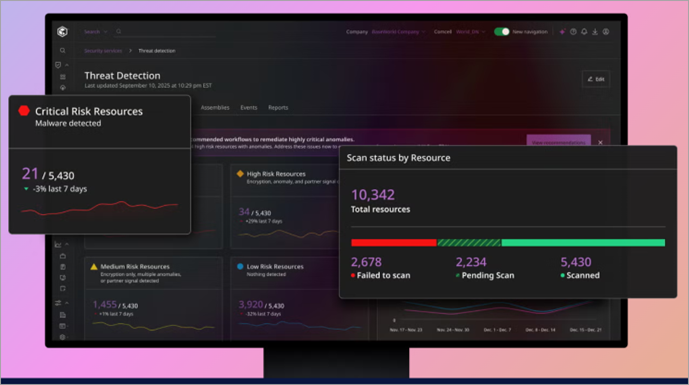
Things like ResOps (Resilience Operations) are not just a buzzword anymore, but what Commvault positions as the evolution from traditional DR/backup to a continuous, proactive discipline blending people, processes, and tooling. Think of it as NIST-inspired stages (Identify, Protect, Detect, Respond, Recover) applied to modern threats like fast lateral movement, identity compromise, and AI-enabled attacks.
Commvault rolled out several enhancements, some already public (e.g., Okta support announced March 5), others teased for RSAC (during the time of writing), and a couple still under NDA until March 23/25.
I'll focus on the practical bits admins care about: faster detection, cleaner recovery, better consolidation, and less manual firefighting.
Why ResOps Matters Right Now
Commvault has been talking ResOps since their SHIFT event (late 2025), but at this briefing Michael Fasulo (who leads much of this area) made it clear: this isn't Commvault inventing something new. It's observing patterns across thousands of customers, from classic DR, to cyber recovery, to AI resilience.This is intended to give structure to the mix of people + process + tools needed for true business continuity.
Key drivers:
- Threats move insanely fast (e.g., breach-to-lateral-movement in ~43 minutes per recent Palo Alto/CrowdStrike-style reports).
- Identity is the new perimeter — attackers log in, not break in.
- Data sprawl + AI pipelines introduce new risks (PII in vectors, over-permissioned RAGs, rogue agents).
- Silos kill response time — backup teams, SecOps, identity admins all need a single source of truth.
ResOps aims to bridge that: unified visibility, automated runbooks, anomaly detection feeding into recovery, and cleanroom-style forensics/validation.
Note: Commvault already has Cleanroom recovery which I explained in my detailed post here. Cleanroom Recovery automates isolated testing environments, validating recoveries with runbook precision before going live.
If you're managing large VMware estates with Entra ID/AD integration, or starting to protect SaaS like Okta, please listen.
Extending Identity Resilience — Okta Support
This is one of the biggest practical announcements (public since early March): Commvault Identity Resilience now extends to Okta.
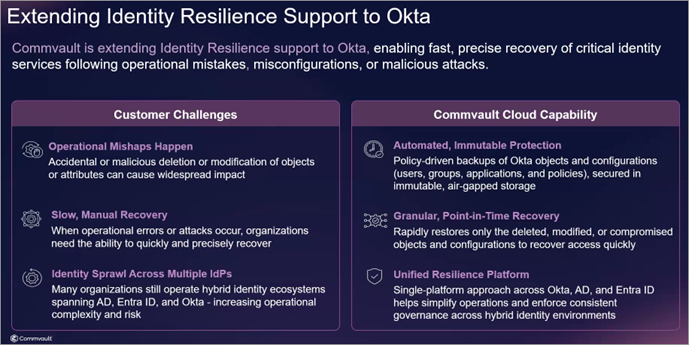
Why this matters: ~80% of Fortune 500 use Okta. Many customers already consolidate AD/Entra protection in Commvault and want the same for Okta — no more point tools.
What you get:
- Backup & granular recovery of users, groups, apps, policies, configurations.
- Point-in-time restore – fix misconfigurations or roll back compromises without full rebuilds.
- Same unified interface/policies as AD/Entra – consistent workflows whether cloud-native or hybrid.
- Ransomware-resistant (immutable copies, anomaly detection on identity changes).
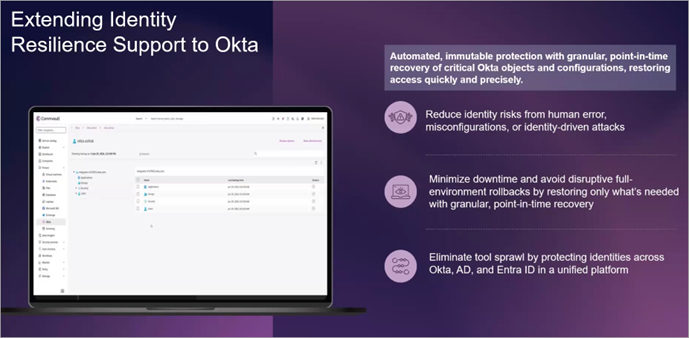
The Early Access starts April 2026, GA in summer. If you've ever had to rebuild Okta after an admin fat-finger or compromise, this is the “easy button” many asked for. The ability to go“back-in-time” was alwaysone of my favourite features in many different tools I used in the past.
Layered on top: integration with CloudSEK threat intel (dark web credential exposure feeds). Commvault pulls signals near-real-time (~5-min sync interval, not instantaneous but fast enough), matches against your backed-up identities, surfaces vulnerabilities/anomalies, and feeds high-fidelity alerts. Reduces false positives dramatically when combined with internal ML/anomaly engines.
In practice: detect stolen creds on dark web → check if they're in your AD/Okta backups → assess usage/behaviour → trigger response/runbook. Huge for shrinking dwell time.
Risk Analysis 2.0 – Powered by Satori Acquisition
Another highlight: Risk Analysis (Commvault's DSPM-like capability) gets a major upgrade via the Satori acquisition.
Old Risk Analysis was strong on unstructured/primary + secondary data classification. Satori brings deep structured/SaaS/cloud coverage (Snowflake, Databricks, vector DBs, etc.).
Now re-released as Risk Analysis 2.0:
- Continuous deep discovery/classification across live + backup data.
- Sensitive data spotting in AI pipelines (PII in training sets, RAGs).
- Unified dashboard for risk scoring over time.
- Data Access Governance – real-time guardrails: mask/redact sensitive data entering LLMs, block rogue AI/agent access, audit non-human identities.
- Feedback loop: if something slips through → signal → update policies → remediate upstream.
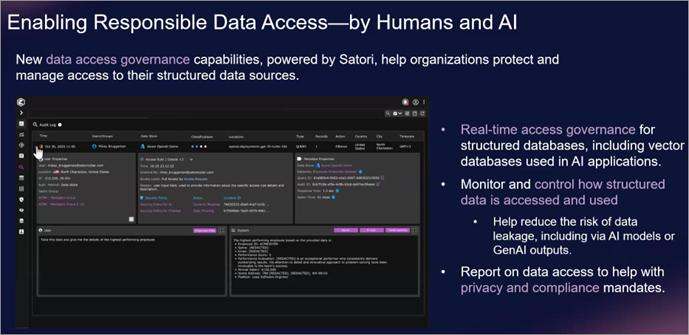
For virtualisation admins: this extends to protecting AI workloads backed by vSphere/VMs – know where sensitive data lives, who/what accesses it, and recover cleanly if compromised. Ties directly into recovery orchestration.
ThreatScan Evolves — Layered, Faster Detection
ThreatScan gets recast into two modes for practicality:
- Hyper-Threat Hunting (quick/fast): hash + signature scans, third-party intel (VirusTotal, Google Threat Intel), index-based for near-constant/landscape-wide runs. Low resource, high frequency — great for early IOCs.
- Deep Inspection (AI-powered): heuristics, ML, behavioral — catches polymorphic malware, encryption patterns where signatures fail.
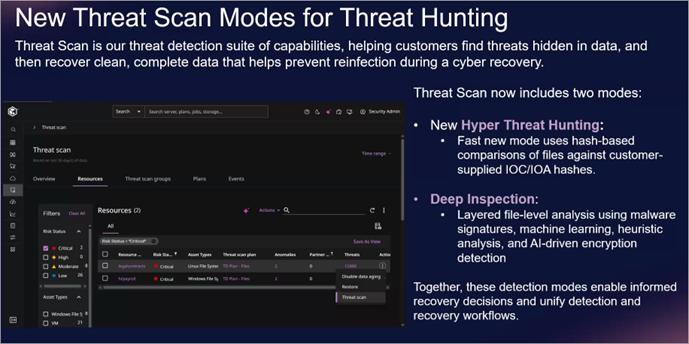
Workflow example:
- Hyper scan flags something.
- Trigger deep inspection.
- If confirmed → orchestrate cleanroom recovery + forensics.
- Synthetic recovery to production (minimal data loss).
- Push signals to Microsoft Sentinel / SOAR / SOC.
All auditable, MPA-gated, runbook-automated. Reduces scan fatigue and speeds validation.
Microsoft Sentinel + Security Copilot Integration
Deep rebuild of Microsoft Sentinel connector.
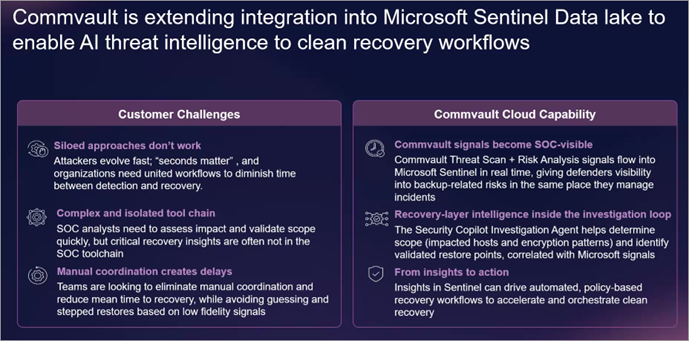
- Old way: basic signal push + playbooks.
- New: dumps into Sentinel's data lake → leverages Security Copilot for plain-English threat explanation → drives automated clean recovery runbooks from Sentinel.
Key wins:
- Unified signals (ThreatScan, Risk Analysis, Satori, CloudSEK → Sentinel).
- Orchestrated cleanroom/synthetic recovery initiated from Sec side or Commvault.
- Human-in-loop pauses for verification.
- Reduces manual coordination between backup & security teams.
For Microsoft-heavy shops: this could slash mean-time-to-clean-recovery significantly.
Latest news
Commvault and TIME (TIME is the 103-year-old global media brand) have launched the inaugural CISO of the Year Award to recognize enterprise leaders redefining cyber resilience in a high-threat, AI-driven world.
- Award Purpose: To spotlight Chief Information Security Officers (CISOs) who are transforming cybersecurity into a strategic driver of trust, operational strength, and business continuity.
- Nomination Period: Open from March 23 to June 20, 2026.
- Selection Criteria: Judges will evaluate nominees based on:
- Business Outcomes over Technical Defense
- Teams over Siloes (cross-functional collaboration)
- Proof over Promises (continuous validation of readiness)
- Readiness over Perfection (focus on rapid recovery)
- Confidence over Fear (enabling innovation without fragility)
- Finalists: To be announced in July 2026.
- Winner: To be revealed in September 2026, coinciding with TIME’s inaugural Executives of the Year: Tech & Data list.
- Eligibility: Nominees must hold a CISO or equivalent C-level security title and be actively serving in that role at the time of nomination.
This partnership underscores the growing strategic importance of the CISO role with rising cyber threats, cloud adoption, and AI integration.

Final Words
We're long past “just backup VMs”. With ransomware evolving, identity attacks exploding, and AI adding new vectors, tools that unify detection → response → recovery are table stakes. And don’t forget that if you arehit byransomware, you must be 100% sure that your backup datais “clean”.
Commvault's push here emphasizes consolidation, speed (early high-fidelity signals), and automation (runbooks with pauses). If you're already using Commvault for VMware protection, with these new announcements you’ll be able to get better anomaly visibility on VMs/files/DBs, identity tie-ins for Entra/Okta, cleaner ransomware recovery.
If you’re attending RSAC in San Francisco this year, expect to see some demos of ThreatScan 2.0, Okta flows, and Satori governance. Make sure to stop by their booth (#S-0634) for the “ResOps” sessions.
- Commvault at AWS re:Invent 2025: Pioneering AI-Enhanced Cyber Resilience with Cloud Unity
- Commvault’s Cloud Unity Platform: Revolutionizing Enterprise Resilience in the AI Era
More posts from ESX Virtualization:
- Ready for Voyage? Try Voyager Linux Distro – A Slick, Hybrid Distro That Just Works
- VMware Workstation Pro 25H2U1 Released: Why You Should Update Now
- Thinware SimpleVM – A Free-Forever Hypervisor Alternative for VMware Admins Tired of Broadcom’s Rising Costs
- Veeam Backup and Replication Upgrade on Windows – Yes we can
- Securing Your Backups On-Premises: How StarWind VTL Fits Perfectly with Veeam and the 3-2-1 Rule
- Winux OS – Why I like it?
- VMware Alternative – OpenNebula: Powering Edge Clouds and GPU-Based AI Workloads with Firecracker and KVM
- Proxmox 9 (BETA 1) is out – What’s new?
- Another VMware Alternative Called Harvester – How does it compare to VMware?
- VMware vSphere 9 Standard and Enterprise Plus – Not Anymore?
- VMware vSphere Foundation (VVF 9) and VMware Cloud Foundation (VCF 9) Has been Released
- Vulnerability in your VMs – VMware Tools Update
- VMware ESXi FREE is FREE again!
- No more FREE licenses of VMware vSphere for vExperts – What’s your options?
- VMware Workstation 17.6.2 Pro does not require any license anymore (FREE)
- Two New VMware Certified Professional Certifications for VMware administrators: VCP-VVF and VCP-VCF
- Patching ESXi Without Reboot – ESXi Live Patch – Yes, since ESXi 8.0 U3
- Update ESXi Host to the latest ESXi 8.0U3b without vCenter
- Upgrade your VMware VCSA to the latest VCSA 8 U3b – latest security patches and bug fixes
- VMware vSphere 8.0 U2 Released – ESXi 8.0 U2 and VCSA 8.0 U2 How to update
- What’s the purpose of those 17 virtual hard disks within VMware vCenter Server Appliance (VCSA) 8.0?
- VMware vSphere 8 Update 2 New Upgrade Process for vCenter Server details
- vSphere 8.0 Page
- ESXi 7.x to 8.x upgrade scenarios
- VMware vCenter Server 7.03 U3g – Download and patch
- Upgrade VMware ESXi to 7.0 U3 via command line
- VMware vCenter Server 7.0 U3e released – another maintenance release fixing vSphere with Tanzu
- What is The Difference between VMware vSphere, ESXi and vCenter
- How to Configure VMware High Availability (HA) Cluster
Stay tuned through RSS, and social media channels (Twitter, FB, YouTube)


Leave a Reply