
ESX Virtualization

VMware ESXi, vSphere, VMware Backup, Hyper-V... how-to, videos....

Nakivo Backup and Replication - #1 Backup solution for Virtual, physical, cloud, NAS and SaaS

Menu
  • Certification
      • VCP-VVF Administrator
          • vcp-vvf-2.
        • Close
      • VCP-DCV vSphere 8
          • vcp2024-125.
        • Close
    • Close
  • VMware
    • Configuration Maximums
    • vSphere
      • VVF 9 and VCF 9
      • vSphere 8.0
      • vSphere 7.0
      • vSphere 6.7
      • vSphere 6.5
      • vSphere 6.0
      • Close
    • VMworld
      • VMware EXPLORE 2024
      • VMware EXPLORE 2023
      • VMware EXPLORE 2022
      • VMworld 2019
      • VMworld 2018
      • VMworld 2017
      • VMworld 2016
      • VMworld 2015
      • VMworld 2014
      • VMworld 2013
      • VMworld 2012
      • VMworld 2011
      • Close
    • Close
  • Proxmox
    • Proxmox
    • Close
  • Microsoft
    • Windows Server 2012
    • Windows Server 2016
    • Windows Server 2019
    • Windows Server 2025
    • Close
  • Categories
    • Tips – VMware, Microsoft and General IT tips and definitions, What is this?, How this works?
    • Server Virtualization – VMware ESXi, ESXi Free Hypervizor, VMware vSphere Server Virtualization, VMware Cloud and Datacenter Virtualization
    • Backup – Virtualization Backup Solutions, VMware vSphere Backup and ESXi backup solutions.
    • Desktop Virtualization – Desktop Virtualization, VMware Workstation, VMware Fusion, VMware Horizon View, tips and tutorials
    • How To – ESXi Tutorials, IT and virtualization tutorials, VMware ESXi 4.x, ESXi 5.x and VMware vSphere. VMware Workstation and other IT tutorials.
    • Free – Free virtualization utilities, ESXi Free, Monitoring and free backup utilities for ESXi and Hyper-V. Free IT tools.
    • Videos – VMware Virtualization Videos, VMware ESXi Videos, ESXi 4.x, ESXi 5.x tips and videos.
    • Home Lab
    • Reviews – Virtualization Software and reviews, Disaster and backup recovery software reviews. Virtual infrastructure monitoring software review.
    • Close
  • Partners
    • NAKIVO
    • StarWind
    • Xorux
    • Close
  • This Web
    • News
    • ESXi Lab
    • About
    • Advertise
    • Archives
    • Disclaimer
    • Privacy policy
    • PDFs and Books
    • Close
  • Free

vCenter Server 5.5 Update 2d Released – not only maintenance release

By Vladan SEGET | Last Updated: December 17, 2020

Shares

VMware has released vCenter Server  5.5 Update 2d. ESXi host builds stays the same, no update here. This release of vCenter Server 5.5 Update 2d fixes many bugs but also changes some default behaviors in DRS.

So it's already 11th update since 5.5 GA version! Check out the release notes here.

Here is a quote concerning the change in the DRS.

Quote:

The default upper limit of Distributed Resource Management (DRS) while putting hosts on maintenance mode during a cluster upgrade is 150%. This issue is resolved by adding a configuration property. For more information see KB 2104983.

The new builds:

vCenter Server 5.5 Update 2d | Build 2442329
vCenter Server 5.5 Update 2d Installation Package | Build 2442328
vCenter Server Appliance 5.5 Update 2d | Build 2442330

vCenter Server 5.5 Update 2d- From the release notes:

There are many bug fixes. Check it out…
vCenter server 5.5 update 2d

vCenter Single Sign-On:

  • VMware Directory Service consumes excessive memory(Mware Directory Service (vmdird.exe) might consume a large part of the available RAM)
  • Backup and restore of vCenter Single Sign-On database might not replicate the data between primary and secondary nodes correctly
  • Attempts to logout through the vCloud Automation Center UI might fail

Networking: 

  • Network Interface Cards of virtual machines in disconnected state might get ejected during vMotion

vCenter Server, vSphere Client, and vSphere Web Access:

  • Virtual machines on ESXi hosts containing NSX Endpoint virtual machines might not power on
  • Update to SUSE Linux Enterprise Edition Server in vCenter Server Appliance to address time zone changes
  • vpxd reports massive logging
  • Accessing the Storage View tab fails with the error
  • Scheduled tasks cannot be created for a different time on the same day in vSphere Web Client
  • The VMware VirtualCenter Server service fails intermittently
  • HTML console cannot be launched with custom port
  • Datastore browser in vSphere Web Client does not overwrite existing files – this one is a bits scary (I haven't experienced that) as “When a new file with an existing file name is uploaded to a folder in datastore, the new file does not replace the existing file. The old file is retained although the upload task is marked as successfully completed“.
  • VMware VirtualCenter Server service fails

Virtual Machine Management:

  • Cloning or deploying deploying virtual machines over the network causes performance degradation
  • Alert event is not triggered when one VM has multiple vNICs with same MAC address

vMotion and Storage vMotion:

  • The default behavior of DRS has been changed to make the feature less aggressive during cluster upgrade

Update: the update from previous version? Dead easy, as I'm using the VCSA in my lab the process is quite straight forward. Just connect to your vcsa appliance at https://IP_of_appliance:5480 > enter your login credentials and go to the update tab. There you hit the check updates button and then the Install updates button.
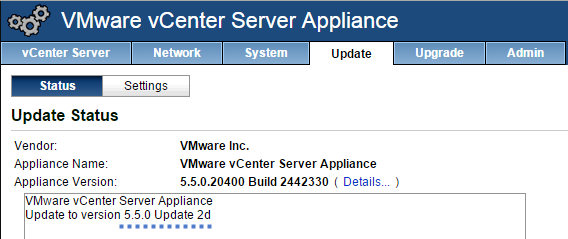
VCSA 5.5 Update 2d

Release notes of vCenter Server 5.5 Update 2d here.

Vote !
Shares

| Filed Under: Server Virtualization Tagged With: vCenter Server 5.5 Update 2d

About Vladan SEGET

This website is maintained by Vladan SEGET. Vladan is as an Independent consultant, professional blogger, vExpert x17, Veeam Vanguard x11, VCAP-DCA/DCD, ESX Virtualization site has started as a simple bookmarking site, but quickly found a large following of readers and subscribers.

Connect on: Facebook. Feel free to network via Twitter @vladan.

Private Sponsors


Featured

  • Thinking about HCI? G2, an independent tech solutions peer review platform, has published its Winter 2023 Reports on Hyperconverged Infrastructure (HCI) Solutions.
Click to Become a Sponsor

Most Recent

  • Reviving Old School Laptops with PrimTux: Battling Obsolescence on a Budget
  • Proxmox Datacenter Manager 1.0 released – a real vCenter Server Alternative?
  • Recovering a Corrupted Exchange Database with Stellar Repair for Exchange
  • Commvault at AWS re:Invent 2025: Pioneering AI-Enhanced Cyber Resilience with Cloud Unity
  • How to Set Up pfSense Community Edition as a Firewall Using VMware Workstation Pro 17 (2025 Edition)
  • HPE Morpheus VM Entreprise and Morpheus VM Essentials updates released – v8.0.11
  • Veeam Backup and Replication Upgrade on Windows – Yes we can
  • Commvault’s Cloud Unity Platform: Revolutionizing Enterprise Resilience in the AI Era
  • Securing Your Backups On-Premises: How StarWind VTL Fits Perfectly with Veeam and the 3-2-1 Rule
  • 3 New Advanced Certifications from VMware/Broadcom Released

Get new posts by email:


Deals

Support us on Ko-Fi


Buy Me a Coffee at ko-fi.com

VMware Engineer Jobs

VMware Engineer Jobs

YouTube

…

Find us on Facebook

ESX Virtualization

…

Copyright © 2025 ·Dynamik-Gen · Genesis Framework · Hosted with HostColor.com