
Error when VM disks have incorrect changed block tracking configuration
How-to correct the incorrect changed block tracking configuration error.
Apparently, there can be a case when you are running your backups using CBT (changed block tracking) feature of vSphere 4, you might gen an error saying that:
Disk “Hard disk 1″ has incorrect changed block tracking configuration.
It means that one or more VM disks have incorrect changed block tracking configuration. I found this info on Veeam forums. It’s not related to Veeam Backup and replication solution, but this can happens to any backup solution using CBT. The problem can easily be corrected via vCenter.
The solution to correct this problem is fairly simple:
01. Connect to your vCenter and open VMware vSphere Client.
02. Do a right-click the VM, choose Edit Settings > Options tab > select General, click Configuration Parameters, and set ALL ENTRIES with ‘ctkEnabled’ substring to false.
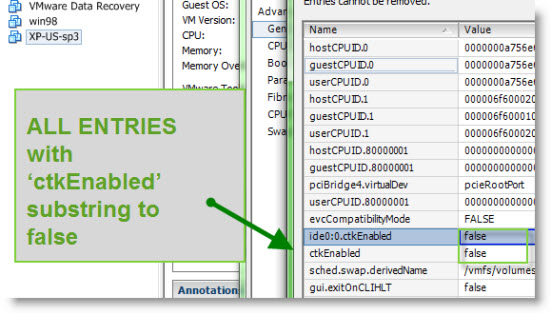
Veeam Backup (or any other backup solution using CBT) will then automatically re-enable changed block tracking with the correct settings during the next job run. It does not affect the VM concerning it’s performance or anything.
Veeam forums are quite great. People get’s their reply quite fast, and there are also other members helping too. It’s a place which I recommend whether you’re Veeam customer or not, or you just testing a Veeam product you can find help for your questions there. Anton Gostev is very active member there and his expertise is seen in many replied questions.
Source: Forum Veeam
Related Posts :
Finaly VEEAM 4.0 available ! Veeam Backup and recovery was during the last week in the center o ...
Installing VMware Workstation and receiving error? If you receive a following error when you're ...
VEEAM backup and Replication will be released soon. As i saw on the VEEAM forums there will be ...
VMware Data Recovery error - Trouble writing files, error -1020 (Sharing violation) Sometimes y ...
Newly released Veeam Backup and Replication 4.1 Before I start to talk about what's new and ava ...
Other posts from Backup and DR
- If you haven't done yet, you should check out the new VMX Explorer
- End of VCB - VMware Consolidated Backup
- Do you want to see a little magic?
- VDR backup fail error
- Arkeia Backup Appliance setup - Part 1
- Arkeia Network Backup Virtual Appliance solution - Video
- Veeam Backup and replication 4.1
- Performance best practices for SRM 4
- Arkeia Free for ESXi - to backup your ESXi 4
- Upgrading VMware Data Recovery to 1.1 and testing the new FLR GUI
- Backing up Free version of VMware ESXi 4 with Free VCBGhetto v.2
- Veeam Backup and recovery - Changed block tracking and vSphere API
- vConverter DR from Vizioncore can be an excellent DR solution.
- VMware Data Recovery - a tool for Easy backups of your Virtual Infrastructure
- Veeam Backup and replication 4 for faster backups and easy recovery
- VMware Site Recovery Manager 4 for ESX 4 is out
- Vmware Data Recovery Part 4 - How-to Restore files inside of your VM Video
- VMware Data Recovery - part 3 - Restore Your Data
- VEEAM Backup and Replication 4.0 will come up soon
- Free Backup solution to backup VMs with GhettoVCBg2 script
- VMware Data Recovery - your first backup - part 2 video
- What's in my lab at the moment?
- VMware Data Recovery - install and configure video- part1
- Partner Central will be down from 10 to 13th of July
- I'll be off for vacations for a few weeks, the blog continues
- I moved my Website yesterday
- Welcome to my new Sponsor
- My website was down yesterday due my hoster's server outage
- Issue with SQL database, I'm not sure that my Feed is updating
- It looks like that I messed up with my contact form


Error when VM disks have incorrect changed block tracking configuration (ESX Virtualization) http://bit.ly/6CJxQ1
This comment was originally posted on Twitter
Important vSphere find made by Anton @gostev from @veeam – http://bit.ly/5QeZdg
This comment was originally posted on Twitter
