
Great tip how-to boot from USB stick inside of VMware Workstation
A tip pointed by Ivo Beerens. By using my RSS Reader to stay updated on blogs in the Virtualization Sphere I checked this post from Ivo. It’s a great tip. What’s about?
Basically when you want to test ESXi 4 installation to the USB Stick (or this Video post too…) you’ll want to folow my post, which I’ve done in the past and that’s it.
But if you want to test unattended installation of ESXi 4 on USB stick then you would want to boot your VM which is executed in your VMware Workstation, from an USB stick too.Well you can’t. Even the version 7 of VMware Workstation does not support that.
Here comes the help tip from Ivo. Basically what do you have to do is a work arround.
01. Download boot manager from PLoP
02. Use the Iso in the boot manager as a boot device to boot your VM
03. Add an USB adapter to your VM (if not already done).
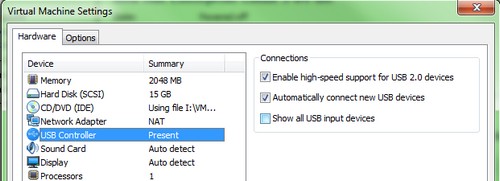
03. Insert your USB stick with ESXi 4 installed in it.
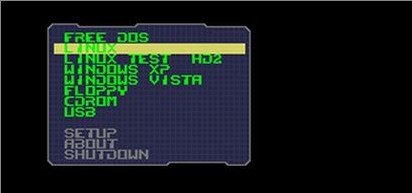
03. When your VM boots from that ISO, just select USB from the menu.
Well not all the credit goes to IVO, because the original help provided was from Ulli Hankeln from sanbarrow.com. -:)
Related Posts :
Not long time ago I published an article about how to install ESXi 4 onto USB memory stick. It's ...
After the Death of Virtual Iron acquired by Oracle, the users of Virtual Iron do have a solution ...
Brand new Virtual network Editor inside of VMware Workstation 7 New release of VMware Workstati ...
As I expected, Xtravirt released a whitepaper about “How to install ESX 4.0 on Workstation 6.5.2 ...
VMware Workstation 7 was announced ready this morning. Together with VMware Player 3.0 and VMwa ...
Other posts from Desktop Virtualization
- How to register License key for a desktop products
- VMware Workstation 7.1 public beta
- Readers Choice Awards for VMware Fusion and update for 3.0.2
- Use snapshots on Virtual ESX with VMware Workstation
- VMware Workstation with Teams functionality is a really flexible and usefull
- Minor release update for VMware Workstation 7
- Why I did not start using teams earlier?
- SSD's will transform the way we think of hard disks
- How-to install Windows 98 inside VMware fusion
- Invalid drive error when Installing VMware Workstation
- How-to enable Thin Print in VMware Workstation 7
- Vmware Workstation 7 new features - Import Windows 7 XP mode VM
- VMware ACE portable package VM creation How-to
- How-to install VMware Workstation
- How-to setup Windows 7 XP Mode
- VMware ACE
- VMware Fusion updated to 3.0.1
- Learn for free with this VMware course for VMware Workstation 7
- New Website Design of VMware Website and new product launch - VMware View 4
- How-to Install ESX 4 inside VMware Workstaiton 7 video
- Expand Virtual disk of Windows 7 VW with VMware Workstation 7
- You can really play now with VMware Workstation 7
- VMware Workstation 7 final is here
- Create a Virtual Machine in VMware Player 3.0
- New Virtual Network Editor in VMware Workstation 7
- New feature in VMware Workstation 7 - Auto Protect
- Buying VMware Fusion 2 now gets you free upgrade to Fusion 3
- MAC users - VMware Fusion 2 On Sale only Today at Amazon
- No more tweaks of VMX files. With VMware Workstation 7 you will be able to run ESX 4 with nested VMs without any tweaks.
- Install Linux Backtrack in a VM on VMware Workstation running on Windows 7


Worked fine! Thanks for the tip.
Your Welcome… -:)
You are welcome… -:)
WORKED!!1 thank you very much